The Complete Guide to MCP Servers in 2026: Everything You Need to Know
The definitive MCP guide for 2026. What Model Context Protocol is, how it works, architecture deep-dive, setup for Claude/Cursor/Copilot, best servers by category, security, and building your own.

The Complete Guide to MCP Servers in 2026: Everything You Need to Know
By Sarah Walker | March 26, 2026 | 18 min read
MCP (Model Context Protocol) is an open standard that lets AI assistants connect to external tools and data sources through a universal interface. Think of it as USB for AI — one protocol, thousands of compatible devices. There are now 12,000+ MCP servers covering databases, APIs, browsers, cloud services, and developer tools. Every major AI coding tool supports it: Claude Code (reference implementation), Cursor, and GitHub Copilot. This guide covers everything from first principles to building your own server.
Table of Contents
- What Is MCP and Why Does It Exist?
- How MCP Works: Architecture Deep-Dive
- The Three Primitives: Tools, Resources, and Prompts
- Setting Up MCP Servers
- Best MCP Servers by Category
- MCP Security: What You Need to Know
- Building Your Own MCP Server
- The Future of MCP
- Frequently Asked Questions
What Is MCP and Why Does It Exist? {#what-is-mcp}
Before MCP existed, every AI tool had its own way of connecting to external services. If you wanted Claude to interact with GitHub, someone built a GitHub integration for Claude. If you wanted ChatGPT to query a database, someone built a database plugin for ChatGPT. Every tool, every platform, every combination required custom work.
The result was an N-by-M problem. N AI tools multiplied by M services meant N*M integrations to build and maintain. It did not scale.
Anthropic released the Model Context Protocol as an open standard in November 2024 to solve this. The pitch was simple: build one MCP server for GitHub, and it works with every AI client that supports MCP. Build one MCP server for Postgres, and it works everywhere. The integration matrix collapses from N*M to N+M.
Eighteen months later, the pitch has delivered. MCP servers number over 12,000. Claude Code, Cursor, and GitHub Copilot all support the protocol. Independent AI tools like Windsurf, Cline, and Zed have adopted it. The protocol is governed by an open spec with contributions from multiple organizations.
If you want to understand why MCP matters, look at what existed before: fragmented, proprietary, and unshareable integrations. MCP made AI tool connections universal, portable, and composable. I covered the basics in an earlier explainer, but this guide goes much deeper — architecture, setup, security, and building from scratch.
How MCP Works: Architecture Deep-Dive {#how-mcp-works}
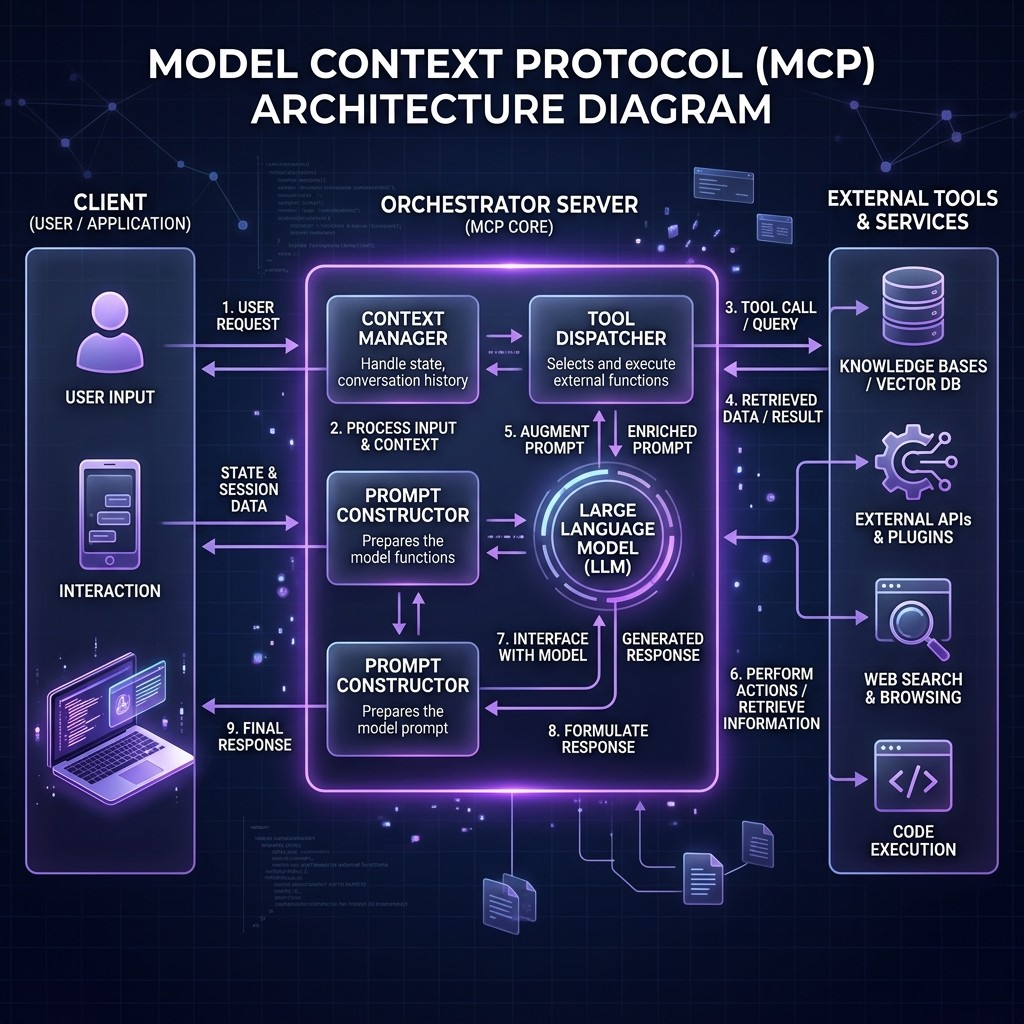
MCP follows a client-server architecture with three participants:
The Three Participants
Host — The application the user interacts with. This is Claude Desktop, Claude Code, Cursor, VS Code with Copilot, or any other AI-powered tool. The host manages the lifecycle of MCP connections and handles security policies.
Client — A protocol client that lives inside the host. Each client maintains a one-to-one connection with a single MCP server. A host can run many clients simultaneously — one per connected server.
Server — A lightweight program that exposes capabilities through MCP. A server might provide access to a database, an API, a file system, a browser, or any other external resource.
Transport Layer
MCP supports two transport mechanisms:
stdio (Standard Input/Output) — The server runs as a local subprocess. The host spawns the server process and communicates through stdin/stdout using JSON-RPC 2.0 messages. This is the most common transport for local development. It is fast, secure (no network exposure), and simple.
Streamable HTTP — The server runs as a remote HTTP service. The client connects over the network and exchanges messages via HTTP requests and Server-Sent Events (SSE). This is used for remote and cloud-hosted MCP servers, team-shared servers, and enterprise deployments. The older SSE-only transport is deprecated but still supported.
The transport layer is abstracted away from the capabilities layer. A server that works over stdio works identically over HTTP — you change the transport configuration, not the server code.
The Message Flow
Here is what happens when you ask Claude Code to "create a GitHub issue for the login bug":
- Claude Code (host) receives your prompt and determines it needs to call the GitHub MCP server.
- The MCP client sends a
tools/callrequest to the GitHub MCP server with the tool name (create_issue) and parameters (title, body, repo). - The GitHub MCP server validates the request, calls the GitHub API using its stored credentials, and receives the response.
- The server sends back a
tools/callresponse with the result (issue URL, number, status). - Claude Code incorporates the result into its context and shows you the output.
All of this happens through a standardized JSON-RPC protocol. The host does not need to know anything about the GitHub API. The server does not need to know anything about Claude's internals. MCP is the contract between them.
The Three Primitives: Tools, Resources, and Prompts {#three-primitives}
Every MCP server exposes capabilities through three primitives. Understanding these is essential for evaluating servers and building your own.
Tools
Tools are executable functions the AI can call. They are the most commonly used primitive. Examples:
create_issueon a GitHub serverrun_queryon a database servernavigateon a browser automation serversend_messageon a Slack server
Tools have defined input schemas (what parameters they accept) and output formats. The AI model sees the tool definitions and decides when and how to call them based on the user's request.
Resources
Resources are data the AI can read. They provide context without requiring an explicit function call. Examples:
- A database schema exposed as a resource by a Postgres server
- A project's README.md exposed by a filesystem server
- A list of open PRs exposed by a GitHub server
Resources are identified by URIs and can be static (read once) or dynamic (updated on each access). They are useful for giving the AI background knowledge about the environment it is operating in.
Prompts
Prompts are reusable prompt templates provided by the server. They are the least commonly used primitive but valuable for standardized workflows. A database server might provide a "migration plan" prompt template that guides the AI through a structured database migration process with the right safety checks.
How the Primitives Interact
In practice, a well-built MCP server uses all three:
A Supabase MCP server might expose your database schema as a resource (so Claude understands your tables without asking), provide tools for running SQL queries and managing migrations, and offer prompt templates for common patterns like "create a new table with RLS policies."
The best MCP servers use all three primitives thoughtfully. Poorly built servers expose a grab bag of tools with no resources or prompts, forcing the AI to guess about context.
Setting Up MCP Servers {#setting-up-mcp}
The setup process differs slightly between AI clients, but the pattern is the same: define the server's command and arguments in a configuration file.
Claude Code
Claude Code uses .mcp.json at the project root for project-specific servers, or ~/.claude/mcp.json for global servers. Here is a typical configuration:
{
  "mcpServers": {
    "github": {
      "command": "npx",
      "args": ["-y", "@modelcontextprotocol/server-github"],
      "env": {
        "GITHUB_PERSONAL_ACCESS_TOKEN": "ghp_your_token_here"
      }
    },
    "postgres": {
      "command": "npx",
      "args": ["-y", "@modelcontextprotocol/server-postgres", "postgresql://localhost:5432/mydb"]
    },
    "filesystem": {
      "command": "npx",
      "args": ["-y", "@modelcontextprotocol/server-filesystem", "/home/user/projects"]
    }
  }
}
Run claude mcp list to verify your servers are connected. If something goes wrong, the MCP troubleshooting guide covers every common error code.
Cursor
Cursor uses .cursor/mcp.json in the project root:
{
  "mcpServers": {
    "github": {
      "command": "npx",
      "args": ["-y", "@modelcontextprotocol/server-github"],
      "env": {
        "GITHUB_PERSONAL_ACCESS_TOKEN": "ghp_your_token_here"
      }
    }
  }
}
The format is identical to Claude Code's configuration. Most MCP server README files now include configuration examples for both tools.
GitHub Copilot
Copilot uses .github/mcp.json in the repository:
{
  "mcpServers": {
    "postgres": {
      "command": "npx",
      "args": ["-y", "@modelcontextprotocol/server-postgres", "postgresql://localhost:5432/mydb"]
    }
  }
}
Copilot's MCP support is in preview as of March 2026. Not all MCP features are supported yet — elicitation and sampling are notably absent.
Remote Servers via HTTP
For team-shared or cloud-hosted MCP servers, use the URL-based configuration:
{
  "mcpServers": {
    "team-database": {
      "url": "https://mcp.yourcompany.com/database",
      "headers": {
        "Authorization": "Bearer your_team_token"
      }
    }
  }
}
Remote servers are increasingly important for enterprise teams where multiple developers need shared access to the same MCP capabilities with centralized credential management.
Best MCP Servers by Category {#best-servers-by-category}
The Skiln.co MCP directory tracks the full ecosystem. Here are the standouts by category as of March 2026:
Developer Tools
| Server | What It Does | Stars | Maintained By |
|---|---|---|---|
| -------- | ------------- | ------- | -------------- |
| GitHub | Full GitHub API: repos, PRs, issues, code search, Actions | 15,200+ | Anthropic (official) |
| GitLab | GitLab API: MRs, pipelines, registries | 3,800+ | Community |
| Linear | Project management: issues, cycles, roadmaps | 2,100+ | Linear (official) |
| Jira | Atlassian Jira: issues, boards, sprints | 1,900+ | Community |
Databases
| Server | What It Does | Stars | Maintained By |
|---|---|---|---|
| -------- | ------------- | ------- | -------------- |
| PostgreSQL | Full Postgres access: queries, schema inspection, migrations | 8,400+ | Anthropic (official) |
| Supabase | Supabase platform: tables, RLS, edge functions, branches | 6,200+ | Supabase (official) |
| MongoDB | MongoDB queries, aggregations, collection management | 3,100+ | Community |
| SQLite | Local SQLite database access | 2,800+ | Anthropic (official) |
Cloud & Infrastructure
| Server | What It Does | Stars | Maintained By |
|---|---|---|---|
| -------- | ------------- | ------- | -------------- |
| Docker | Container management: build, run, compose, logs | 4,600+ | Community |
| Cloudflare | Workers, R2, D1, KV, DNS management | 3,900+ | Cloudflare (official) |
| AWS | S3, Lambda, EC2, CloudFormation interactions | 2,700+ | Community |
| Vercel | Deployments, domains, environment variables | 2,400+ | Vercel (official) |
Browsers & Automation
| Server | What It Does | Stars | Maintained By |
|---|---|---|---|
| -------- | ------------- | ------- | -------------- |
| Playwright | Browser automation: navigation, screenshots, testing | 7,800+ | Anthropic (official) |
| Puppeteer | Chrome automation, PDF generation, scraping | 3,200+ | Community |
| Browserbase | Cloud browser instances for remote automation | 1,800+ | Browserbase (official) |
Communication
| Server | What It Does | Stars | Maintained By |
|---|---|---|---|
| -------- | ------------- | ------- | -------------- |
| Slack | Messages, channels, threads, reactions | 4,100+ | Anthropic (official) |
| Notion | Pages, databases, blocks, comments | 3,500+ | Community |
| Gmail | Email: read, search, draft, send | 2,200+ | Google (official) |
| Discord | Messages, channels, threads, reactions | 1,600+ | Community |
AI & Data
| Server | What It Does | Stars | Maintained By |
|---|---|---|---|
| -------- | ------------- | ------- | -------------- |
| Memory | Persistent memory across sessions using knowledge graphs | 5,900+ | Anthropic (official) |
| Fetch | HTTP requests with content extraction | 4,300+ | Anthropic (official) |
| Brave Search | Web search with Brave Search API | 3,700+ | Anthropic (official) |
| EXA | Semantic search and web content retrieval | 2,100+ | EXA (official) |
For detailed reviews of the top servers, see the Top 10 MCP Servers deep-dive.
MCP Security: What You Need to Know {#mcp-security}
I wrote a dedicated MCP security guide because this topic deserves serious attention. Here is the condensed version for this overview.
The Threat Model
An MCP server runs with whatever permissions you grant it. A database server has your database credentials. A GitHub server has your personal access token. A filesystem server can read (and potentially write) files on your machine. This is powerful and dangerous.
The Five-Point Security Checklist
Before installing any MCP server:
- Source verification — Is it from an official publisher (Anthropic, the service provider) or a verified community maintainer? Unknown publishers require extra scrutiny.
- Code transparency — Can you read the source code? Avoid closed-source MCP servers entirely. The server runs on your machine with your credentials — you need to know what it does.
- Permission scope — Does the server request only the access it needs? A Slack server should not need filesystem access. A database server should not need network access beyond the database connection.
- Transport security — Local stdio servers are inherently safer (no network exposure). Remote HTTP servers must use TLS and proper authentication.
- Maintenance activity — Check the repo for recent commits, issue responses, and security advisory handling. Abandoned servers accumulate vulnerabilities.
Container Isolation
For sensitive environments, run MCP servers in Docker containers. This sandboxes the server's access to only what you explicitly mount:
docker run -e GITHUB_TOKEN=$TOKEN \
  -v /path/to/project:/workspace:ro \
  mcp-github-server
The :ro flag mounts the workspace as read-only — the server can read but not modify your files. This pattern is becoming standard for enterprise MCP deployments.
Credential Management
Never hardcode credentials in MCP configuration files that get committed to repositories. Use environment variables, secret managers (1Password CLI, AWS Secrets Manager, Vault), or .env files excluded from version control.
Building Your Own MCP Server {#building-your-own}
Building an MCP server is straightforward if you understand the protocol. The official SDK supports TypeScript, Python, Java, Kotlin, C#, and Go.
Minimal TypeScript Server
Here is the skeleton of an MCP server that exposes one tool:
import { McpServer } from "@modelcontextprotocol/sdk/server/mcp.js";
import { StdioServerTransport } from "@modelcontextprotocol/sdk/server/stdio.js";
import { z } from "zod";

const server = new McpServer({
  name: "my-tool-server",
  version: "1.0.0"
});

server.tool(
  "get_weather",
  "Get current weather for a location",
  {
    location: z.string().describe("City name or coordinates")
  },
  async ({ location }) => {
    const weather = await fetchWeather(location);
    return {
      content: [{
        type: "text",
        text: JSON.stringify(weather, null, 2)
      }]
    };
  }
);

const transport = new StdioServerTransport();
await server.connect(transport);
This server defines one tool (get_weather) with a typed input schema and a handler function. When connected to Claude Code or Cursor, the AI can call this tool whenever the user asks about weather.
Adding Resources
server.resource(
  "supported-cities",
  "weather://cities",
  async (uri) => ({
    contents: [{
      uri: uri.href,
      text: JSON.stringify(["London", "New York", "Tokyo", "Sydney"])
    }]
  })
);
Resources give the AI context without requiring a tool call. Here, the AI knows which cities are supported before the user even asks.
Testing with MCP Inspector
The MCP Inspector is the official debugging tool:
npx @modelcontextprotocol/inspector node dist/index.jsThis opens a browser UI where you can see your server's tools, resources, and prompts, call them manually, and inspect the JSON-RPC messages. Use this before connecting to a real AI client.
Publishing
MCP servers are published as npm packages (TypeScript), PyPI packages (Python), or Docker images. The Skiln.co directory accepts submissions at skiln.co/submit. Include a clear README with configuration examples for Claude Code, Cursor, and Copilot.
For a complete step-by-step tutorial on building skills (which complement MCP servers), see the skill-building guide.
The Future of MCP {#future-of-mcp}
What Is Coming in 2026-2027
OAuth 2.1 for remote servers — The MCP spec is finalizing native OAuth support, which will replace the current pattern of manually passing tokens in environment variables. This matters enormously for enterprise adoption and team-shared servers.
MCP registries — Centralized discovery services (similar to npm for packages) are in development. This will make finding, evaluating, and installing MCP servers significantly easier than the current GitHub-based discovery.
Agent-to-agent MCP — The protocol is being extended to support AI agents connecting to other AI agents through MCP. This unlocks multi-agent architectures where a coding agent delegates research to a search agent, which delegates data extraction to a scraping agent — all through MCP.
Standardized auth and audit — Enterprise features like audit logging, rate limiting, and role-based access control are being baked into the protocol layer rather than left to individual server implementations.
My Prediction
MCP will be to AI tools what HTTP is to web browsers — the invisible plumbing that makes everything work together. Within two years, developers will not think about MCP any more than they think about TCP/IP. They will install a "Postgres connection" or a "Slack integration" and the protocol will be an implementation detail.
The winners in this ecosystem will be the tools with the best MCP client implementations (Claude Code currently leads), the best server curation (which is why directories like Skiln.co exist), and the best security story for enterprises.
Frequently Asked Questions {#faq}
What is MCP in simple terms?
MCP is a standard way for AI assistants to connect to external tools and data sources. Instead of each AI tool building its own integration for every service, MCP provides one universal protocol. Build an MCP server once, and it works with Claude Code, Cursor, Copilot, and any other MCP-compatible tool.
Is MCP only for Claude Code?
No. Anthropic created MCP and open-sourced it. Claude Code is the reference implementation, but Cursor, GitHub Copilot, Windsurf, Cline, and other tools all support MCP. The 12,000+ server ecosystem is shared across all compatible clients.
How many MCP servers exist?
Over 12,000 as of March 2026, with several hundred new servers published each month. The Skiln.co directory tracks the ecosystem with ratings, categories, and installation instructions.
Are MCP servers safe to install?
It depends on the server. Official servers from Anthropic, Google, Cloudflare, Supabase, and other major publishers are well-audited. Community servers require the same scrutiny you would apply to any open-source dependency. Read the MCP security guide for a detailed checklist.
Can I build my own MCP server?
Yes. The official SDK supports TypeScript, Python, Java, Kotlin, C#, and Go. A minimal server can be built in under 100 lines of code. The protocol handles all the communication complexity — you just define your tools, resources, and prompts.
What is the difference between MCP servers and Claude Code skills?
MCP servers give AI tools access to external capabilities (APIs, databases, browsers). Claude Code skills give Claude behavioral instructions (how to approach tasks, what conventions to follow, what patterns to use). They complement each other — skills shape behavior, MCP servers expand capabilities.
Do I need to be a developer to use MCP servers?
You need basic comfort with the command line and JSON configuration files. Installing a server typically involves running an npx command and adding a few lines to a config file. Building a server requires programming knowledge.
How does MCP compare to OpenAI's function calling?
MCP is a server protocol — the server runs independently and provides tools to any compatible client. OpenAI function calling defines functions within a single API call. MCP is broader in scope, supports resources and prompts beyond just tools, and is client-agnostic. They solve different problems at different layers.