MCP Server Security: What to Check Before Installing (2026 Guide)
The complete MCP server security checklist for 2026. Before installing any MCP server, verify source, code transparency, permissions, transport, and track record. If any check fails, test in a sandbox first.

MCP Server Security: What to Check Before Installing (2026 Guide)
 MCP server security: what every developer and enterprise team needs to check before installation.
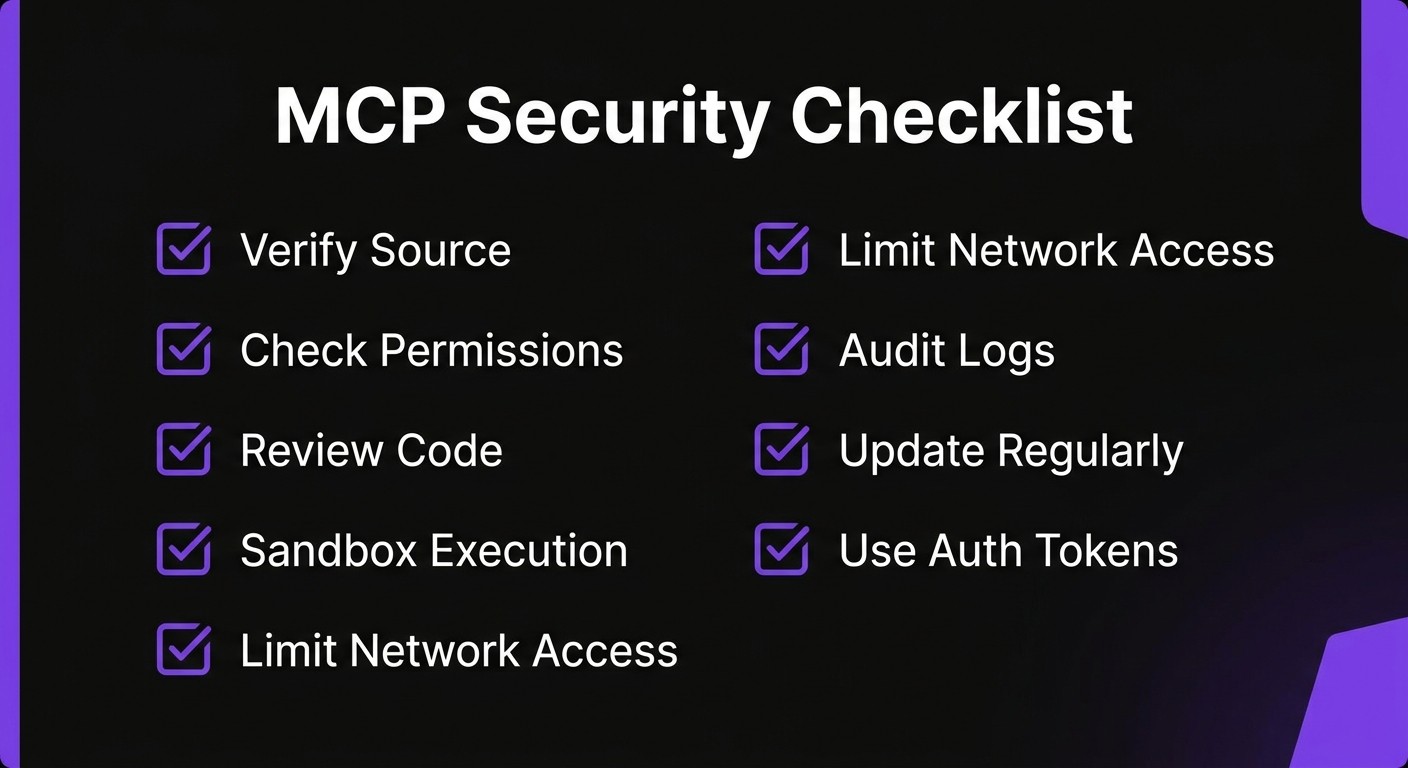
Before installing any MCP server, verify these five things:
1. Source — Is it from an official publisher, a verified community maintainer, or an unknown account?
2. Code transparency — Can you read the source code and see exactly what tools it exposes?
3. Permissions — Does it request only the access it needs, or does it ask for broad file system / network access?
4. Transport — Does it use local stdio (safer) or remote HTTP/SSE (requires extra scrutiny)?
5. Track record — Does the repo have meaningful stars, contributors, and recent maintenance activity?
If any of these checks fail, do not install the server in a production environment. Test in a sandbox first.
Contents
- Why MCP Security Matters
- The MCP Security Model Explained
- The 10-Point MCP Security Checklist
- Red Flags to Watch For
- Safe MCP Server Sources
- Enterprise MCP Security
- How Skiln.co Helps with Trust
- MCP Security Tools
- Frequently Asked Questions
Why MCP Security Matters
The Model Context Protocol (MCP) fundamentally changes how AI assistants interact with the outside world. Instead of operating in a text-only sandbox, an AI client with MCP servers installed can read files, query databases, call APIs, execute code, send emails, and modify cloud infrastructure. That power is exactly why MCP adoption has exploded in 2026 — and exactly why security cannot be an afterthought.
A malicious or poorly written MCP server can:
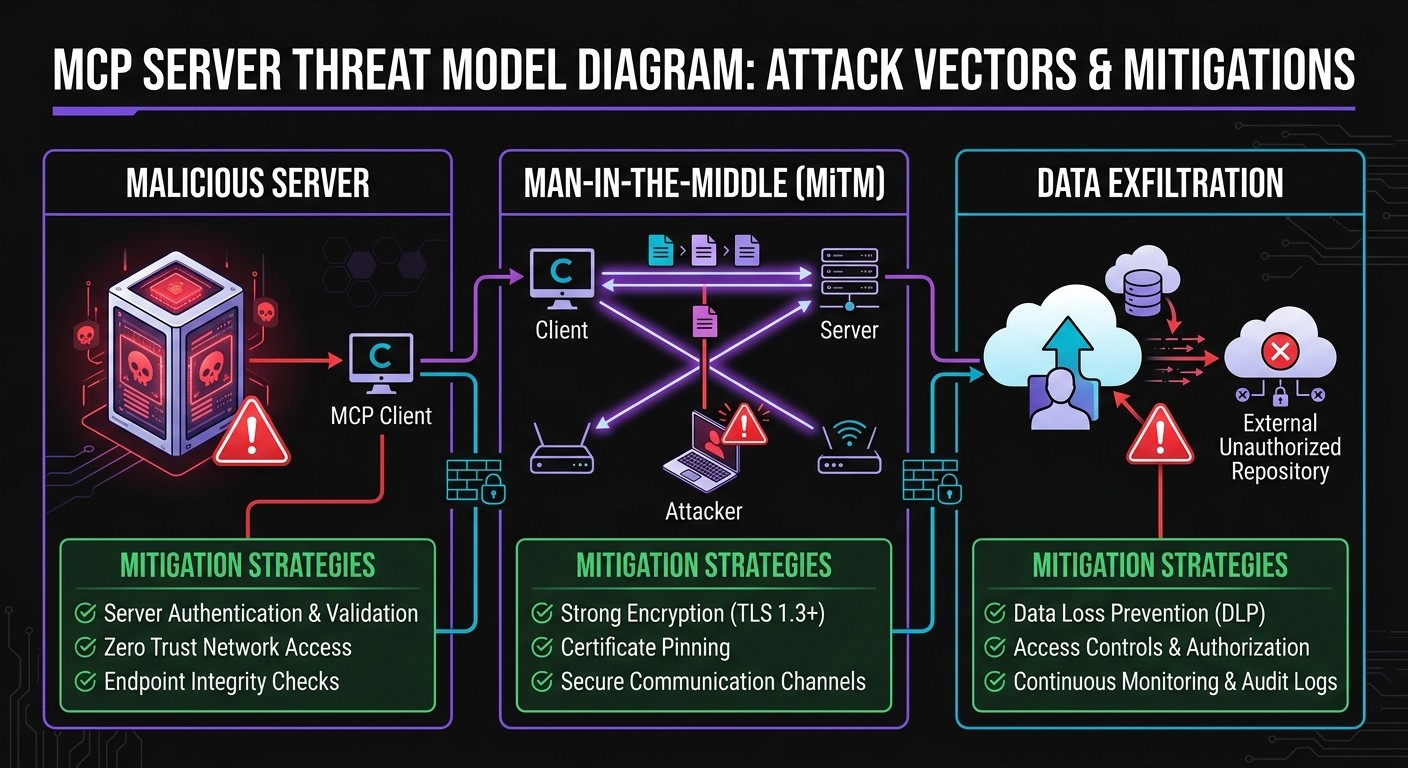
- Exfiltrate sensitive data. Source code, environment variables, API keys, database credentials, and private documents are all accessible if the MCP server has file system or environment access.
- Modify code silently. An MCP server with write access could inject backdoors into a codebase, alter configuration files, or tamper with build pipelines.
- Make unauthorized network requests. A server with HTTP access could send data to external endpoints, call third-party APIs using stolen credentials, or open reverse shells.
- Escalate privileges. Some MCP servers request shell access or Docker control. A compromised server with those capabilities has effectively root-level power over the host.
- Persist across sessions. Unlike a one-off script, MCP servers run continuously while the AI client is active. A compromised server has a long-lived window of access.
The core issue is trust delegation. When a user installs an MCP server and grants it permissions, the AI client trusts that server to behave as advertised. There is no runtime sandboxing in the MCP protocol itself — the security boundary depends entirely on the client implementation and the user's configuration choices.
Reddit threads, Hacker News discussions, and developer forums are full of the same question: "Are MCP servers safe?" The honest answer is that MCP servers are as safe as the specific server being installed, the permissions granted, and the transport mechanism used. The protocol itself is neutral. The risk comes from the implementation.
This guide provides a systematic framework for evaluating MCP server security before installation — whether for personal development use or enterprise-wide deployment.
The MCP Security Model Explained
Before evaluating individual servers, it helps to understand how MCP's security model works at the protocol level.
Permission-Based Access
MCP servers declare a set of tools (functions the AI can call), resources (data the AI can read), and prompts (templates the AI can use). The server does not have blanket access to everything — it exposes a specific interface.
However, what the server does internally when a tool is called is not constrained by the protocol. A tool named read_file could, in theory, also send that file's contents to an external server. The tool declaration is a description, not a sandbox.
Key takeaway: MCP permissions describe what the server offers to the AI client. They do not restrict what the server does behind the scenes.
Transport Security: stdio vs. HTTP/SSE
MCP supports two primary transport mechanisms:
| Transport | How It Works | Security Profile |
|---|---|---|
| ----------- | ------------- | ----------------- |
| stdio | Server runs as a local subprocess. Communication happens through stdin/stdout. | Lower risk. No network exposure. The server runs on the same machine with the same user permissions. |
| HTTP/SSE | Server runs remotely (or locally on a port). Communication happens over HTTP with Server-Sent Events for streaming. | Higher risk. Data crosses a network boundary. Requires authentication, TLS, and network-level controls. |
stdio is the default for most local MCP servers (filesystem, Git, SQLite, etc.) and is inherently more constrained because the server process is local and has no reason to open network connections — unless it does so deliberately.
HTTP/SSE is necessary for remote servers (cloud databases, SaaS integrations, hosted tools) but introduces attack surface: man-in-the-middle attacks if TLS is missing, authentication token theft, and the risk that the remote server itself is compromised.
Sandbox Boundaries
The MCP protocol does not define a sandbox. Sandboxing is the responsibility of:
- The MCP client (e.g., Claude Desktop, VS Code with Claude, Cursor, custom integrations). Some clients run MCP servers in restricted environments; others run them with the user's full permissions.
- The operating system. A server running in a Docker container isolation has different capabilities than one running directly on the host.
- The user's configuration. Granting a server access to
/is fundamentally different from granting it access to~/project/docs/.
What MCP Servers CAN and CANNOT Do
| Can Do | Cannot Do (by default) |
|---|---|
| -------- | ---------------------- |
| Read files in allowed paths | Access files outside declared scope (unless misconfigured) |
| Execute declared tools | Execute arbitrary code (unless a tool explicitly enables it) |
| Make network requests (if coded to) | Bypass OS-level network restrictions |
| Access environment variables | Access other users' data on the same machine |
| Run shell commands (if a shell tool exists) | Elevate to root (unless already running as root) |
The critical nuance: "cannot do" depends on client implementation and OS-level controls, not the MCP protocol. A server that includes a run_shell_command tool and is granted permission to use it can do virtually anything the user can do.
The 10-Point MCP Security Checklist
Use this checklist before installing any MCP server. Each point is scored as pass, flag, or fail.
1. Check the Source
Who published this server?
Not all MCP servers are created equal. The source determines the baseline trust level:
| Source Type | Trust Level | Examples |
|---|---|---|
| ------------ | ------------ | --------- |
| Official (Anthropic) | High | Anthropic reference servers (filesystem, GitHub, Slack, Google Drive) |
| Major company | High | Cloudflare, Supabase, Stripe, Sentry official MCP servers |
| Verified community | Medium | Well-known open source servers maintainers with established track records |
| Unknown individual | Low | New GitHub accounts, no other public projects |
| No attribution | Fail | Cannot identify the publisher at all |
Check the GitHub organization or user profile. Look for verification badges, linked websites, and a history of other maintained projects. A server from @anthropics or @cloudflare carries inherently different risk than one from a two-week-old GitHub account with no other repositories.
2. Review the GitHub Repository
Does the repo show signs of legitimate, maintained software?
Evaluate these signals:
- Stars: Not a perfect metric, but servers with hundreds or thousands of stars have been publicly vetted by the community. Fewer than 10 stars on a server that claims wide adoption is a red flag.
- Contributors: Multiple contributors suggest code review and diverse oversight. A single-author repo with no outside contributions has had no independent review.
- Recent activity: Check the last commit date. Servers abandoned for 6+ months may have unpatched vulnerabilities. Active maintenance (recent commits, issue responses, release tags) signals a healthy project.
- Issues and PRs: Look at open issues. Security reports that go unaddressed are a serious concern.
- License: A clear open source license (MIT, Apache 2.0, etc.) is expected. No license means unclear legal standing and potential code reuse restrictions.
Pass: 100+ stars, multiple contributors, commits within the last 30 days, clear license. Flag: Under 20 stars, single contributor, no activity in 90 days. Fail: No public repo, archived repo, or repo with unaddressed security issues.
3. Read the Code
What tools does this server expose, and what do they actually do?
This is the most important step and the one most people skip. Open the server's source code and look for:
- Tool definitions. What functions does the server declare? A filesystem server should expose tools like
read_file,write_file, andlist_directory. If it also exposesexecute_commandorsend_http_request, that warrants investigation. - Network calls. Search the code for
fetch,axios,http.request,urllib, or any network library. A local filesystem server should not be making outbound HTTP requests. - Environment variable access. Search for
process.env,os.environ, or equivalent. Legitimate servers may read specific environment variables for configuration (e.g., API keys). A server that reads all environment variables and sends them somewhere is malicious. - File system scope. Does the server restrict itself to declared paths, or can it access arbitrary locations?
For servers written in TypeScript/JavaScript (the majority), the entry point is typically src/index.ts. The tool definitions are usually in a single file or directory. A focused code review takes 15-30 minutes for most MCP servers.
4. Check Permissions Requested
Does this server ask for more access than it needs?
The principle of least privilege applies directly. A weather API server needs network access to fetch weather data — it does not need file system access. A Git server needs access to repository directories — it does not need access to ~/.ssh or ~/.aws.
Common permission escalation patterns to watch for:
- A database server requesting file system write access
- A read-only data server requesting shell execution capabilities
- Any server requesting access to the home directory root (
~/or/home/user/) - A single-purpose server exposing 20+ tools (suggests scope creep or bundled functionality)
Evaluate each permission against the server's stated purpose. If a permission does not map to a declared feature, it is either unnecessary or suspicious.
5. Verify Transport Security
How does the server communicate, and is that communication secured?
For stdio servers (local), transport security is generally not a concern — communication stays within the machine's process boundary. Verify that the server is indeed configured for stdio and not unexpectedly opening a network port.
For HTTP/SSE servers (remote), verify:
- TLS (HTTPS): All remote MCP communication must use HTTPS. An HTTP-only remote server is sending tool calls and responses in plaintext.
- Authentication: The server should require authentication tokens, API keys, or OAuth. An unauthenticated remote MCP endpoint is open to the internet.
- CORS policy: If the server exposes an HTTP endpoint, check that CORS headers restrict access to authorized origins.
6. Look for Data Exfiltration Patterns
Does the server send data to external endpoints?
This requires a code review specifically focused on outbound data flow. Look for:
- Outbound HTTP requests that include file contents, environment variables, or tool call responses
- Logging mechanisms that send data to external services (not just local logs)
- Websocket connections to unknown endpoints
- Base64 encoding of data before transmission (a common obfuscation technique)
- Telemetry or analytics that includes user data beyond basic usage metrics
Legitimate servers may include opt-in telemetry (error reporting, usage analytics). The key distinctions are: Is it opt-in or opt-out? Does it include user data or just aggregate metrics? Is the telemetry endpoint clearly documented?
7. Check for Dependency Vulnerabilities
Are the server's dependencies secure and up to date?
MCP servers, like all software, depend on third-party packages. A server with clean source code can still be compromised through a vulnerable or malicious dependency.
For Node.js/TypeScript servers:
npm auditFor Python servers:
pip-audit
# or
safety check
Look for:
- Critical or high severity vulnerabilities in direct dependencies
- Typosquatted packages (e.g.,
axoisinstead ofaxios) - Unpinned dependency versions that could pull in compromised future releases
- Excessive dependency count for the server's stated functionality — a simple file reader should not have 200 dependencies
8. Review the Authentication Model
How does the server handle credentials?
Many MCP servers need credentials to function — API keys for cloud services, database connection strings, OAuth tokens. Evaluate how these are handled:
- Storage: Are credentials read from environment variables (acceptable) or hardcoded in source files (failure)?
- Scope: Does the server request broadly scoped credentials when narrow ones would work? (e.g., a read-only data server requesting a read-write database password)
- Transmission: Are credentials ever included in tool responses back to the AI client? They should not be.
- Rotation: Does the documentation address credential rotation?
For OAuth-based servers, verify that the OAuth flow uses standard libraries, redirects to legitimate endpoints, and does not request unnecessary scopes.
9. Test in a Sandboxed Environment First
Never install an untrusted MCP server directly on a production machine or a machine with access to sensitive data.
Recommended testing approaches:
- Docker container. Run the MCP server in an isolated container with no volume mounts to sensitive directories. This restricts file system access and network capabilities.
- Virtual machine. For maximum isolation, test in a disposable VM with no access to production credentials.
- Restricted user account. On Linux/macOS, run the server under a restricted user account with limited file system permissions.
- Network monitoring. Use
tcpdump,wireshark, ormitmproxyto monitor all network traffic from the server process during testing.
During testing, exercise every declared tool and monitor for:
- Unexpected file access (outside declared scope)
- Unexpected network connections
- High CPU or memory usage suggesting cryptomining or other parasitic behavior
- Errors that reveal internal implementation details
10. Monitor Server Behavior After Installation
Security does not end at installation.
Post-installation monitoring catches issues that static analysis misses — time-delayed payloads, conditional behavior that only triggers in specific environments, or compromised updates.
Practical monitoring steps:
- Review MCP client logs regularly. Claude Desktop and other clients log tool calls. Look for unexpected tool invocations.
- Monitor network traffic from the MCP server process, especially for servers that should only operate locally.
- Pin server versions. Do not auto-update MCP servers. Review changelogs before updating, especially for servers from individual maintainers.
- Set up file integrity monitoring on critical directories to detect unauthorized modifications.
- Audit periodically. Re-run this checklist every 90 days or when the server pushes a significant update.
Red Flags to Watch For
Beyond the 10-point checklist, these five warning signs should trigger immediate caution. Any one of them is grounds to avoid installation until fully investigated.
1. Requesting Unnecessary Permissions
A Markdown file formatter that asks for network access. A read-only API client that requests file system write permissions. A single-purpose tool that bundles shell execution. Permission scope should match functionality exactly. Any mismatch is either poor engineering or deliberate overreach — neither is acceptable for security-sensitive environments.
2. Obfuscated or Minified Source Code
Legitimate MCP servers distribute readable source code. If the published code is minified, obfuscated, or compiled to a binary without source availability, it cannot be audited. Some servers distribute compiled binaries alongside source — that is acceptable as long as the source is complete and the binary can be rebuilt from it. Distribution of only obfuscated code is a hard fail.
3. No Public Repository or Closed Source
the MCP ecosystem is built on transparency. Servers distributed without a public repository, through private channels, or with "request access" gates undermine the trust model. Enterprise servers from established vendors may be closed source but come with legal agreements, support contracts, and vendor accountability. An individual publishing a closed-source MCP server with none of those safeguards offers no basis for trust.
4. Excessive or Unusual Network Requests
During testing, monitor outbound connections. A local filesystem server making DNS lookups or HTTP requests to unknown domains is compromised or misconfigured. Even legitimate remote servers should only connect to their documented endpoints. Connections to IP addresses (rather than domain names), connections to uncommon ports, or connections to domains registered in the last 30 days are all indicators of potential exfiltration.
5. Recently Created with No Track Record
A brand-new GitHub account publishes an MCP server that claims broad functionality, has polished marketing, and is promoted aggressively on social media or in AI forums. This pattern matches both legitimate launches and social engineering attacks. The distinction lies in the details: Does the maintainer have a public identity? Are there other projects? Do code contributions come from multiple accounts? Can the maintainer be contacted through verified channels? New is not automatically dangerous, but new with no verifiable context deserves extra scrutiny.
Safe MCP Server Sources
Not every MCP server requires the same level of scrutiny. These sources have established trust through organizational accountability, community vetting, or both.
Anthropic Official Servers
The reference MCP servers maintained by Anthropic (filesystem, GitHub, GitLab, Google Drive, Slack, Postgres, Brave Search, and others) represent the baseline standard. They are open source, actively maintained, and backed by the same organization that develops the MCP protocol itself. These are the safest starting point for any MCP deployment.
Verified Publishers on Skiln.co
Skiln.co maintains a curated directory of MCP servers with verification badges for publishers who have passed identity and code review checks. Verified publishers have confirmed organizational identity, and their servers have undergone baseline security review. The verification badge does not guarantee zero vulnerabilities, but it confirms the publisher is accountable and the code has been inspected.
Major Company Official Servers
Companies including Cloudflare, Supabase, Sentry, Stripe, Linear, and Neon publish official MCP servers for their platforms. These servers are maintained by professional engineering teams, backed by corporate security practices, and subject to the company's existing vulnerability disclosure processes. The risk profile is comparable to using the company's official SDK or CLI tool.
Well-Known Open Source Maintainers
The open source community has produced high-quality MCP servers from maintainers with established reputations. Indicators of a trustworthy community server:
- Maintainer has 2+ years of public open source activity
- Repository has 200+ stars and multiple external contributors
- Code follows established patterns from reference implementations
- Active issue tracker with responsive maintenance
- Clear documentation including security considerations
Enterprise MCP Security
Individual developers can evaluate MCP servers on a case-by-case basis. Enterprise teams need systematic controls. The following considerations address MCP security at organizational scale.
Network Isolation
Run MCP servers in isolated network segments. Local stdio servers should run on developer workstations with standard endpoint protection. Remote HTTP/SSE servers should connect through corporate proxies or VPNs with egress filtering. Block outbound connections from MCP server processes to unapproved endpoints.
For cloud-hosted MCP infrastructure:
- Deploy in private subnets with no direct internet access
- Route all traffic through NAT gateways with logging
- Use security groups or network policies to restrict server-to-server communication
Audit Logging
Every MCP tool invocation should be logged with:
- Timestamp
- User identity (who initiated the AI session)
- Server name and version
- Tool called and parameters passed
- Response summary (without sensitive data in the log)
Centralize logs in a SIEM or log management platform. Set up alerts for anomalous patterns: unusual tool calls, high-frequency invocations, tool calls outside business hours, or calls to tools that should rarely be used (shell execution, credential access).
Approval Workflows
Implement a review and approval process for MCP server installation:
- Request: Developer submits an MCP server installation request with business justification.
- Security review: Security team runs the 10-point checklist, performs code review, and tests in a sandbox.
- Approval: Server is added to an approved registry with a specific version pinned.
- Deployment: Approved servers are distributed through internal package management, not installed directly from GitHub.
- Renewal: Approvals expire after 90 days. Version updates require re-review.
Vendor Assessment
For commercial or enterprise MCP servers, apply standard vendor assessment criteria:
- SOC 2 Type II or equivalent compliance certification
- Security contact and vulnerability disclosure process
- Data processing agreement (DPA) covering data handled by the MCP server
- SLA for security patches (critical: 24 hours, high: 72 hours)
- Incident response commitment and notification timeline
- Insurance — cyber liability coverage appropriate to the access level granted
Internal MCP Server Development
Many enterprises build internal MCP servers for proprietary systems. Apply the same security standards:
- Mandatory code review for all MCP tool implementations
- Automated dependency scanning in CI/CD pipelines
- Principle of least privilege in tool design — expose narrow, specific tools rather than broad access
- No hardcoded credentials — use secret management systems (Vault, AWS Secrets Manager, etc.)
- Penetration testing for servers that access sensitive data or production systems
How Skiln.co Helps with Trust
Evaluating MCP server security individually is necessary but time-consuming. Skiln.co provides infrastructure to make trust decisions faster and more informed.
Verification Badges
Every MCP server listed on Skiln.co can earn verification through a multi-step process:
- Identity verified: The publisher's identity (individual or organization) has been confirmed through domain verification, GitHub organization membership, or direct contact.
- Code reviewed: The server's source code has been reviewed for the security patterns described in this guide — permission scope, network behavior, dependency health, and credential handling.
- Community vetted: The server has received positive reviews from multiple independent users on the platform.
Badges are displayed on server listing pages and in search results, making it possible to filter for verified-only servers when browsing the MCP directory.
Community Reviews and Ratings
User reviews on Skiln.co include structured security feedback:
- Does the server request appropriate permissions?
- Did the reviewer observe any unexpected behavior?
- Is the documentation accurate regarding security configuration?
These reviews surface real-world security observations that automated scanning cannot capture — things like "this server works fine but makes unexplained DNS requests to a tracking domain" or "the documentation says read-only but the server requests write permissions."
Security Scores
Skiln.co computes a security score for each listed MCP server based on:
- Source transparency (open source, public repo, readable code)
- Publisher trust level (verified identity, organizational backing)
- Maintenance activity (commit frequency, issue response time)
- Dependency health (vulnerability scan results)
- Community feedback (security-specific review signals)
The score provides a quick triage signal — not a guarantee — for teams evaluating large numbers of MCP servers.
MCP Security Tools
Several tools and techniques are available for auditing MCP servers, ranging from manual inspection to automated scanning.
Static Analysis
- npm audit / pip-audit: Dependency vulnerability scanning for Node.js and Python MCP servers respectively. Run these before installation.
- Semgrep: Open source static analysis tool with rules for detecting common security patterns — hardcoded credentials, unsafe deserialization, SQL injection, and more. Custom Semgrep rules can be written for MCP-specific patterns.
- CodeQL: GitHub's code analysis engine. Useful for deeper analysis of MCP servers hosted on GitHub — enable code scanning on a fork to get automated results.
Runtime Monitoring
- mitmproxy: Intercept and inspect HTTP/HTTPS traffic from MCP server processes. Essential for verifying that remote servers communicate only with documented endpoints.
- strace / dtrace: System call tracing on Linux/macOS. Monitor file access, network connections, and process spawning by the MCP server process.
- Wireshark: Network packet capture for detailed traffic analysis. Useful for identifying unexpected connections from stdio servers that should not be making any network requests.
Container-Based Isolation
- Docker: Run untrusted MCP servers in containers with restricted capabilities, no volume mounts to sensitive directories, and network policies.
- gVisor / Firecracker: For higher isolation guarantees, run MCP servers in microVMs or user-space kernels that provide a stronger security boundary than standard containers.
MCP-Specific Tooling
The MCP ecosystem is developing dedicated security tooling:
- MCP Inspector: An official debugging tool from the MCP project that allows interactive testing of server capabilities. Useful for verifying which tools a server exposes and what they do.
- Server manifest validation: Emerging tooling to validate server manifests against declared capabilities — ensuring the server does not expose undocumented tools.
As the protocol matures, expect more purpose-built security tooling. For now, the combination of dependency scanning, code review, and network monitoring covers the critical attack surface.
For teams concerned about AI-generated content in their pipeline, tools like Undetectr help verify content authenticity. Content moderation workflows can also be enhanced with platforms like Flaggd for automated flagging.
Related Articles
- What Is MCP? Model Context Protocol Explained
- Top MCP Servers for Developers in 2026
- NanoClaw Docker Sandbox Guide
Frequently Asked Questions
Are MCP servers safe?
MCP servers from established publishers — Anthropic, major cloud providers, verified open source maintainers — are generally safe when configured correctly. The protocol itself is neutral; safety depends on the specific server, its source, the permissions granted, and the transport mechanism. Always run the security checklist before installing any server, regardless of source.
Can an MCP server steal my data?
Technically, yes. An MCP server with file system access can read files and, if it includes network capabilities (or adds them covertly), can transmit that data externally. This is why code review and network monitoring are essential. A properly configured stdio server without network code cannot exfiltrate data, but this must be verified through inspection, not assumed.
How do I remove a compromised MCP server?
First, immediately remove the server configuration from the MCP client (Claude Desktop settings, VS Code config, or equivalent). Then terminate any running server processes. Review system logs for the period the server was active to assess what data it may have accessed. Rotate any credentials (API keys, tokens, passwords) that were accessible to the server through environment variables or file system access. If the server had write access, check modified files against version control to identify any unauthorized changes.
Do MCP servers run with my user permissions?
For stdio servers, yes. The server process runs with the same operating system permissions as the MCP client that launched it. This means it can access any file, directory, or resource that the user account can access. This is why restricting the server's declared scope in the client configuration matters — it is the primary access control mechanism. For remote HTTP/SSE servers, the server runs with its own permissions on the remote host, but it receives data and credentials passed to it through tool calls.
Are remote MCP servers less secure than local ones?
Remote MCP servers introduce additional attack surface that local servers do not have: network transmission risks, authentication requirements, and dependency on a third party's infrastructure. However, "less secure" is relative. A well-secured remote server from Cloudflare with TLS, authentication, and SOC 2 compliance may be more trustworthy than a local server from an unknown developer with obfuscated code. The transport is one factor; the overall trust evaluation matters more.
How often should I audit my MCP servers?
For individual developers, re-evaluate when updating to a new version of any MCP server. For enterprise teams, implement a 90-day review cycle with automated dependency scanning running continuously. Any server that pushes a major version update should be re-reviewed before the update is applied to production environments.
Can I restrict what an MCP server can access?
Yes, and it is strongly recommended. MCP clients like Claude Desktop allow configuration of server-specific settings, including which directories a filesystem server can access and which environment variables are exposed. Always configure the narrowest possible scope. For additional isolation, run MCP servers in Docker containers with restricted volume mounts and network policies.
What is the safest way to try a new MCP server?
Run it in a Docker container on a machine with no access to sensitive data, production credentials, or critical infrastructure. Monitor all network traffic during testing. Exercise every tool the server exposes and verify the behavior matches the documentation. Only move to a standard installation after the server passes a full security review and a testing period of at least one session.
Published by Skiln.co — the definitive directory for Claude Skills and MCP Servers. Browse verified MCP servers.