Claude Code Permissions in 2026: The settings.json Guide
Bash(rm *) does not stop /bin/rm. Rules for Write and Glob are never consulted. Project allow rules never load under claude -p. The full permission reference, checked against Anthropic's docs.


- Permission rules are enforced by Claude Code, not by the model. A boundary written as prose in
CLAUDE.mdshapes what Claude tries, and changes nothing about what it is allowed to do. - Rules evaluate deny, then ask, then allow, first match wins. Specificity never breaks the tie, so an allow rule can never carve an exception out of a deny rule.
- A Bash deny rule is not a security boundary around a program.
Bash(rm *)stopsrm -rf build/and does not stop/bin/rm -rf build/orbash -c 'rm -rf build/'. - Path rules written for
Write,GloborMultiEditare accepted and then never consulted. OnlyRead(path)andEdit(path)are checked. - In
claude -pand SDK runs, a project'spermissions.allowrules never load at all: the workspace trust dialog they depend on is only ever shown interactively.
3 rule lists · 5 settings scopes · 6 permission modes · every rule string quoted from the reference
You wrote Bash(rm *) into your deny list, watched Claude run something destructive anyway, and went looking for the bug. There is no bug. That rule stops exactly one spelling of the command, and the Claude Code permissions reference says so in a table most guides never reproduce: the same rule does not stop /bin/rm, and it does not stop bash -c 'rm -rf build/'.
This matters more than a normal configuration detail because the failure is silent. A rule that matches nothing looks identical in /permissions to a rule that protects you, and the moment you find out which one you wrote is the moment it did not hold.
So this is the reference for what the permission system actually enforces: the three lists and the order they resolve in, which of the five settings files wins, the rule syntax for each tool, and the three places where a rule you wrote in good faith quietly does nothing.
I checked every rule string, field name, version number and precedence claim here against Anthropic's own permissions and settings references rather than against other write-ups, which matters unusually much on a subject where the popular advice is a layer of enforcement that does not exist.

What Permission Rules Actually Enforce
Start with the sentence that invalidates a lot of published advice. From the permissions reference: "Permission rules are enforced by Claude Code, not by the model. Instructions in your prompt or CLAUDE.md shape what Claude tries to do, but they don't change what Claude Code allows."
That is worth reading twice if you have ever written a "Forbidden Operations" list into a project memory file. It is a widely repeated pattern, and our own Claude Code security guide recommends it in a section written before the current rule syntax settled. It is not useless, it is just not a control: it biases the model, it does not bind the runtime.
Four layers can carry a restriction, and they differ in what defeats them:
| Layer | Enforced by | Defeated by | Use it for |
|---|---|---|---|
| --- | --- | --- | --- |
CLAUDE.md prose | The model's cooperation | Any prompt injection, or the model simply not doing it | Conventions and intent, never boundaries |
| Permission rules | Claude Code, before the tool call | A different spelling of the same command | Tool and path scoping |
| Sandboxing | The OS, on Bash and its child processes | Very little, within its scope | Filesystem and network limits that must hold |
PreToolUse hooks | Your own code, before the prompt | Nothing you did not write | Logic a pattern cannot express |
The mental model: permission rules decide which tool calls Claude Code will make, and sandboxing decides what those calls can touch once made. The reference recommends both for defence in depth, precisely because sandbox restrictions survive a prompt injection that talks the model into trying something.
The Three Lists and the Order That Decides Everything
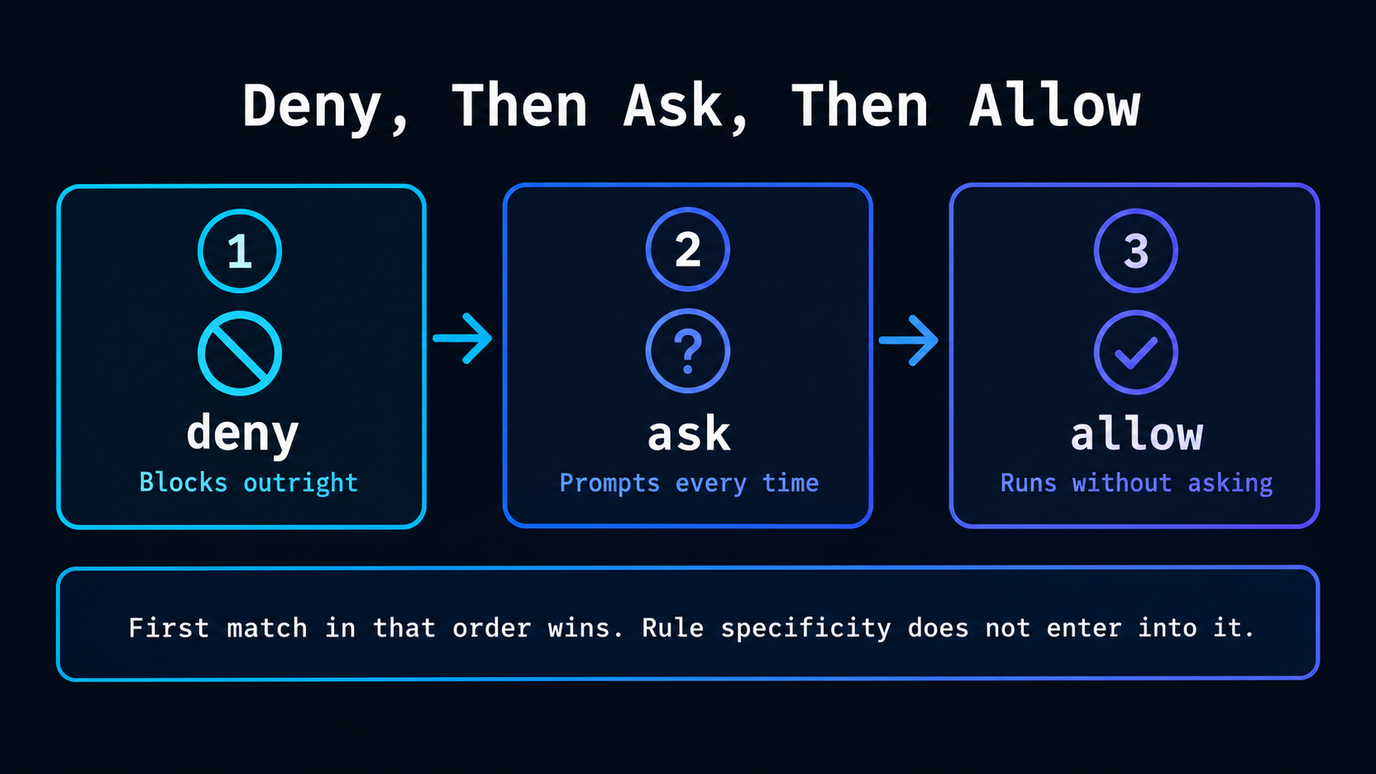
Rules live in three arrays under permissions, and the semantics are exactly what the names suggest: allow runs without asking, ask prompts every time, deny blocks outright.
The part people get wrong is the resolution order. Rules evaluate deny, then ask, then allow, and the first match in that order wins. Rule specificity does not enter into it.
{
  "permissions": {
    "allow": ["Bash(npm run *)", "Bash(git commit *)"],
    "deny": ["Bash(git push *)"]
  }
}
A broad deny like Bash(aws *) blocks every matching call including one that also matches a narrow allow like Bash(aws s3 ls). There is no exception mechanism. The same precedence holds between ask and allow: a matching ask rule prompts even when a more specific allow rule also matches. If you want an exception, you have to not write the deny rule that swallows it.
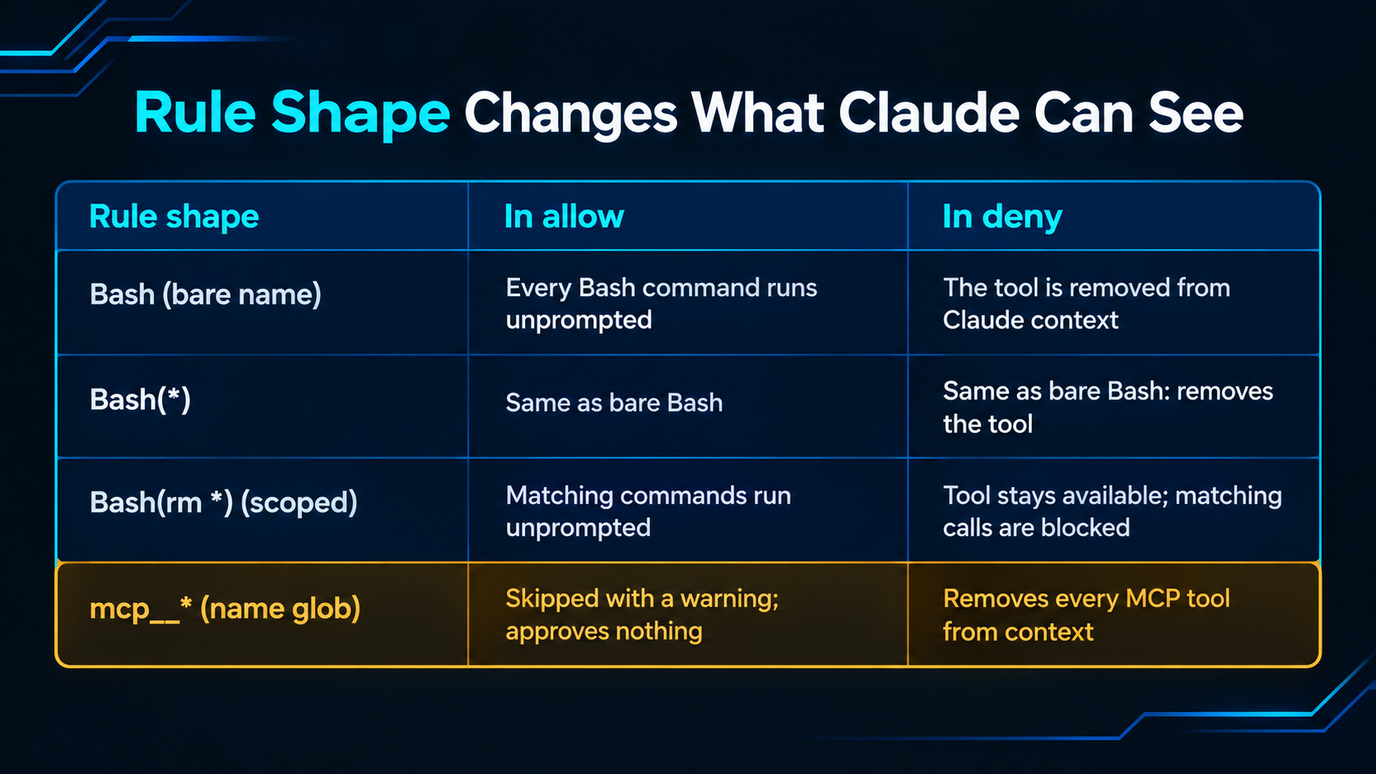
One distinction earns its own row, because it changes what Claude can even see:
| Rule shape | In allow | In deny |
|---|---|---|
| --- | --- | --- |
Bash (bare name) | Every Bash command runs unprompted | The tool is removed from Claude's context; Claude never sees it |
Bash(*) | Same as bare Bash | Same as bare Bash: removes the tool |
Bash(rm *) (scoped) | Matching commands run unprompted | Tool stays available; matching calls are blocked when attempted |
mcp__* (name glob) | Skipped with a warning; approves nothing | Removes every MCP tool from context |
That last row is a real trap. Deny and ask rules accept globs in the tool-name position, but allow rules only accept them after a literal mcp prefix. An unanchored allow glob such as "" or "mcp__" is skipped with a warning and auto-approves nothing at all, which is the opposite of what someone writing it intends.
The one tool none of this reaches is EndConversation: a deny rule cannot remove it while any other tool remains, and an ask rule never prompts for it.
Where Rules Live, and Which File Wins
Permission rules follow the same precedence as every other setting. Five scopes, highest first:
| Rank | Scope | File | Applies to |
|---|---|---|---|
| --- | --- | --- | --- |
| 1 | Managed | managed-settings.json, MDM, or the claude.ai console | Everyone the organisation deploys it to |
| 2 | Command line | claude --settings | You, this session |
| 3 | Project local | .claude/settings.local.json | You, this project |
| 4 | Shared project | .claude/settings.json | Everyone in the project |
| 5 | User | ~/.claude/settings.json | You, every project |
Precedence is the wrong frame for deny rules, though, and this is the detail that makes the system coherent. The allow, deny and ask lists from every applicable scope are combined, and within the combined set the deny-first order still runs. So a user-level deny blocks a project-level allow, and a project-level deny blocks a user-level allow. Restrictions accumulate downward and upward at once; only permissions are subject to being overridden.
Managed settings sit above the command line, which is unusual and deliberate: --allowedTools cannot override a managed deny, while --disallowedTools can always add restrictions on top. Administrators who want the whole system locked to their file set allowManagedPermissionRulesOnly, which makes managed settings the only source of permission rules at all.
Two smaller things worth knowing. When you answer a prompt with "Yes, and don't ask again", the saved rule goes to .claude/settings.local.json at the git repository root, resolved through worktrees to the main checkout, so an approval granted in a subdirectory applies repository-wide since v2.1.211. And disableBypassPermissionsMode works from any scope, so you can set it in your own user settings to lock yourself out of bypass mode.
Bash Rule Syntax: Where the Asterisk Goes
A rule is Tool or Tool(specifier). Parentheses inside a specifier are literal, so a command containing them needs no escaping. For Bash the specifier matches the whole command text with * standing in for any text, including spaces.
Where you put the * is the whole game, and the results are less intuitive than they look:
| You write | Matches | Does not match |
|---|---|---|
| --- | --- | --- |
Bash(npm run build) | npm run build | npm run build --watch |
Bash(npm run *) | npm run build, npm run test --watch, npm run | npm install |
Bash(git log * main) | git log --oneline main, git log -5 main | git log main |
Bash(git * main) | git merge main, git push origin main | git log |
Bash(ls *) | ls -la, ls | lsof |
Bash(ls*) | ls -la, lsof | — |
Bash( --help ) | npm --help x | npm --help |
Three rules explain every row. Claude Code matches everything before the first literally, so the words in front of your wildcard are what limit the rule. A trailing with a space before it also matches the bare command, but only when it is the rule's only wildcard, which is why Bash(ls ) covers ls and Bash( --help ) does not cover npm --help. And that space is part of the pattern, which is the entire difference between Bash(ls ) and Bash(ls*) catching lsof.
Put the after the subcommand. Bash(git log ) allows only git log; Bash(git *) allows every git command, including git -c core.fsmonitor=