Claude Code Output Styles in 2026: The Complete Guide
The /output-style command was removed in v2.1.91, switching has been live since v2.1.251, and a style switch keeps your prompt cache. The full reference, checked against Anthropic's docs.


- The
/output-stylecommand no longer exists. It was deprecated in v2.1.73 and removed in v2.1.91, so the instruction at the top of most guides fails silently. - Switching styles mid-session has applied from your next message since v2.1.251. Guides still telling you to run
/clearare describing an older release. - A style switch is one of the few mid-session changes that keeps your prompt cache. Running
/clearto "apply" it throws away the cache the switch preserved. - Custom styles silently drop Claude Code's software engineering instructions unless you set
keep-coding-instructions: true. The default isfalse. - Five built-in styles, four frontmatter fields, three file locations, and one setting key:
outputStyle.
5 built-ins · 4 frontmatter fields · 7 reference tables · every rule quoted from the docs
You read that Claude Code output styles let you stop re-prompting for the same tone every turn, typed /output-style, and got nothing back. The command was removed three minor versions after it was deprecated, which is why the first instruction in most write-ups on this topic is now dead on arrival. What replaced it is a /config menu and a single settings field, and the switching rules changed again underneath that in v2.1.251.
That second change is the one worth your attention, because the old advice is not merely stale, it is costly. Every guide I could reach still says a style change needs /clear or a fresh session to take effect. It does not, and /clear is exactly the wrong move: Anthropic's prompt-caching reference lists a style switch under the actions that keep your cache intact, while /clear discards it.
This is the reference that sorts it out: what the five built-ins actually do, the three ways to switch that still work, what a switch costs, how to write a custom style without accidentally lobotomising Claude's coding behaviour, and where styles stop reaching.
I checked every field name, file path, version number and cache behaviour here against Anthropic's own documentation rather than against other guides, which matters more than usual on a feature that has changed three times in two months.

What Output Styles Actually Change
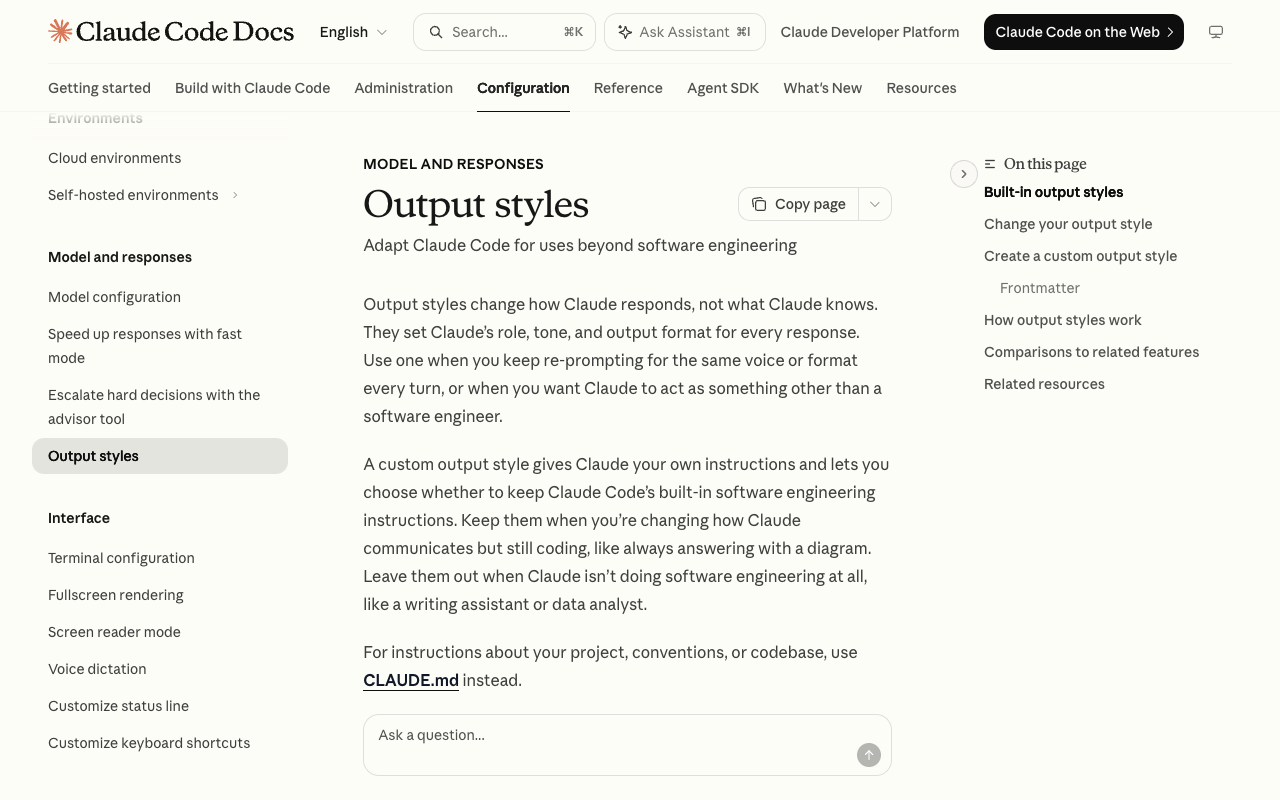
An output style changes the instructions Claude Code gives Claude. Not what Claude knows, not what it can reach, and not what it is allowed to run. The docs put it plainly: output styles "set Claude's role, tone, and output format for every response".
That distinction decides whether this is the feature you want. If you keep re-typing "stop explaining, just show me the diff", that is a style problem. If Claude keeps forgetting your project uses pnpm, that is a memory problem and belongs in CLAUDE.md.
| Feature | How it works | Reach for it when |
|---|---|---|
| --- | --- | --- |
| Output styles | Changes Claude Code's default instructions | You want a different role, tone or default format every turn |
CLAUDE.md | Adds a user message after the system prompt | Claude should always know your project conventions |
--append-system-prompt | Appends to the system prompt without removing anything | You want a one-off addition passed at launch |
| Agents | Runs a subagent with its own system prompt, model and tools | You want a separately scoped helper for a focused task |
| Skills | Loads task-specific instructions when invoked or relevant | You have a reusable workflow |
The row that catches people is the first one. Output styles replace part of Claude Code's default instructions; the other four only add to them. That is why a custom style can quietly change how Claude scopes and verifies work, which the section on keep-coding-instructions below returns to. If you are still deciding which extension point fits your problem, our plugins vs skills vs MCP decision guide maps the same territory from the other direction.
The Five Built-In Output Styles
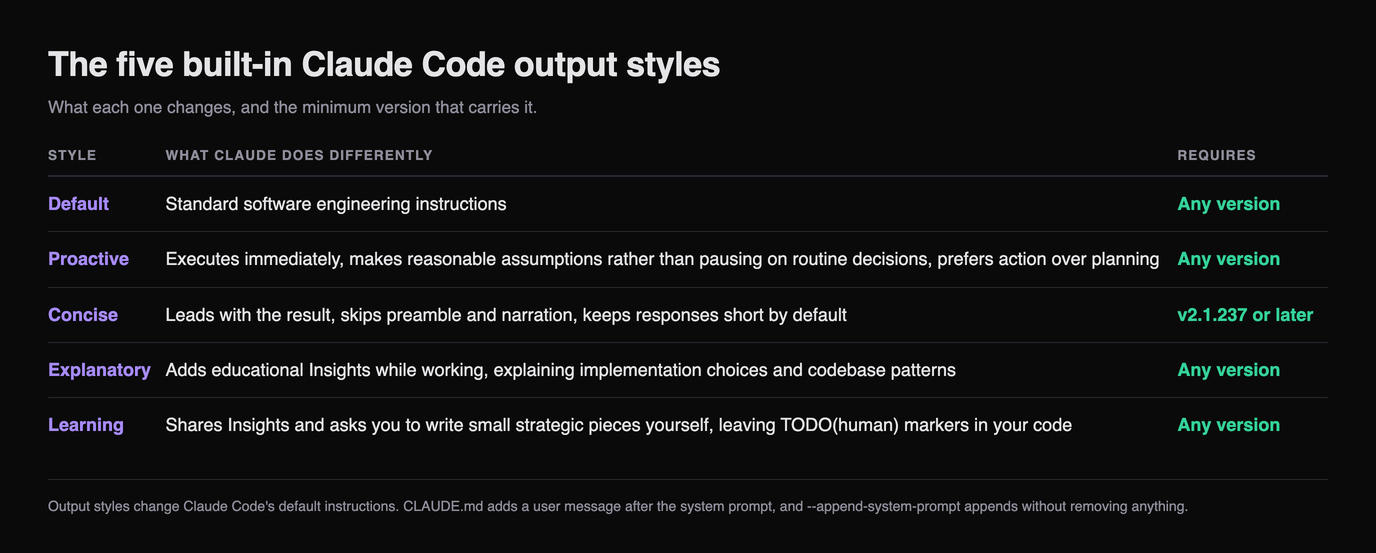
Default is the standard set of software engineering instructions. Four more ship with Claude Code, and they differ more than their names suggest.
| Style | What Claude does differently | Requires |
|---|---|---|
| --- | --- | --- |
| Default | Standard software engineering instructions | Any version |
| Proactive | Executes immediately, makes reasonable assumptions rather than pausing on routine decisions, prefers action over planning | Any version |
| Concise | Leads with the result, skips preamble and narration, keeps responses short by default | v2.1.237 or later |
| Explanatory | Adds educational "Insights" while working, explaining implementation choices and codebase patterns | Any version |
| Learning | Shares Insights and asks you to write small strategic pieces yourself, leaving TODO(human) markers in your code | Any version |
Two of these carry caveats that matter in practice.
Proactive is not a permission mode. It is stronger autonomous-execution guidance than auto mode applies, and it works without changing your permission mode, which means your permission mode still decides what actually runs without asking you. Turning on Proactive does not widen what Claude may execute. It changes how readily Claude decides to try.
Concise does not abbreviate the things you need in full. The docs are specific: Claude keeps doing the engineering work as thoroughly as in Default, answers in full when you ask for an explanation, and always preserves the complete content of error reports, security warnings, and confirmations for destructive actions. It shortens narration, not safety output.
Explanatory and Learning are the two that cost you tokens, by design, because both produce longer responses than Default. Concise does the opposite.
The Command Most Guides Still Tell You to Run
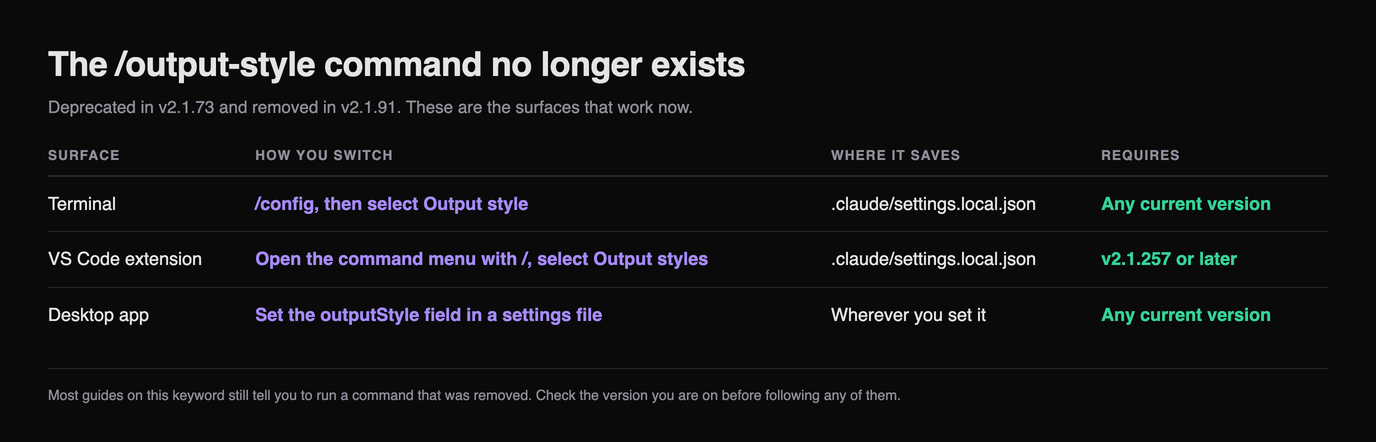
There is no /output-style command. It was deprecated in v2.1.73 and removed in v2.1.91. Three surfaces replace it, and all three write to the same place.
| Surface | How you switch | Where it saves | Requires |
|---|---|---|---|
| --- | --- | --- | --- |
| Terminal | /config, then select Output style | .claude/settings.local.json | Any current version |
| VS Code extension | Open the command menu with /, select Output styles | .claude/settings.local.json | v2.1.257 or later |
| Desktop app | Set the outputStyle field in a settings file | Wherever you set it | Any current version |
The desktop app is the odd one out. Running /config there opens Settings > Claude Code rather than a picker, so editing the field directly is the path.
You can skip the menus entirely on any surface by setting the field yourself:
{
  "outputStyle": "Explanatory"
}
That is the whole API surface. One key, one string, and the value is the style name, which for a custom style is the file name unless you override it in frontmatter.
Switching Is Live Now, and It Keeps Your Cache
Since v2.1.251, when you switch styles mid-session Claude uses the new style starting with your next message. Before that release, a mid-session switch applied only after you ran /clear or started a new session, which is the behaviour every guide I could reach still documents.
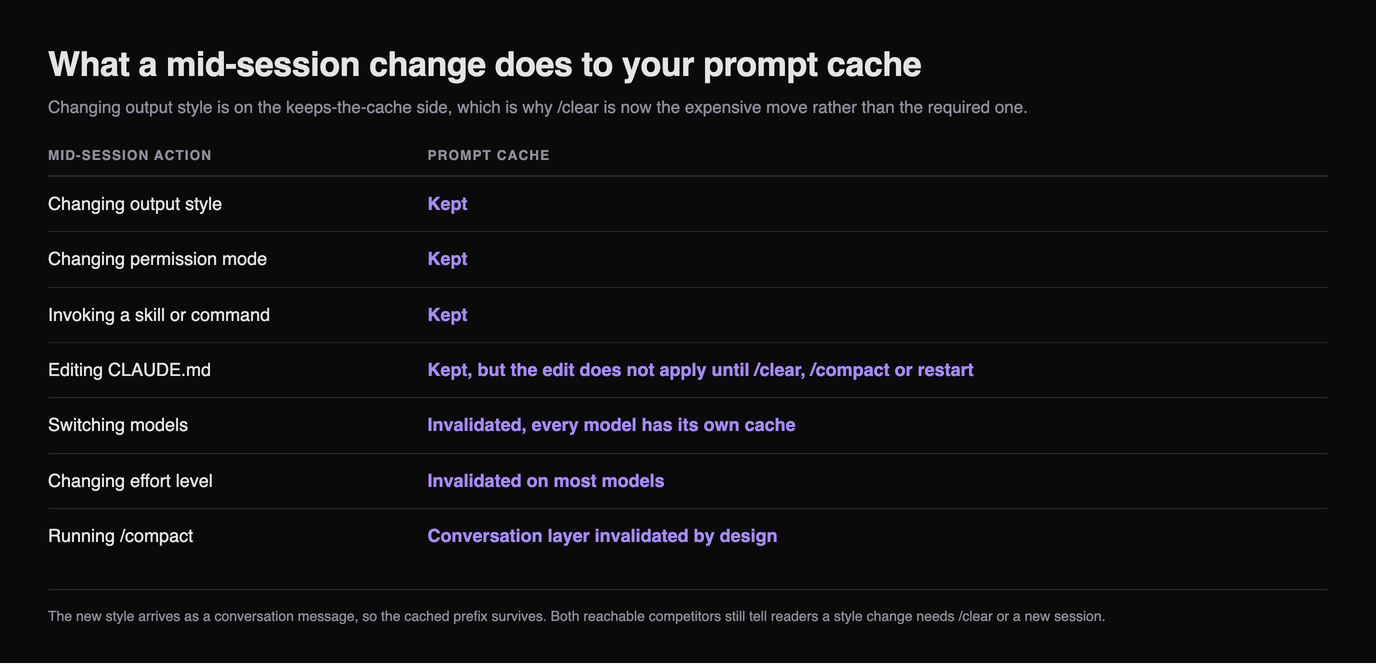
The reason the old advice is worth actively unlearning is what it costs. Claude Code delivers the new style's instructions as a message in the conversation, so the request after a switch still reads the system prompt and the earlier conversation from cache. A style switch sits on the docs' list of actions that keep the cache, alongside changing permission mode and invoking a skill.
| Mid-session action | Prompt cache |
|---|---|
| --- | --- |
| Changing output style | Kept |
| Changing permission mode | Kept |
| Invoking a skill or command | Kept |
| Editing CLAUDE.md | Kept, but the edit does not apply until /clear, /compact or restart |
| Switching models | Invalidated, every model has its own cache |
| Changing effort level | Invalidated on most models |
Running /compact | Conversation layer invalidated by design |
Read those two lists together and the old instruction inverts. You were told to run /clear so the style would apply. The style already applies, and /clear is the thing that makes your next turn slower and more expensive by rebuilding a cache the switch had left alone.
The practical version: switch whenever the task changes. Flip to Explanatory when you hit unfamiliar code, back to Concise when you are grinding through a known refactor, and stop treating it as a decision you have to make at session start.
Switching a Style and Editing One Are Different Operations
This is the distinction that produces the "I changed it and nothing happened" reports, and neither guide currently ranking for this query separates the two.
Switching between styles that are already loaded takes effect on your next message. Creating or editing a style file does not, at least in the terminal, because Claude Code reads style files when it starts. Edit ~/.claude/output-styles/reviewer.md mid-session and Claude keeps using the version loaded at launch.
Style picker shows your style but behaviour is unchanged? You edited the file this session. Restart Claude Code. Style is not in the picker at all? The file is in the wrong directory, or you are in a session that started before you created it. Behaviour changed but Claude stopped following your usual engineering conventions? You wrote a custom style without
keep-coding-instructions.That third case is the expensive one, and it has its own section below.
Writing a Custom Output Style
A custom output style is a Markdown file: frontmatter for metadata, then the instructions. Save it at one of three levels.
| Level | Path | Scope |
|---|---|---|
| --- | --- | --- |
| User | ~/.claude/output-styles | All your projects |
| Project | .claude/output-styles | Anyone working in this repo |
| Managed policy | .claude/output-styles inside the managed settings directory | Everyone in the organisation |
The file name becomes the style name unless you set name in frontmatter. Four fields are supported, and the defaults matter more than the fields.
| Frontmatter | Purpose | Default |
|---|---|---|
| --- | --- | --- |
name | Style name, if not the file name | Inherits from file name |
description | Shown in the /config picker | None |
keep-coding-instructions | Keep Claude Code's built-in software engineering instructions | false |
force-for-plugin | Plugin styles only: apply automatically whenever the plugin is enabled | false |
keep-coding-instructions defaults to false, and that is the single biggest trap in this feature. A custom style leaves out Claude Code's built-in software engineering instructions unless you opt back in, and those instructions are not decoration: they cover how Claude scopes changes, writes comments, and verifies its work. Write a style that only says "always answer with a diagram first", omit the field, and you have also removed the guidance that made Claude check its work.
The rule is simple. Still coding, just communicating differently? Set it to true. Not doing software engineering at all, such as a writing assistant or data analyst? Leave it out.
---
name: Diagrams first
description: Lead every explanation with a diagram
keep-coding-instructions: true
---

When explaining code, architecture, or data flow, start with a Mermaid diagram
showing the structure, then explain in prose.


## Diagram conventions

Use `flowchart TD` for control flow and `sequenceDiagram` for request paths.
Keep diagrams under 15 nodes.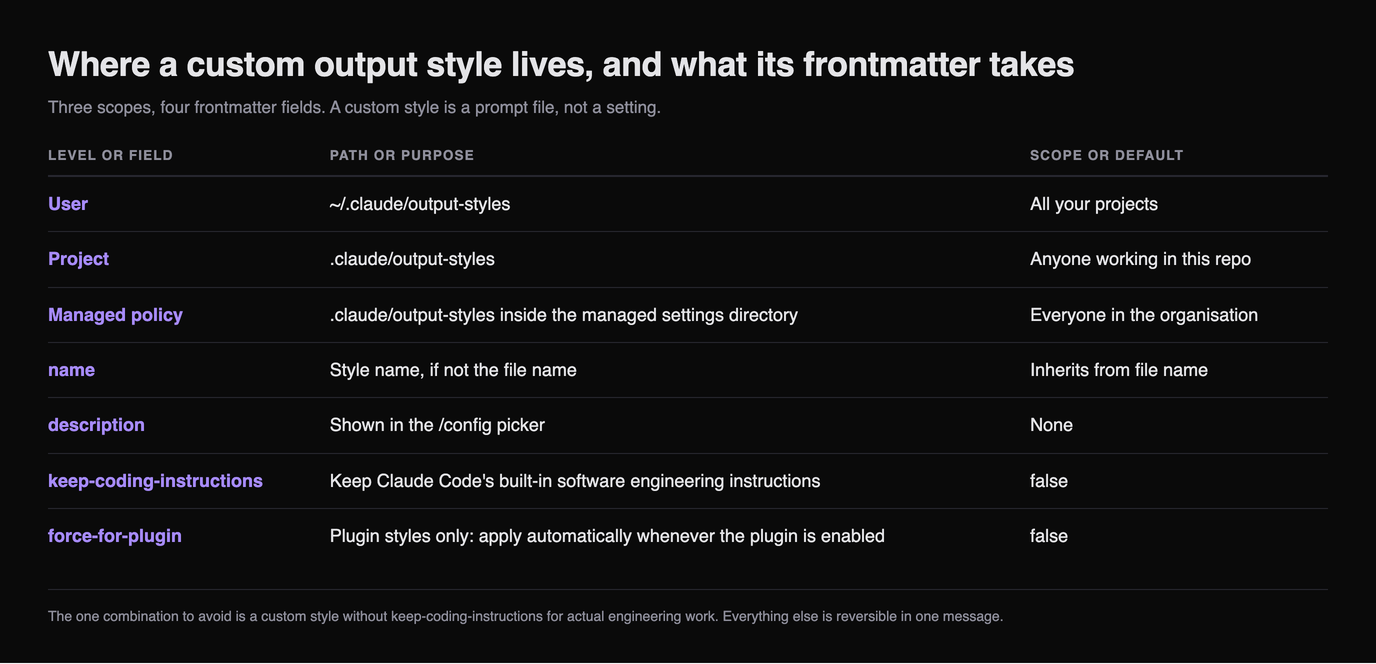
If that frontmatter block looks familiar, it is the same shape skills and commands use, and the full slash commands reference covers the twenty fields their version supports.
Precedence, Nesting and Plugin Overrides
Project output styles load from every .claude/output-styles/ directory between your working directory and the repository root. When two of those define a style with the same name, the one closest to the working directory wins. In a monorepo that means a style in apps/web/.claude/output-styles/ beats the root copy for sessions working inside apps/web, which is usually what you want and occasionally a surprise.
Plugins can ship styles too, in an output-styles/ directory. One field makes them behave unlike anything else here: force-for-plugin applies the style automatically whenever the plugin is enabled, without the user selecting it, and it overrides the user's outputStyle setting. If more than one enabled plugin sets it, the first one loaded wins.
That is worth knowing before you debug someone's configuration. If a teammate's Claude is behaving unlike yours on the same repo with the same settings file, an enabled plugin forcing a style is a candidate that no settings diff will show you. Our roundup of the best Claude Code plugins covers what else a bundle can carry.
Where Output Styles Reach, and Where They Stop
An output style applies to the main conversation and to a fork, which inherits the parent's full conversation and system prompt. It does not apply to other subagents, because those run their own system prompt.
This catches people delegating work. Set Concise, hand a task to a subagent, and the subagent's output is not concise, because your style never reached it. If you want a subagent to behave a particular way, that belongs in the agent's own definition, and our guide to the best Claude subagents shows how those are configured.
Two more details on how styles reach Claude. The active style's instructions go out with every request, and when you select any style other than Default, Claude Code also reminds Claude of the style during the conversation. Both cost input tokens, though prompt caching absorbs most of that after the first request in a session.
Output token cost varies by style rather than by the instructions' length. Explanatory and Learning produce longer responses than Default by design. Concise produces shorter ones. For a custom style, whatever your instructions tell Claude to produce is what you pay for.
Which Style to Actually Use
Most people should not stay on one. The switch is cheap and live, so match it to the task in front of you.
| Situation | Style | Why |
|---|---|---|
| --- | --- | --- |
| Grinding through a refactor you already understand | Concise | Narration is pure overhead when you know the plan |
| Reading unfamiliar code or debugging something subtle | Explanatory | The Insights are the point, and you want the audit trail |
| Learning a codebase or a language | Learning | TODO(human) markers force the retention that reading does not |
| Long autonomous runs on work you have scoped | Proactive | Fewer stops on routine decisions, permissions unchanged |
| Anything where you are unsure | Default | It is the tuned baseline, not a fallback |
The one combination to avoid is a custom style without keep-coding-instructions for actual engineering work. Everything else here is reversible in one message.
A custom style is a prompt, and prompts are easier to edit than to start. Skiln indexes installable Claude skills, commands, agents and MCP servers with their real install paths, so you can begin from frontmatter that already parses. Browse skills · Browse commands · Generate a config
Disclosure: Skiln publishes this article and runs the directory it links to.
Related Articles
- Claude Code Slash Commands in 2026: The Full Reference
- What Are Claude Skills? The Complete Guide for 2026
- How to Build Your Own Claude Skill: Complete Tutorial
- Claude Code Hooks: Complete Guide with 15 Ready-to-Use Examples
- Claude Skills Not Triggering? 9 Fixes That Work in 2026
- Best Claude Code Plugins in 2026
Every field, path, version number and default above comes from Anthropic's output styles reference. The cache behaviour is from how Claude Code uses prompt caching, which lists a style switch among the actions that keep the cache, with the underlying mechanism documented in the Claude API prompt caching reference, and the subagent boundary is from the subagents reference. For the working habits these styles are meant to support, Anthropic's Claude Code best practices is the companion piece. Where a version number here disagrees with another guide, the release notes are what the product enforces.