Claude Code Slash Commands in 2026: The Full Reference
Custom commands merged into skills, the frontmatter reference runs to 20 fields, and allowed-tools does not do what every other guide says it does. The full reference, checked against Anthropic's docs.


- Custom commands have merged into skills. A file at
.claude/commands/deploy.mdand a skill at.claude/skills/deploy/SKILL.mdboth create/deployand behave the same way. - The frontmatter reference is 20 fields. The three top-ranking guides document four of them, so the useful half of the feature set is missing from most write-ups.
allowed-toolsdoes not restrict anything. It pre-approves tools for the single turn that invokes the command, and the grant clears on your next message.- You can stack up to six inline commands in one message, and name conflicts resolve enterprise, then personal, then project, then bundled.
20 frontmatter fields · 5 reference tables · every rule quoted from the docs
You followed a guide, wrote .claude/commands/review.md, typed /review, and it worked. Then you wanted the command to run on a cheaper model, or to stop Claude from invoking it on its own, or to run in a subagent so it would not flood your context, and the guide had nothing to say. That is where most writing about Claude Code slash commands stops.
The gap is measurable. Anthropic's frontmatter reference lists twenty fields. The three guides currently ranking for this query document four of them between them: description, allowed-tools, model and argument-hint. Sixteen fields, the entire named-argument system, and the rules that decide which command wins a name clash are simply absent.
This is the reference that fills that in: what changed in 2026, where files live, all twenty fields in one table, how arguments actually bind, and the four behaviours that are easy to get wrong.
I checked every field, limit and precedence rule here against Anthropic's own reference rather than against other guides, which matters more than usual on this topic. All three top results describe allowed-tools as restricting which tools a command may use. The documentation says it does the opposite, and that correction is worth the read on its own.

What Changed in 2026: Commands Merged Into Skills
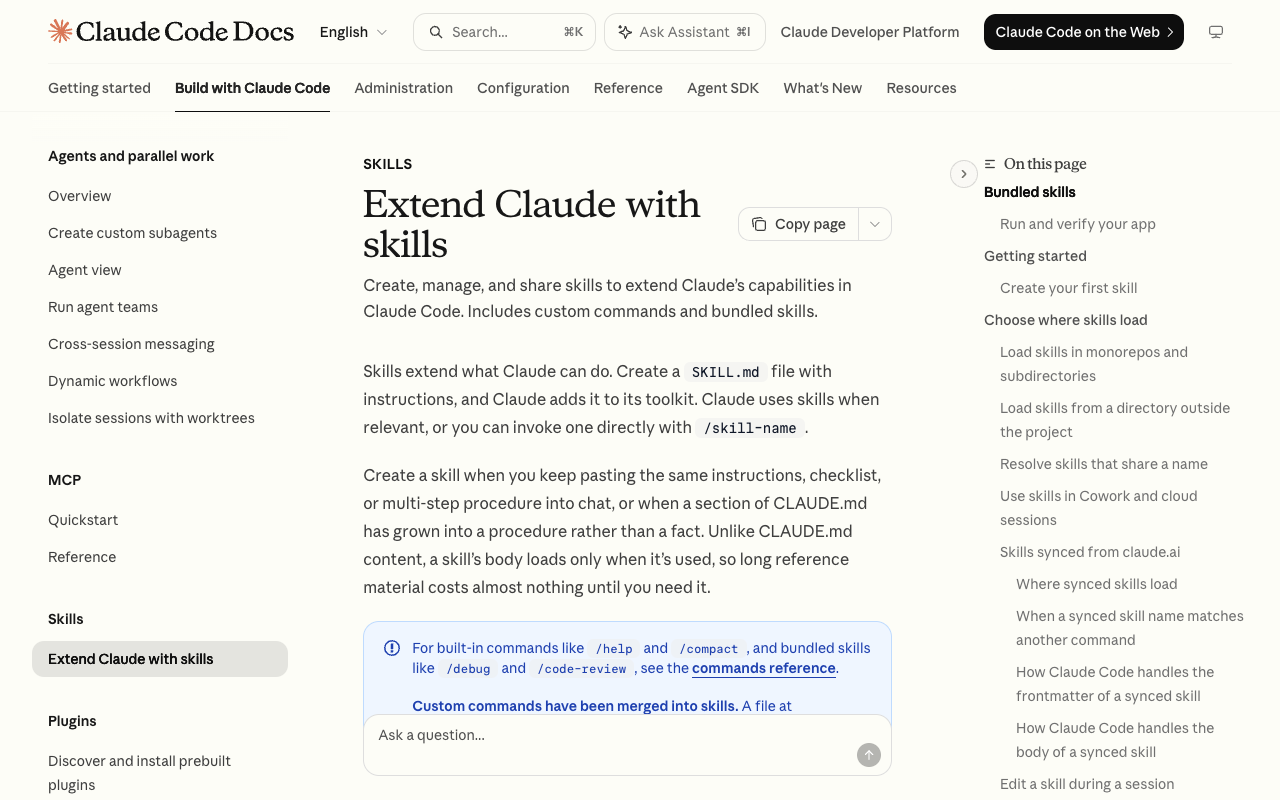
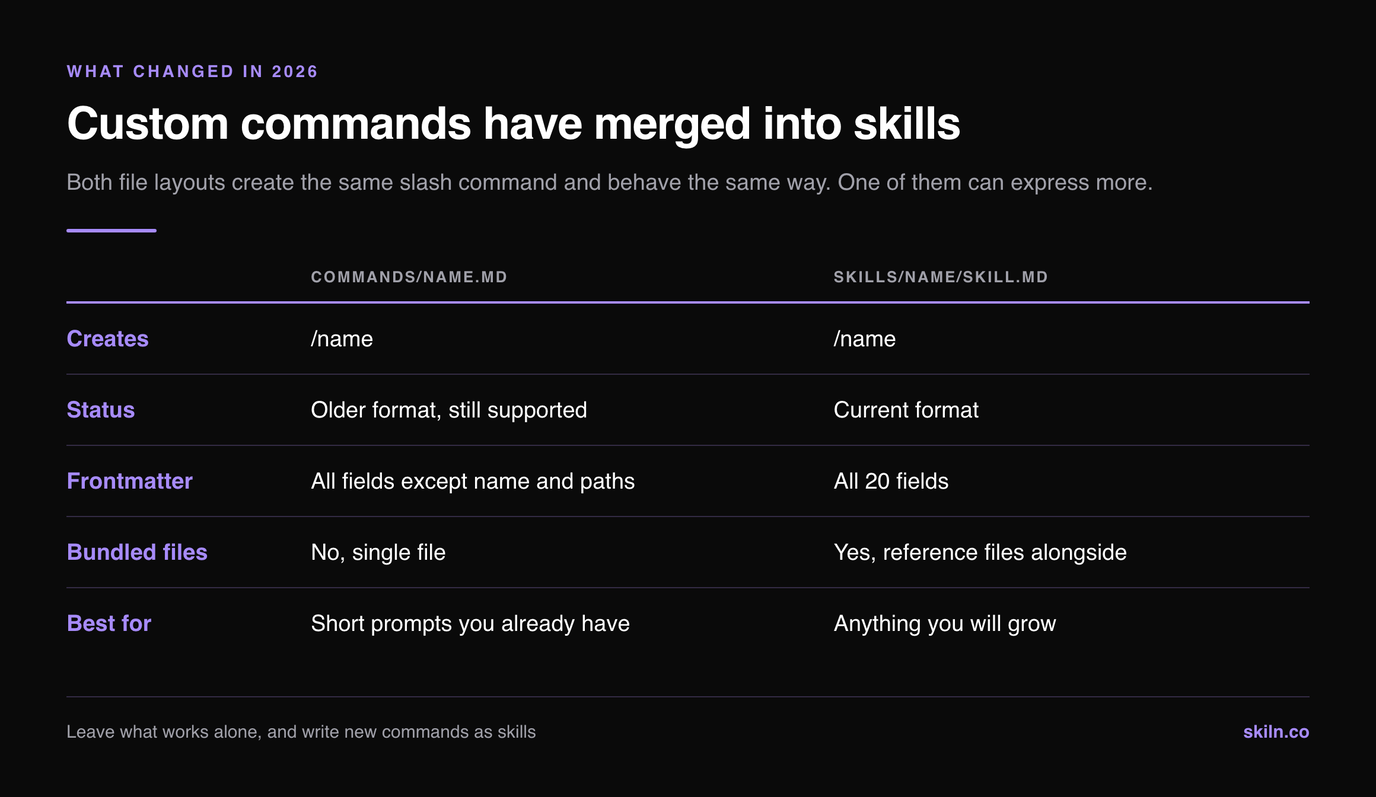
The single most important fact about slash commands in 2026 is that they are no longer a separate feature. The documentation is direct about it: "Custom commands have been merged into skills. A file at .claude/commands/deploy.md and a skill at .claude/skills/deploy/SKILL.md both create /deploy and work the same way."
Your existing command files keep working. Nothing breaks, nothing needs migrating, and the folder is not deprecated in the sense of being scheduled for removal. What it is, in the docs' own words, is "the older format".
.claude/commands/name.md | .claude/skills/name/SKILL.md | |
|---|---|---|
| --- | --- | --- |
| Creates | /name | /name |
| Status | Older format, still supported | Current format |
| Frontmatter | All fields except name and paths | All 20 fields |
| Bundled files | No, single file | Yes, reference files alongside |
| Best for | Short prompts you already have | Anything you will grow |
The practical rule: leave what works alone, and write new commands as skills. The moment a command needs a second file, a glob trigger, or a name different from its filename, the older format cannot express it. For the broader distinction between these and the other extension points, our plugins vs skills vs MCP decision guide maps which one to reach for.
The Built-In Slash Commands
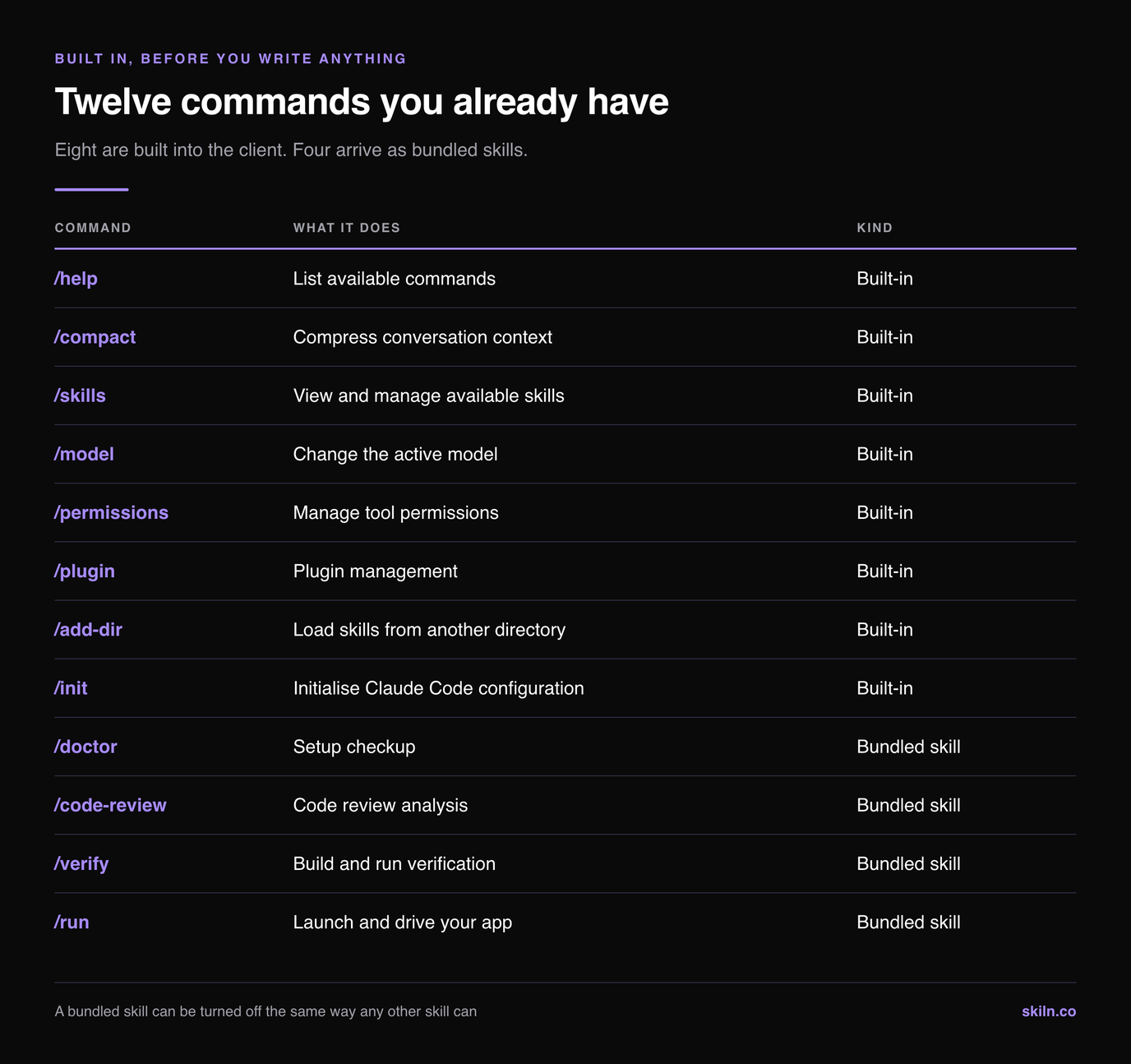
Two different things answer to a slash in Claude Code, and telling them apart explains a lot of confusing behaviour. Built-in commands are compiled into the CLI. Bundled skills ship with it but are ordinary prompt-based skills, which means you can override them, and you can switch them off.
| Command | What it does | Kind |
|---|---|---|
| --- | --- | --- |
/help | List available commands | Built-in |
/compact | Compress conversation context | Built-in |
/skills | View and manage available skills | Built-in |
/model | Change the active model | Built-in |
/permissions | Manage tool permissions | Built-in |
/plugin | Plugin management | Built-in |
/add-dir | Load skills from another directory | Built-in |
/init | Initialise Claude Code configuration | Built-in |
/doctor | Setup checkup | Bundled skill |
/code-review | Code review analysis | Bundled skill |
/verify | Build and run verification | Bundled skill |
/run | Launch and drive your app | Bundled skill |
Because the bottom group are skills, a project skill of the same name takes precedence over the bundled one, with the exception of aliases. If you never want them, "disableBundledSkills": true in settings removes the lot, and skillOverrides handles them one at a time.
Where Command Files Live, and Which One Wins
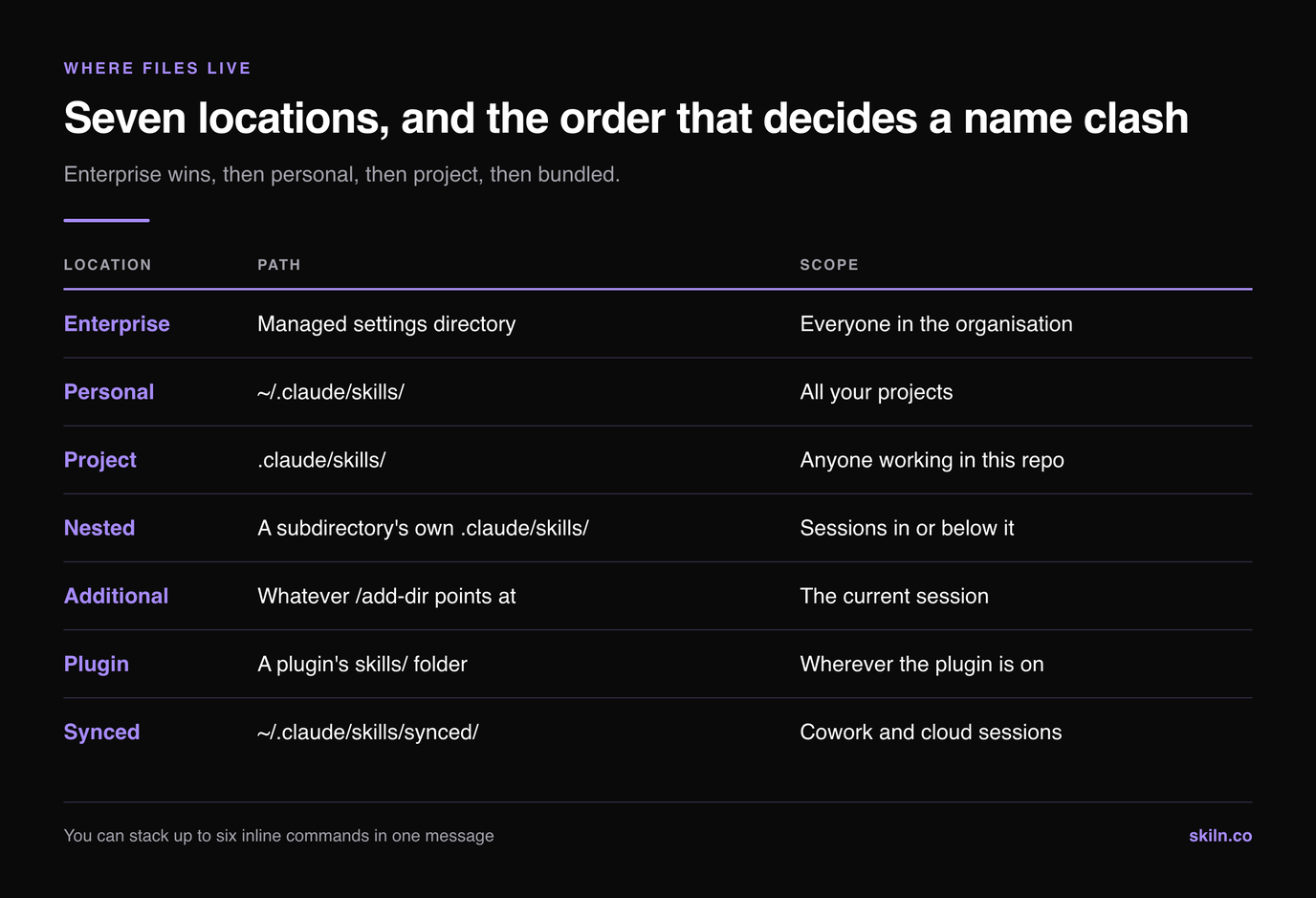
Claude Code loads commands from seven places. When two share a name, the winner is decided by where they came from, not by which was written most recently, which is the usual cause of a command behaving differently on a colleague's machine.
| Location | Path | Scope |
|---|---|---|
| --- | --- | --- |
| Enterprise | Managed settings directory | Everyone in the organisation |
| Personal | ~/.claude/skills/ | All your projects |
| Project | .claude/skills/ | Anyone working in this repo |
| Nested | A subdirectory's own .claude/skills/ | Sessions in or below it |
| Additional | Whatever /add-dir points at | The current session |
| Plugin | A plugin's skills/ folder | Wherever the plugin is on |
| Synced | ~/.claude/skills/synced/ | Cowork and cloud sessions |
Precedence runs enterprise, then personal, then project, then bundled. Two special cases are worth committing to memory. A root command and a nested command with the same name both load, and the nested one is addressed by its directory prefix, so /deploy and /apps/web:deploy coexist. Plugin commands are always namespaced as /plugin-name:command-name, so they never collide with yours.
Sessions load commands from the working directory and every parent up to the repo root. That is why a command sitting in a subdirectory you have not touched yet may not appear until Claude first edits a file there.
The Frontmatter Reference: All 20 Fields
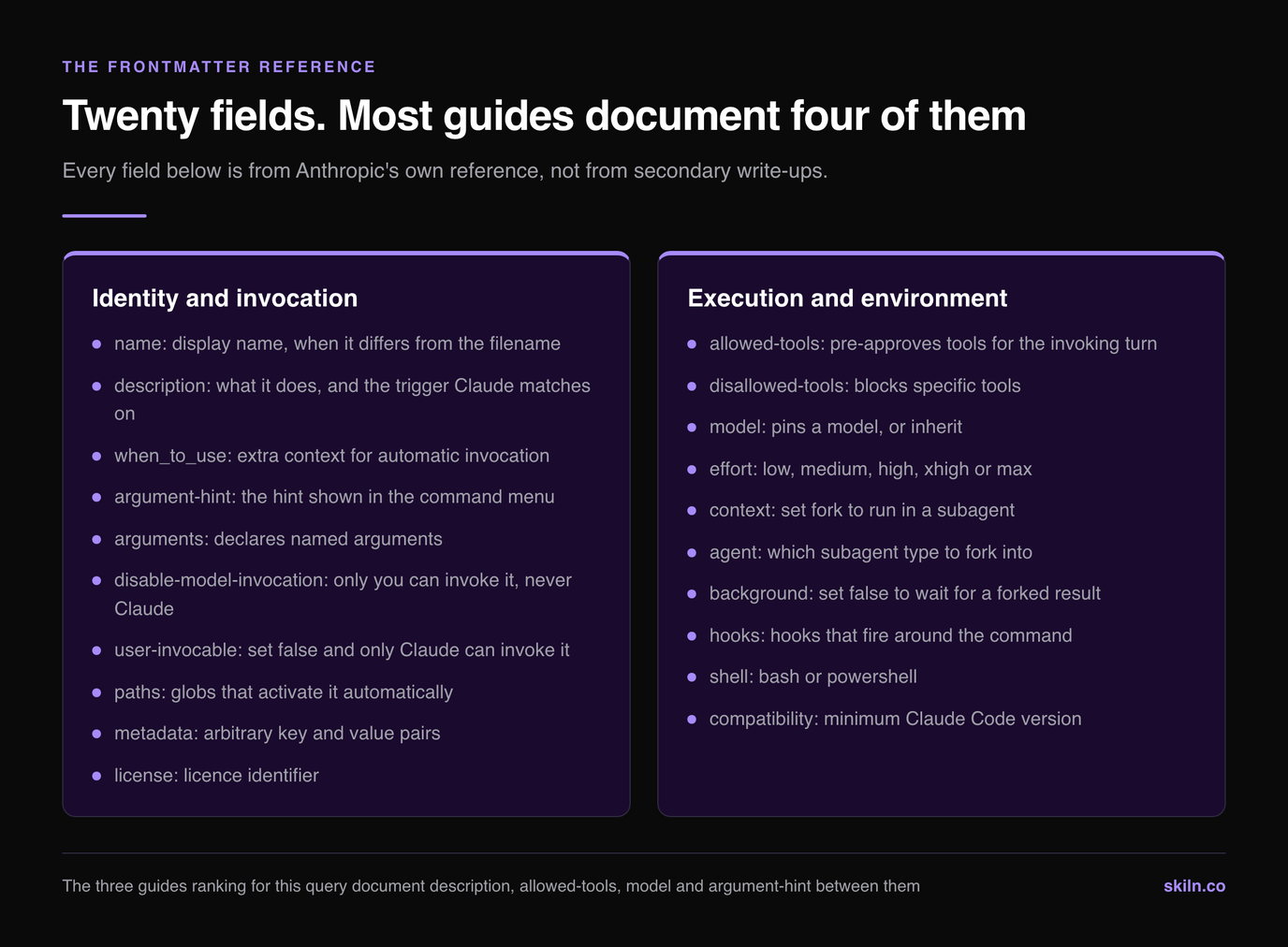
Here is the part that no competing guide carries. Every field is optional, and all of them go in YAML between --- markers at the top of the file.
| Field | What it controls |
|---|---|
| --- | --- |
name | Display name, when it differs from the filename |
description | What it does, and the trigger Claude matches on |
when_to_use | Extra context for automatic invocation |
argument-hint | The hint shown in the command menu |
arguments | Declares named arguments |
disable-model-invocation | Only you can invoke it, never Claude |
user-invocable | Set false and only Claude can invoke it |
allowed-tools | Pre-approves tools for the invoking turn |
disallowed-tools | Blocks specific tools |
model | Pins a model, or inherit |
effort | low, medium, high, xhigh or max |
context | Set fork to run in a subagent |
agent | Which subagent type to fork into |
background | Set false to wait for a forked result |
hooks | Hooks that fire around the command |
paths | Globs that activate it automatically |
shell | bash or powershell |
metadata | Arbitrary key/value pairs |
license | Licence identifier |
compatibility | Minimum Claude Code version |
Four of these change behaviour enough to deserve their own sections below. Before that, the one field people reach for first and misuse most often is description. It is not documentation. It is the string Claude matches against when deciding whether to invoke the command without being asked, which is why a vague description produces a command that never fires on its own. Our guide to skills that will not trigger works through that failure in detail.
Arguments: Positional, Named, and $ARGUMENTS
Three binding styles exist, and mixing them up is the most common reason a command receives an empty string where it expected input.
$ARGUMENTS          all arguments, exactly as typed
$ARGUMENTS[0]       the first argument
$0                  shorthand for $ARGUMENTS[0]
$1, $2              positional arguments
$issue              a named argument
Named arguments are the readable option and the one almost nobody documents. Declare them in frontmatter and refer to them by name in the body:
---
name: migrate-component
arguments: [component, from-lang, to-lang]
---
Migrate $component from $from-lang to $to-lang.
Typing /migrate-component SearchBar JavaScript TypeScript binds each argument in order. Quoting works the way a shell would lead you to expect, so /my-command "hello world" second passes two arguments rather than three.
A handful of environment placeholders are also available inside a command, including ${CLAUDE_SESSION_ID}, ${CLAUDE_PROJECT_DIR} and ${CLAUDE_SKILL_DIR}. The last one is how a skill refers to files sitting next to its own SKILL.md without hardcoding a path.
Running Shell Commands Before Claude Reads the File
A command file can run shell commands and have their output substituted in before Claude sees any of it. This is what turns a static prompt into something that reacts to the current state of the repo.
The inline form puts a command at the start of a line:
Current git status: !`git status --short`

Latest commits: !`git log --oneline -5`
For several commands at once, open a fenced code block whose opening fence is three backticks followed immediately by an exclamation mark, and put one command per line inside it:
npm test
git status
Two behaviours catch people out. A non-zero exit code fails the whole invocation, so append || true anywhere a non-zero result is expected and harmless. Search tools are the exception already handled for you: grep and git diff treat exit code 1 as a normal "no matches" result rather than a failure.
Shell execution never prompts for permission, which is deliberate and worth understanding before you install someone else's command. Pre-approve what it needs with allowed-tools, switch the whole mechanism off with "disableSkillShellExecution": true, and note that skills synced from claude.ai never run shell commands on your machine at all. If you install commands from public repos, our notes on Claude Code security practices are the right companion to this section.
allowed-tools Pre-Approves, It Does Not Restrict
This is the correction worth the price of admission. Every top-ranking guide presents allowed-tools as a sandbox: list the tools the command may use, and it cannot touch anything else. That is not what it does.
The reference is unambiguous. The field "grants permission for the listed tools during the turn that invokes the skill, so Claude can use them without prompting you for approval". Then the sentence that matters: "It does not restrict which tools are available: every tool remains callable, and your permission settings still govern tools that are not listed."
So allowed-tools removes friction, it does not build a fence. Three consequences follow:
allowed-tools: Bash(git *) Bash(npm *) Read GrepFirst, a command with that line can still call any other tool, subject to your normal permission prompts. Second, the grant is scoped to one turn and clears the moment you send your next message, so invoking the command again re-applies it. Third, if you actually want to prevent a tool from being used, disallowed-tools is the field that does that job.
Running a Command in a Subagent
By default a command runs in your main conversation and everything it reads stays in your context. For anything that surveys a lot of files, that is the wrong shape, and context: fork fixes it.
---
context: fork
agent: Explore
background: false
---
context: fork isolates the command from the conversation history and gives it a clean context of its own. agent chooses the subagent type, with Explore and Plan built in, and both of those deliberately skip your CLAUDE.md. background defaults to true, so set it to false when you need the result before the session continues, which is also required in non-interactive runs.
The pairing to reach for is context: fork with disable-model-invocation: true for a heavyweight task command you always trigger by hand. If subagents are new to you, our roundup of Claude subagents covers the ones worth installing.
Turning Commands Off Without Deleting Them
Deleting a command file to stop it firing is a blunt instrument, especially when the file is committed and shared. skillOverrides in .claude/settings.json gives four states instead.
| Value | Effect |
|---|---|
| --- | --- |
on | Visible to Claude and listed in the menu |
name-only | Claude sees the name but not the full description |
user-invocable-only | Hidden from Claude, still in your menu |
off | Hidden entirely |
user-invocable-only is the useful middle setting. It keeps a command available to you while removing it from the pool Claude considers on its own, which is the fix when a command keeps triggering on prompts it should ignore. name-only reclaims listing budget from commands you rarely use without hiding them.
You can also cycle these states from the /skills menu by highlighting an entry and pressing space, then escape to save, which is faster than editing settings by hand.
One last mechanic: you can stack commands in a single message. Claude Code "expands the first skill plus up to five more stacked after it", so six inline commands is the ceiling. Expansion stops at the first token that is not an inline user-invocable command, which means a forked command such as /code-review ends the chain wherever it appears.
Most broken commands are hand-rolled first attempts. Skiln indexes installable Claude commands, skills, agents and MCP servers with their real install paths, so you can start from frontmatter that already parses and edit from there. Browse commands · Browse skills · Generate a config
Disclosure: Skiln publishes this article and runs the directory it links to.
Related Articles
- What Are Claude Skills? The Complete Guide for 2026
- How to Build Your Own Claude Skill: Complete Tutorial
- Claude Code Hooks: Complete Guide with 15 Ready-to-Use Examples
- Claude Skills Not Triggering? 9 Fixes That Work in 2026
- Best Claude Code Plugins in 2026
- Claude Code Plugins vs Skills vs MCP Servers
Every field name, limit and precedence rule above comes from Anthropic's slash commands reference and the Agent Skills reference, with settings keys checked against the settings reference. For the workflow habits these commands are meant to encode, Anthropic's own Claude Code best practices is the companion piece, and the Introduction to Agent Skills course on Claude Academy walks the same ground interactively. Where a number here disagrees with another guide, the reference is what the product enforces.