Claude Code Worktrees: The Complete Guide to Parallel AI Development in 2026
**Claude Code worktrees let developers run multiple AI coding sessions in parallel — each in its own isolated directory and branch — without any file conflicts.** One flag (`--worktree`) creates a full working copy of the codebase, starts Claude in it, and handles cleanup when the session ends. **W

Claude Code Worktrees: The Complete Guide to Parallel AI Development in 2026
TL;DR
Claude Code worktrees let developers run multiple AI coding sessions in parallel — each in its own isolated directory and branch — without any file conflicts. One flag (--worktree) creates a full working copy of the codebase, starts Claude in it, and handles cleanup when the session ends.
What this means in practice:
- Run 4-5 Claude instances simultaneously, each working on a different task
- Zero merge conflicts between sessions — every worktree has its own branch and file state
- Automatic cleanup when sessions end without changes; prompted cleanup when commits exist
- Combine with agent teams for orchestrated multi-agent workflows with inter-session communication
The key command: claude --worktree feature-auth — that is all it takes to spin up an isolated parallel session.
Table of Contents
- What Are Claude Code Worktrees?
- Key Features
- Step-by-Step: Running 4-5 Parallel Claude Instances
- Worktrees + Agent Teams: Maximum Throughput
- Real-World Workflows
- Performance Tips
- Pros and Cons
- Frequently Asked Questions
- Related Articles
What Are Claude Code Worktrees?
Every developer who has used Claude Code for more than a week hits the same wall: one session is not enough. There is a feature branch that needs a new API endpoint, a bug report that requires a hotfix, a refactor that has been sitting in the backlog for weeks, and a set of tests that someone really should write. Claude Code can handle all of them — but not if they are fighting over the same working directory.
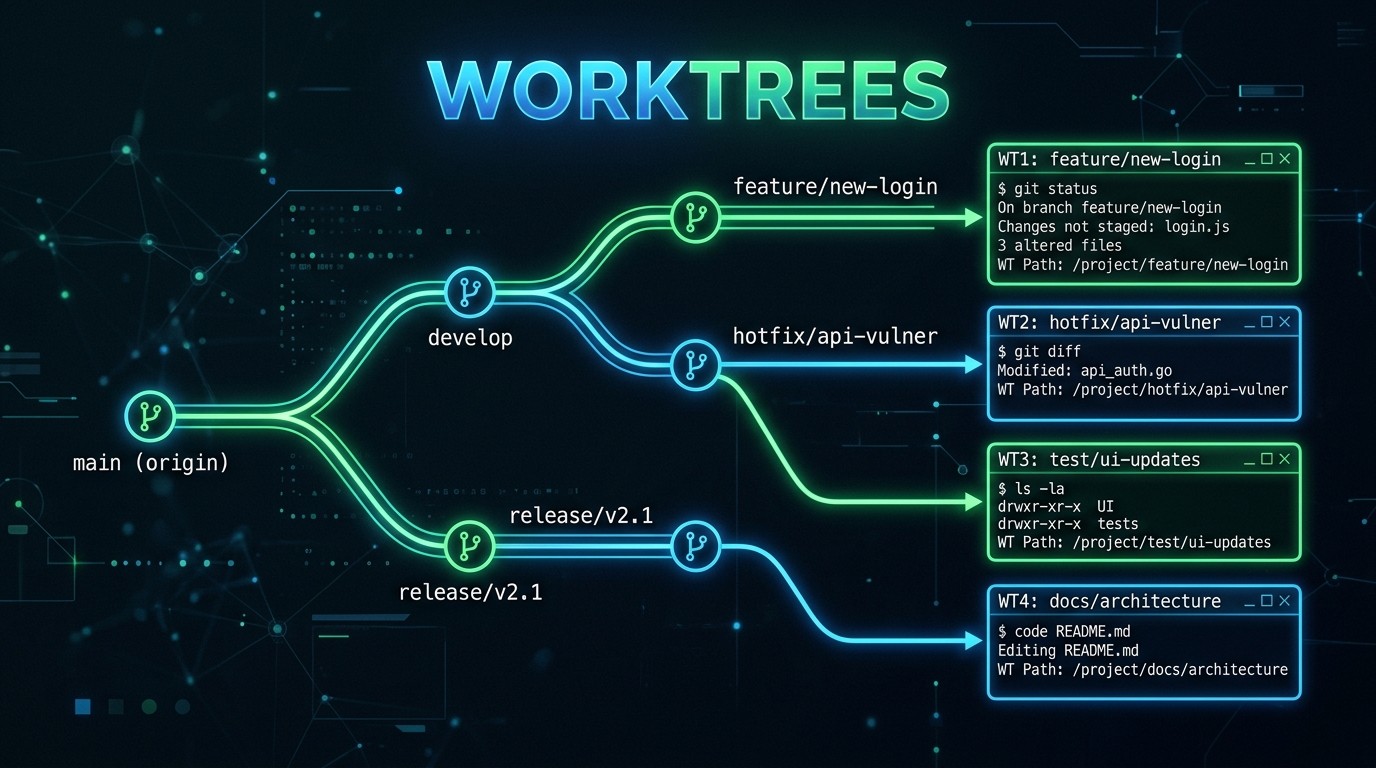
Git worktrees solve this at the filesystem level. A git worktree is a separate checkout of the same repository. It gets its own directory, its own branch, and its own staging area, but it shares the full commit history and remote connections with the main repository. Creating a worktree is not the same as cloning — there is no duplication of the .git directory, no separate remote configuration, and no need to fetch anything. The worktree is ready instantly because it points back to the same underlying git data.
Claude Code's --worktree flag (introduced in early 2026) wraps this git primitive into a single command. When a developer runs claude --worktree feature-payments, Claude Code does the following:
- Creates a new directory at
.claude/worktrees/feature-payments/ - Runs
git worktree addto check out a new branch (feature-payments) in that directory - Starts a Claude Code session scoped entirely to the new directory
- Handles cleanup when the session ends
The result is a fully isolated Claude Code environment. Files edited in one worktree do not appear as changes in another. Tests run in one worktree do not interfere with builds in another. Each session operates as though it has the repository to itself — because, from the filesystem's perspective, it does.
This is the foundation of parallel AI development in 2026. Instead of waiting for Claude to finish one task before starting the next, developers open multiple terminal tabs, launch a worktree in each one, and let Claude work on four or five tasks simultaneously. The productivity gain is not incremental. Teams that have adopted worktree-based workflows report completing in one afternoon what previously took a full day of sequential work.
Key Features
The --worktree Flag
The --worktree flag (shorthand -w) is the entry point for everything covered in this guide. Its syntax is minimal:
claude --worktree feature-auth
claude -w bugfix-login-redirect
claude --worktree refactor-db-layer
The value passed to the flag serves double duty: it becomes both the worktree directory name (.claude/worktrees/feature-auth/) and the git branch name (feature-auth). This naming convention keeps the mental model simple — the directory and the branch always match, so there is no confusion about which worktree corresponds to which branch.
If a developer prefers not to name the worktree upfront, they can ask Claude mid-session to "work in a worktree" or "start a worktree," and Claude will create one automatically, choosing a name based on the task description.
Isolation Model
The isolation that worktrees provide operates at two levels.
Filesystem isolation: Each worktree is a complete, independent directory tree. Editing src/auth.ts in one worktree does not touch src/auth.ts in another. Running npm install in one worktree does not modify node_modules in another.
Session isolation: Each Claude Code instance running in a worktree has its own context window, conversation history, and tool execution environment. A Bash command runs in that worktree's directory. An Edit command modifies that worktree's files. No cross-contamination between sessions.
This two-layer isolation is what makes parallel development safe. Each session operates in a clean sandbox.
Automatic Branch Creation
When --worktree creates a new worktree, it also creates a new git branch with the same name, branched from the current HEAD. This means every worktree starts from the same baseline — the latest commit on whatever branch the developer was on when they ran the command.
# On main branch, at commit abc123
claude --worktree feature-payments    # Creates branch 'feature-payments' from abc123
claude --worktree bugfix-null-check   # Creates branch 'bugfix-null-check' from abc123
claude --worktree refactor-api-layer  # Creates branch 'refactor-api-layer' from abc123
All three branches share the same starting point. Each evolves independently. When the work is done, each branch gets its own pull request, its own review cycle, and its own merge.
If a branch with that name already exists, Claude Code will check out the existing branch in the worktree rather than creating a new one, making it easy to resume work on a previously started task.
Shared Git History
Despite the isolation, all worktrees share the same git history. A commit made in one worktree is immediately visible to git log in any other worktree. This means:
- Fetching once updates everywhere. Running
git fetchin any worktree pulls down remote changes for all of them. - Rebasing is straightforward. A worktree can rebase onto
mainwithout affecting other worktrees. - Cherry-picking works across worktrees. If one worktree produces a commit that another needs,
git cherry-pickgrabs it instantly — no remote push required.
This shared history is a key advantage over cloning the repository multiple times. Clones create entirely separate repositories with separate fetch cycles and histories. Worktrees keep everything connected.
/batch Integration
For tasks that are parallelizable without inter-agent coordination, the /batch command provides a streamlined alternative. The /batch command automatically handles worktree isolation under the hood — developers do not need to manually create worktrees for batch operations.
/batch "Update all API endpoints to use the new authentication middleware"When /batch processes this instruction, it splits the work across multiple files or modules, creates isolated worktrees for each chunk, runs the transformations in parallel (up to 10x faster than sequential prompts), and merges the results.
The distinction: /batch handles independent, parallelizable changes that do not need sessions to communicate. Manual worktrees (or agent teams) are for tasks where sessions need awareness of each other's progress.
Agent Teams in Worktrees
Agent teams take parallel development further by adding communication between sessions. Where standalone worktrees operate independently, agent teams let multiple Claude Code instances work together — with one session acting as team lead, assigning tasks to teammates, and synthesizing results.
Each teammate in an agent team runs in its own worktree automatically. Unlike standalone worktrees, teammates can exchange messages, share intermediate results, and coordinate their work.
To enable agent teams (still experimental in March 2026), set the environment variable:
export CLAUDE_CODE_EXPERIMENTAL_AGENT_TEAMS=1Then start a session and ask Claude to "work as a team" on a complex task. Agent teams are the best choice for tasks with dependencies. Standalone worktrees (or /batch) are better for fully independent tasks.
Cleanup and Merge Workflow
Claude Code handles worktree lifecycle automatically based on session outcome:
No changes made: The worktree and its branch are removed automatically when the session ends.
Changes or commits exist: Claude prompts the developer to keep or remove the worktree. Keeping preserves the directory and branch for later use. Removing deletes the worktree and branch, discarding all changes.
For worktrees that are kept, the standard merge workflow applies:
# Push the worktree's branch to remote
cd .claude/worktrees/feature-auth/
git push -u origin feature-auth

# Open a pull request (using GitHub CLI)
gh pr create --title "Add auth middleware" --body "Implemented in Claude Code worktree session"

# After PR is merged, clean up
git worktree remove .claude/worktrees/feature-auth/
git branch -d feature-auth
Adding .claude/worktrees/ to .gitignore prevents worktree contents from appearing as untracked files in the main repository.
Resource Management
Worktrees are lightweight by design. They share the main .git directory, so disk overhead is limited to working tree files. There is no duplication of git objects or packfiles.
However, worktrees do not share dependency directories. Each worktree needs its own node_modules, .venv, target, or equivalent. A project with 500 MB of node_modules consumes an additional 500 MB per worktree.
Each Claude Code session also consumes its own context window and API tokens. Running five parallel sessions means five concurrent API streams. Developers on metered plans should factor this into their usage calculations.
Step-by-Step: Running 4-5 Parallel Claude Instances
This section walks through the practical setup for running multiple Claude Code sessions in parallel using worktrees. The example assumes a web application with a backend API, a frontend, a test suite, and a documentation site.
Step 1: Prepare the Main Branch
Start from a clean state on the main branch. All worktrees will branch from this point, so it should be up to date.
git checkout main
git pull origin main
Verify there are no uncommitted changes:
git status
# Should show: nothing to commit, working tree clean
Step 2: Add Worktrees to .gitignore
Prevent worktree directories from polluting the main repository's untracked file list:
echo ".claude/worktrees/" >> .gitignore
git add .gitignore
git commit -m "chore: ignore Claude Code worktree directories"
This only needs to be done once per repository.
Step 3: Launch the First Worktree
Open a terminal tab and start the first Claude Code session in a worktree:
claude --worktree feature-paymentsClaude creates the worktree at .claude/worktrees/feature-payments/, checks out a new branch, and starts a session. Give it the task:
"Implement a Stripe payments integration. Add the webhook handler, the checkout session creator, and the subscription management endpoints."
This session now owns the payments feature. It will work in its isolated directory without affecting anything else.
Step 4: Launch Additional Worktrees
Open new terminal tabs and launch more worktrees:
# Terminal 2
claude --worktree bugfix-auth-redirect

# Terminal 3
claude --worktree refactor-database-queries

# Terminal 4
claude --worktree add-e2e-tests

# Terminal 5 (optional)
claude --worktree update-api-docs
Each session gets its instructions independently:
- Terminal 2: "Fix the authentication redirect loop that occurs when the session token expires mid-request."
- Terminal 3: "Refactor all raw SQL queries in the data layer to use the query builder. Maintain the same behavior."
- Terminal 4: "Write end-to-end tests for the user registration and login flows using Playwright."
- Terminal 5: "Update the API documentation to reflect the new v3 endpoints added last sprint."
All five sessions are now running in parallel, each in its own worktree, each on its own branch.
Step 5: Monitor Progress
Check which worktrees are active at any time:
git worktree listThis outputs something like:
/home/dev/project                              abc1234 [main]
/home/dev/project/.claude/worktrees/feature-payments    def5678 [feature-payments]
/home/dev/project/.claude/worktrees/bugfix-auth-redirect ghi9012 [bugfix-auth-redirect]
/home/dev/project/.claude/worktrees/refactor-database-queries jkl3456 [refactor-database-queries]
/home/dev/project/.claude/worktrees/add-e2e-tests       mno7890 [add-e2e-tests]
To check the status of a specific worktree without interrupting its Claude session:
cd .claude/worktrees/feature-payments && git log --oneline -5Step 6: Merge and Clean Up
As each session completes, push its branch and open a pull request:
# From any worktree
git push -u origin feature-payments
gh pr create --title "feat: Stripe payments integration" --body "Webhook handler, checkout sessions, subscription management"
After the PR is reviewed and merged:
git worktree remove .claude/worktrees/feature-payments
git branch -d feature-payments
Repeat for each completed worktree. For a batch cleanup of all merged worktrees:
# Remove worktrees for branches that have been merged to main
for wt in $(git worktree list --porcelain | grep "^worktree " | sed 's/worktree //'); do
  branch=$(cd "$wt" && git rev-parse --abbrev-ref HEAD 2>/dev/null)
  if [ -n "$branch" ] && git branch --merged main | grep -q "$branch"; then
    git worktree remove "$wt" 2>/dev/null
    git branch -d "$branch" 2>/dev/null
  fi
done
Worktrees + Agent Teams: Maximum Throughput
Standalone worktrees are powerful for independent tasks. But some projects require coordination — where the output of one task feeds into another, or where multiple sessions need to agree on a shared interface before implementing their respective pieces.
This is where agent teams and worktrees combine for maximum throughput.
How Agent Teams Use Worktrees
When agent teams are enabled (CLAUDE_CODE_EXPERIMENTAL_AGENT_TEAMS=1), the team lead automatically creates worktrees for each teammate. The team lead stays in the main working directory (or its own worktree) and coordinates the overall effort. Teammates work in isolated worktrees, communicate with each other and the lead via inter-agent messaging, and report results back when their tasks are complete.
The key difference from standalone worktrees is the communication layer. Agent teams maintain live messaging between sessions, enabling:
- Task handoffs: The team lead assigns work dynamically based on progress
- Interface agreements: Two teammates can agree on an API contract before implementing their sides
- Dependency resolution: If Task B depends on Task A's output, the team lead routes it accordingly
- Result synthesis: The team lead collects outputs and produces a unified result
Configuring Subagents for Worktree Isolation
For custom agents defined in .claude/agents/, worktree isolation can be set in the agent's frontmatter:
---
name: migration-worker
description: Handles database migration tasks
isolation: worktree
---

You are a database migration specialist. When given a migration task,
create the migration file, update the schema, and run the migration
in your isolated worktree.
The isolation: worktree directive tells Claude Code to create a fresh worktree every time this agent runs. The worktree auto-cleans if the agent makes no changes. If it commits work, the worktree persists for review.
This pattern is especially powerful for large-scale migrations and code transformations where dozens of agents can operate in parallel, each modifying a different module or service.
Example: Full-Stack Feature with Agent Teams
Here is how a team lead might coordinate a full-stack feature across four teammates:
- Team Lead starts in the main repository, analyzes the feature requirements, and defines the task breakdown
- Teammate 1 (worktree:
feat-api-endpoints) implements the backend API endpoints - Teammate 2 (worktree:
feat-db-schema) creates the database schema and migrations - Teammate 3 (worktree:
feat-frontend-ui) builds the frontend components - Teammate 4 (worktree:
feat-integration-tests) writes integration tests
The team lead waits for Teammate 2 to finish the schema, then notifies Teammates 1 and 3 of the table structure so they can build against it. Teammate 4 waits for the API endpoints before writing tests. The lead synthesizes all four branches into a single merge sequence — coordination happens programmatically, not manually.
Real-World Workflows
Feature Development Sprint
A development team uses worktrees to parallelize their sprint backlog. On Monday morning, the tech lead launches five worktrees — one per feature ticket. Each Claude session gets the ticket description, acceptance criteria, and relevant context files. By end of day, all five features have initial implementations ready for review:
claude -w ticket-1234-user-profiles
claude -w ticket-1235-notification-system
claude -w ticket-1236-search-improvements
claude -w ticket-1237-export-feature
claude -w ticket-1238-admin-dashboard
PRs are opened as sessions complete. The review queue fills up in parallel rather than sequentially.
Bug Triage
When a production incident surfaces multiple bugs, worktrees turn serial debugging into parallel investigation:
claude -w bug-memory-leak-websocket
claude -w bug-race-condition-checkout
claude -w bug-null-pointer-user-service
Each session investigates its bug, implements the fix, and adds a regression test. Hotfix PRs open within hours rather than days.
Code Review Assistance
Worktrees also serve as isolated environments for code review:
claude --worktree review-pr-456Inside the worktree, Claude checks out the PR branch, analyzes changes, runs tests, checks for security issues, and suggests improvements — all without touching the reviewer's main working directory.
Large-Scale Refactoring
Module-by-module refactoring is a natural fit for worktrees. Each module gets its own worktree, Claude session, and PR:
claude -w refactor-auth-module
claude -w refactor-billing-module
claude -w refactor-notification-module
claude -w refactor-analytics-module
Each session applies the same refactoring pattern to its assigned module. The /batch command can also handle this when the transformation is identical across all targets. The choice: use worktrees when each module needs custom reasoning, use /batch when a single repeated instruction suffices.
Performance Tips
Disk Space Management
Each worktree creates a full copy of the working tree. For a project with a 200 MB source tree and 800 MB of dependencies, five worktrees consume approximately 5 GB. Strategies to manage this:
- Use
.gitignorepatterns aggressively. Worktrees do not need build artifacts, cache directories, or IDE configuration files. Ensure these are excluded. - Share dependency caches where possible. Tools like
pnpmuse a global content-addressable store, sonode_modulesin different worktrees reference the same underlying files. Consider switching topnpmoryarnwith PnP for worktree-heavy workflows. - Clean up promptly. Remove worktrees as soon as their branches are merged. Stale worktrees accumulate disk usage over time.
- Run
git worktree pruneperiodically. This removes references to worktrees whose directories have been manually deleted.
CPU and Memory Allocation
Each Claude Code session is relatively lightweight on the local machine — most computation happens server-side. The local resource consumption comes from:
- The CLI process itself: Minimal CPU and memory per session
- Tool execution: When Claude runs
Bashcommands (builds, tests, linters), those run locally and consume local resources - Language servers and IDE integrations: If each worktree triggers its own TypeScript server, ESLint daemon, or similar, memory can add up
For workloads where Claude is running heavy local commands in each worktree (like full test suites or production builds), limit the number of concurrent worktrees to 2-3 instead of 4-5. The bottleneck in those cases is local CPU, not Claude's throughput.
Context Window Management
Each Claude Code session maintains its own context window. Effective context management across parallel sessions means:
- Keep tasks focused. A worktree named
bugfix-null-checkshould not drift into refactoring the entire module. Narrow scope keeps context clean and responses accurate. - Front-load context. Give each session the relevant files and requirements at the start. Claude works better with clear initial context than with incremental drip-feeding.
- Use CLAUDE.md files strategically. The
CLAUDE.mdin the repository root is shared across all worktrees (since they share the same repo). Put project-wide conventions there. For worktree-specific context, create a temporaryCLAUDE.mdin the worktree directory. - Avoid cross-referencing between sessions. Each session should be self-contained. If Session A needs the output of Session B, use agent teams (which have built-in messaging) rather than manually copying context between standalone worktrees.
Network and API Considerations
Running five parallel Claude sessions means five concurrent API streams. On metered plans, this multiplies token usage by the number of concurrent sessions. A few strategies to manage this:
- Prioritize sessions. Not all five sessions need to run simultaneously. Stagger them if the API budget is a concern — start two, let them finish, start two more.
- Use
/batchfor uniform tasks. Batch operations are more token-efficient than five separate conversational sessions performing similar work. - Monitor usage with hooks. A
Notificationhook can log API call counts per session, helping track which worktrees are consuming the most resources.
Pros and Cons
Pros
| Advantage | Details |
|---|---|
| ----------- | --------- |
| True parallel development | 4-5 Claude sessions working simultaneously on different tasks. No waiting for one to finish before starting the next. |
| Complete isolation | Each worktree has its own directory, branch, and file state. Zero risk of cross-session conflicts. |
| Lightweight setup | A single --worktree flag creates the entire environment. No scripts, no configuration, no clone operations. |
| Shared git history | All worktrees share the same repository data. Fetching, rebasing, and cherry-picking work seamlessly across worktrees. |
| Automatic cleanup | Claude handles worktree removal for sessions that make no changes. Prompted cleanup for sessions with commits. |
| Agent team integration | Worktrees combine with agent teams for orchestrated parallel workflows with inter-session communication. |
| Works with existing tools | Worktrees are standard git — GitHub CLI, CI/CD pipelines, code review tools, and IDE extensions all work without modification. |
| Disk-efficient | Worktrees share the .git directory. Only working tree files are duplicated, not the full repository history. |
Cons
| Limitation | Details |
|---|---|
| ------------ | --------- |
| Dependency duplication | Each worktree needs its own node_modules, .venv, or equivalent. This can consume significant disk space for large dependency trees. |
| API token multiplication | Each parallel session consumes its own token budget. Five sessions means roughly five times the API cost for the same time period. |
| Local resource pressure | If Claude runs heavy local commands (builds, tests) in each worktree, local CPU and memory can become the bottleneck. |
| Branch management overhead | Five worktrees means five branches, five PRs, and five review cycles. Teams need clear naming conventions and cleanup discipline. |
| Agent teams are experimental | As of March 2026, agent teams require an experimental feature flag. The API and behavior may change in future releases. |
| No shared dependency caches by default | Unlike pnpm's content-addressable store, npm and yarn classic duplicate all dependencies per worktree. |
| Context fragmentation | Splitting work across five sessions means each session has less context about the overall project state. Cross-cutting concerns can slip through. |
Frequently Asked Questions
What is the difference between Claude Code worktrees and cloning the repository multiple times?
Clones create entirely new repositories with separate .git directories, fetch cycles, and histories. Worktrees create new working directories that point back to the original repository's .git directory, sharing all history, remotes, and configuration. This makes worktrees faster to create, more disk-efficient, and easier to manage. Commits in one worktree are immediately visible to all others via git log, without needing to push and pull.
How many parallel Claude Code worktrees can run at the same time?
There is no hard limit from Claude Code or git. The practical limit depends on local machine resources (disk, CPU, memory) and API plan capacity (each session consumes its own token stream). Most developers find 4-5 concurrent worktrees to be the sweet spot. Beyond that, the overhead of managing branches and reviewing PRs offsets the parallelism gains. Teams with generous API quotas have reported running 8-10 for large migrations.
Do worktrees share node_modules or Python virtual environments?
No. Dependency directories like node_modules, .venv, vendor, and target must be installed separately in each worktree. Sharing them would break isolation. To minimize disk impact, use pnpm (global content-addressable store with hardlinks) or yarn with Plug'n'Play mode. For Python, uv and pip with a shared cache directory reduce duplicate downloads.
What happens to a worktree if the Claude Code session crashes?
The worktree and branch persist on disk. Claude Code's automatic cleanup only runs during a normal session exit. To clean up orphaned worktrees, run git worktree list to find them, then git worktree remove for any that are no longer needed. Running git worktree prune removes references for manually deleted directories. Any committed work is preserved in the shared git history.
Can Claude Code worktrees be used with the /batch command?
Yes — /batch uses worktrees under the hood. It automatically creates isolated worktrees for each chunk, runs transformations in parallel, and merges the results. No manual worktree creation needed. The distinction: /batch excels at uniform, parallelizable changes (like migrating all files to a new API pattern), while manual worktrees suit distinct tasks that each require their own reasoning and context.
How do agent teams differ from running multiple standalone worktrees?
Communication. Standalone worktrees are fully independent — the developer coordinates results manually by merging branches. Agent teams add a coordination layer where a team lead assigns tasks, routes dependencies, and synthesizes outputs. Teammates can message each other directly. Use standalone worktrees for independent tasks; use agent teams when tasks have dependencies or shared interfaces.
Are Claude Code worktrees supported in VS Code and the desktop app?
Yes. The Claude Code Desktop app had built-in worktree support before the CLI added it. The VS Code extension, JetBrains plugin, and web interface all support worktrees as of early 2026. In VS Code, starting a new worktree opens it as a separate workspace window, so each Claude session has its own editor context. In the desktop app, worktrees appear as separate tabs in the session manager. The behavior and commands are identical across all interfaces — the --worktree flag (or asking Claude to "start a worktree") works everywhere.
What is the recommended naming convention for worktree branches?
Since the --worktree flag uses its value as both the directory name and the branch name, the naming convention should be compatible with both git branch naming rules and filesystem path conventions. The most common pattern is type-description — for example, feature-payments, bugfix-auth-redirect, refactor-db-layer, or test-e2e-registration. Avoid spaces, special characters, and overly long names. Keeping worktree names under 40 characters prevents path length issues on Windows and keeps git worktree list output readable. Some teams prefix with a ticket number: 1234-feature-payments.
Related Articles
- Claude Code Hooks: Complete Guide with 15 Ready-to-Use Examples — Automate your Claude Code workflow with hooks for formatting, security, testing, and notifications.
- What Are Claude Skills? Everything Developers Need to Know — Understand the reusable skill system that powers Claude Code's specialized capabilities.
- Best AI Agent Frameworks in 2026 — Ranked comparison of NanoClaw, OpenClaw, CrewAI, LangGraph, and more.
- Browse the Skiln Skills Directory — Find and install skills for Claude Code, including development workflow skills that complement worktree-based setups.