Claude Code Subagents in 2026: The Config Reference
Eighteen frontmatter fields, five locations, and the failure modes nobody documents: how Claude Code actually loads a .claude/agents file, which fields it consults, and the five ways it skips yours without saying a word.

- Five frontmatter problems make Claude Code skip your agent file without reporting it in the session. A missing
descriptionand an opening---that is not line 1 are two of them. disallowedToolsresolves beforetools, and an entry with a specifier such asBash(git push *)removes the whole Bash tool, not the matching commands.- A subagent can never ask you anything.
AskUserQuestion,EndConversation,EnterPlanMode,ScheduleWakeupandWorkfloware removed from every subagent, so "check with me if unsure" in the prompt body is decoration. - Conversation history does not reach a subagent. Neither does your output style, your auto memory, or the parent's context window size.
- Eighteen frontmatter fields, five load locations, and
nameis the identity: nested folders under.claude/agents/change nothing except which definition wins.
18 fields · 5 locations · 5 silent-skip conditions · every value quoted from the reference
You wrote a subagent file, restarted Claude Code, asked for exactly the job it was built for, and got the main agent doing the work itself. No error, no warning, nothing in /agents. The usual next move is to rewrite the description until something happens.
That is often the wrong layer. Claude Code skips a malformed agent file without reporting it in the session at all, and there are five ways to trip that, one of which is putting a comment above the opening ---. A file that is never loaded and a file whose description is too vague look identical from the prompt.
So this is the reference for how Claude Code subagents are actually loaded and resolved: the five locations and which one wins, all eighteen frontmatter fields, the tool resolution order, what reaches the subagent's context and what never does, and the places where a field you wrote in good faith is accepted and then ignored.
Every field name, default, version number and precedence claim below is checked against Anthropic's subagent and settings references rather than other write-ups, which matters here because the popular guides were written in May 2026 and the field list has grown since.

Where Claude Code Looks for Agent Files
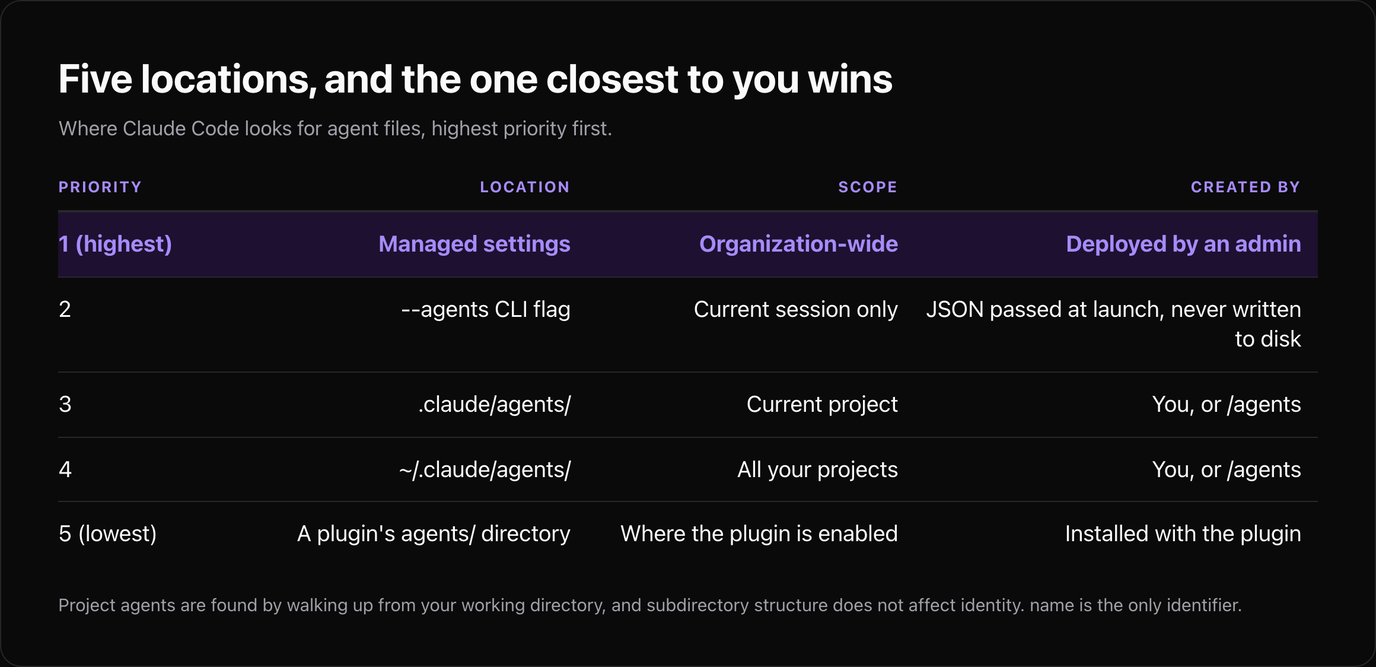
A subagent is a Markdown file: YAML frontmatter for configuration, and the body becomes the system prompt. That part every guide gets right. The part that decides whose file wins is the load order.
| Priority | Location | Scope | Created by |
|---|---|---|---|
| --- | --- | --- | --- |
| 1 (highest) | Managed settings | Organization-wide | Deployed by an admin |
| 2 | --agents CLI flag | Current session only | JSON passed at launch, never written to disk |
| 3 | .claude/agents/ | Current project | You, or /agents |
| 4 | ~/.claude/agents/ | All your projects | You, or /agents |
| 5 (lowest) | A plugin's agents/ directory | Where the plugin is enabled | Installed with the plugin |
Three details in that table are worth more than the table. Project agents are found by walking up from your current working directory, so a subagent defined in a monorepo package beats the same name defined at the repo root when you are working inside that package. Directories are scanned recursively, and subdirectory structure does not affect identity: name is the only identifier, so filing agents under .claude/agents/backend/ organises you and changes nothing about resolution. And plugin agents carry scoped identifiers, plugin-name:agent-name, which is why your own agent names cannot contain a colon.
If two files in nested directories declare the same name, the one closest to your working directory is the definition you get. That is a feature when you meant it and a long debugging session when you did not.
The Full Frontmatter Reference
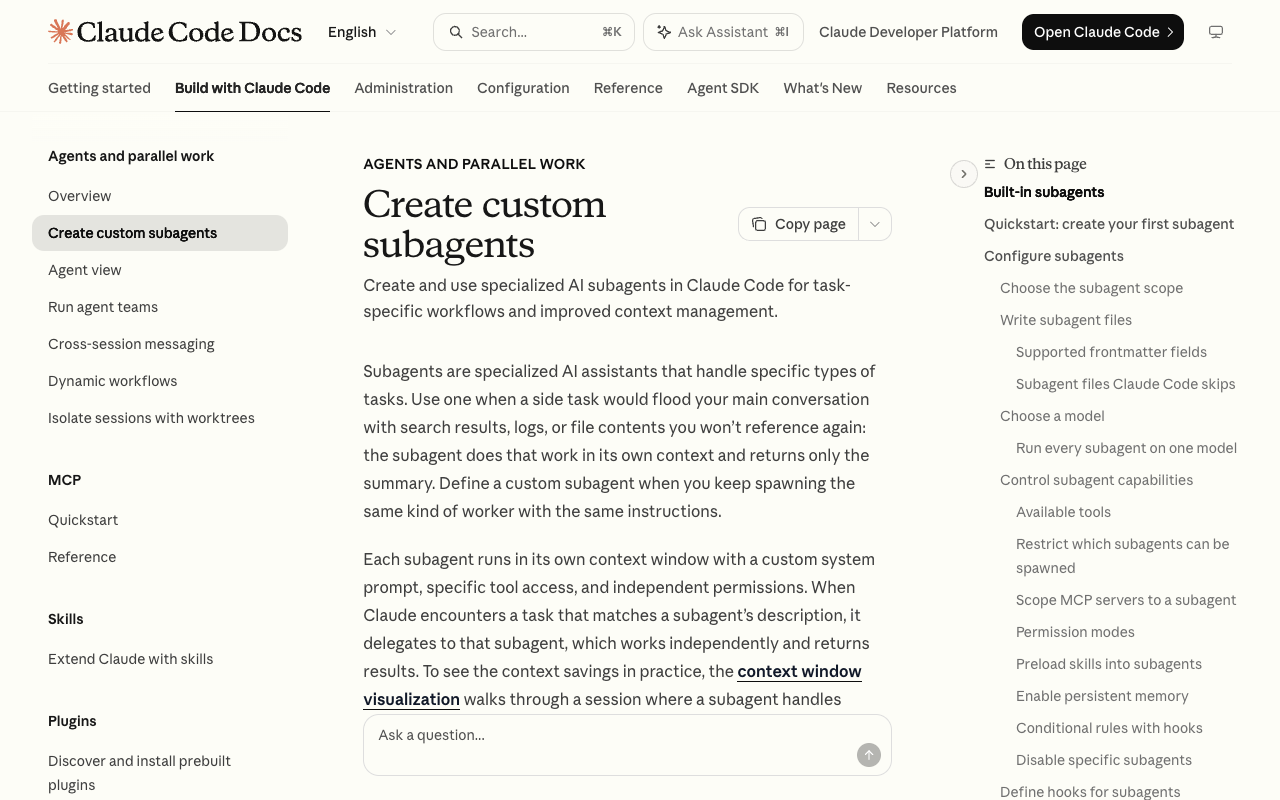
Only name and description are required. The other sixteen fields are where the behaviour lives, and most published guides document between six and thirteen of them.
| Field | Required | Values | What it does |
|---|---|---|---|
| --- | --- | --- | --- |
name | Yes | lowercase letters and hyphens | Identity. Also the agent_type hooks match on. Cannot contain : |
description | Yes | string | When Claude should delegate here. This is the delegation trigger |
tools | No | comma list or array | Allowlist. Inherits everything available if omitted |
disallowedTools | No | comma list or array | Denylist, applied before tools |
model | No | sonnet, opus, haiku, fable, a full model ID, or inherit | Model for this subagent |
permissionMode | No | default, acceptEdits, auto, dontAsk, bypassPermissions, plan, manual | Permission behaviour. Ignored for plugin subagents |
maxTurns | No | integer | Stops after N agentic turns and marks the run partial |
skills | No | array of strings | Preloads full skill content at startup |
mcpServers | No | array or object | MCP servers for this subagent. Ignored for plugin subagents |
hooks | No | object | PreToolUse, PostToolUse, Stop. Ignored for plugin subagents |
memory | No | user, project, local | Persistent memory scope across sessions |
background | No | boolean | Keeps the subagent backgrounded even when Claude wants it in front |
omitClaudeMd | No | boolean | Skips user, project and local CLAUDE.md. Needs v2.1.271+ |
effort | No | low, medium, high, xhigh, max | Effort override. Inherits the session's level if omitted |
isolation | No | worktree | Runs in a temporary git worktree |
color | No | red, blue, green, yellow, purple, orange, pink, cyan | Display colour only |
initialPrompt | No | string | Auto-submitted first turn when the agent runs as the main session |
experimental | No | object | cacheTtl of 5m or 1h |
A minimal file that does something useful:
---
name: migration-checker
description: Checks database migrations for destructive statements. Use proactively before any migration is applied.
tools: Read, Grep, Glob
model: haiku
memory: project
---

You review migration files. Flag DROP, TRUNCATE and NOT NULL additions on
populated tables. Quote the file and line. Do not edit anything.
Note what is not in that file: a permission rule. Subagent tool scoping and Claude Code's permission rules are separate systems, and tools is the one that decides which tools the subagent can see at all.
Five Ways a Subagent File Is Skipped in Silence
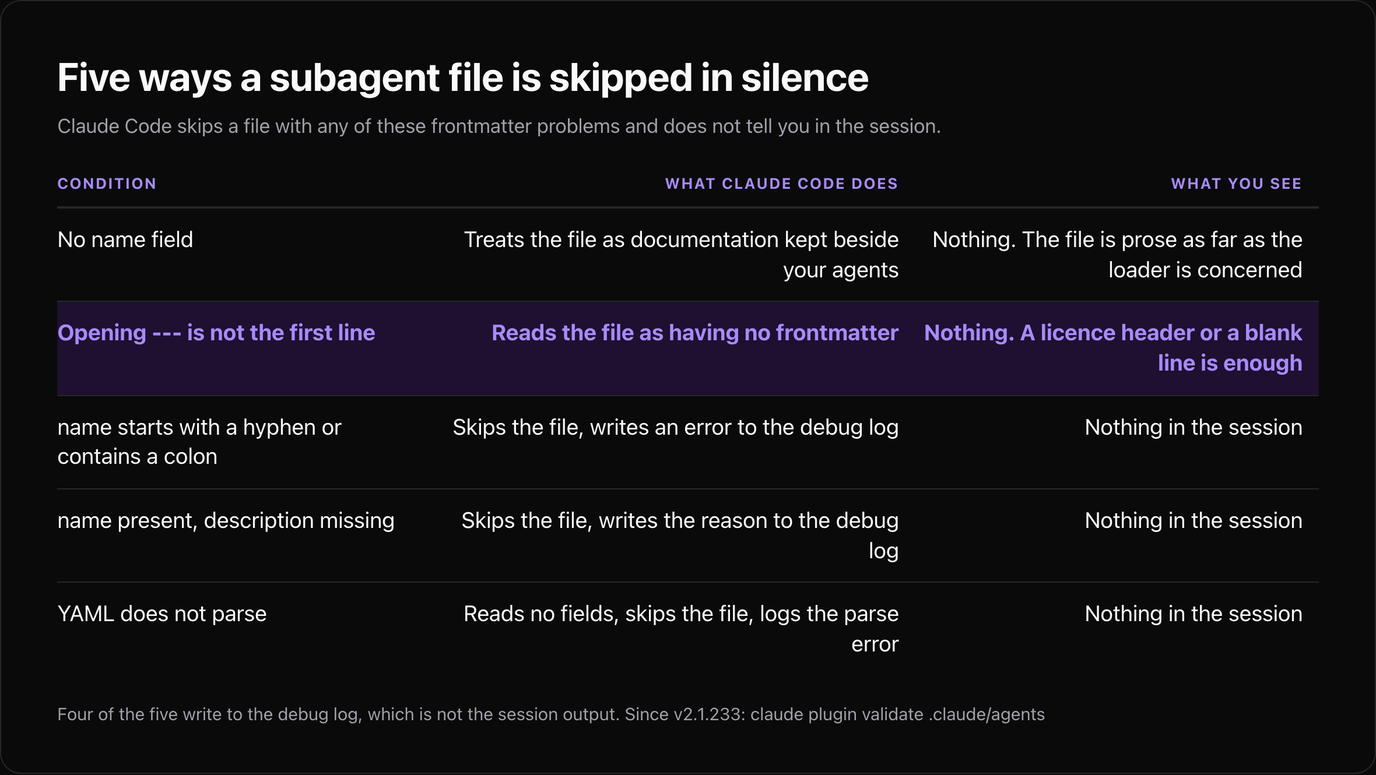
This is the section the other guides do not have, and it explains most "my subagent is ignored" reports. Claude Code skips a file in a project, user or managed agents directory when the frontmatter has any of these problems, and it does not tell you in the session.
| Condition | What Claude Code does | What you see |
|---|---|---|
| --- | --- | --- |
No name field | Treats the file as documentation kept beside your agents | Nothing. The file is prose as far as the loader is concerned |
Opening --- is not the first line | Reads the file as having no frontmatter, treats it as documentation | Nothing. A licence header or a blank line is enough to do this |
name starts with - or contains : | Skips the file, writes an error to the debug log | Nothing in the session |
name present, description missing | Skips the file, writes the reason to the debug log | Nothing in the session |
| YAML does not parse | Reads no fields, skips the file, logs the parse error | Nothing in the session |
Four of those five write something to the debug log, which is not the session output, so the only difference between them from the prompt is none at all. Since v2.1.233 there is a direct check:
claude plugin validate .claude/agentsRun it after every edit to an agent file. It takes a second and it is the only thing standing between a typo'd name and an afternoon of rewriting a description that was fine.
The same command is worth putting in a PreToolUse or commit hook if your team keeps project agents in version control, which our hooks guide has the scaffolding for.
Tools: What tools and disallowedTools Resolve To
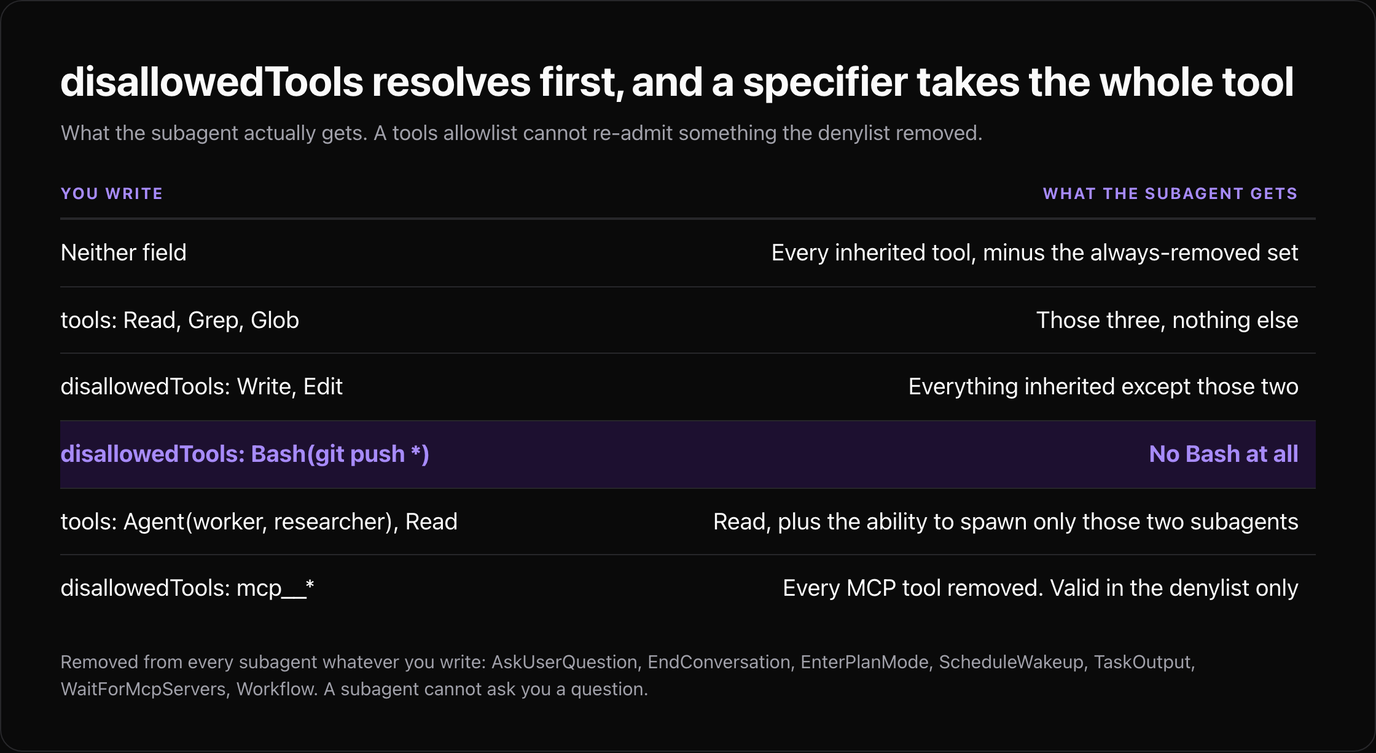
If you set neither field, the subagent inherits every built-in and MCP tool from the main conversation, minus a fixed set that is never available to any subagent. If you set both, the order is not the one most people assume.
disallowedTools is applied first, then tools is resolved against what is left. So a tools allowlist cannot re-admit something the denylist removed, in the same way an allow rule cannot carve an exception out of a deny rule in the permission system.
The specifier behaviour is the trap. A disallowedTools entry written as Bash(git push *) removes the whole Bash tool from the subagent, not just matching commands. If you wanted the subagent to run builds but not push, the denylist is the wrong instrument; scope tools to what it may call, or put the restriction in a PreToolUse hook.
| You write | What the subagent gets |
|---|---|
| --- | --- |
| Neither field | Every inherited tool, minus the always-removed set below |
tools: Read, Grep, Glob | Those three, nothing else |
disallowedTools: Write, Edit | Everything inherited except those two |
disallowedTools: Bash(git push *) | No Bash at all |
tools: Agent(worker, researcher), Read | Read, plus the ability to spawn only those two subagents |
disallowedTools: mcp__* | Every MCP tool removed. mcp__* is valid in the denylist only |
Now the fixed set. These are removed from every subagent regardless of what you write: AskUserQuestion, EndConversation, EnterPlanMode, ExitPlanMode (unless permissionMode: plan), ScheduleWakeup, TaskOutput, WaitForMcpServers, Workflow, and Agent once the depth limit is reached.
The first one has a consequence worth stating plainly: a subagent cannot ask you a question. A prompt body that says "check with the user before making assumptions" produces a subagent that makes assumptions, because the tool that would ask does not exist in its context. Put decisions the user must make in the parent conversation, and give the subagent work it can finish alone.
Background subagents are narrower still. They keep Read, Grep, Glob, Bash, PowerShell, Edit, Write, NotebookEdit, WebFetch, WebSearch, TodoWrite, Skill, ToolSearch, EnterWorktree, ExitWorktree, Monitor, TaskStop, SendMessage and Artifact, plus all MCP tools. Anything else in your tools list is dropped for that run. Since background is the default in fork mode in interactive sessions, a subagent can quietly lose a tool you scoped it to depending on how it was started.
What Reaches the Subagent, and What Never Does
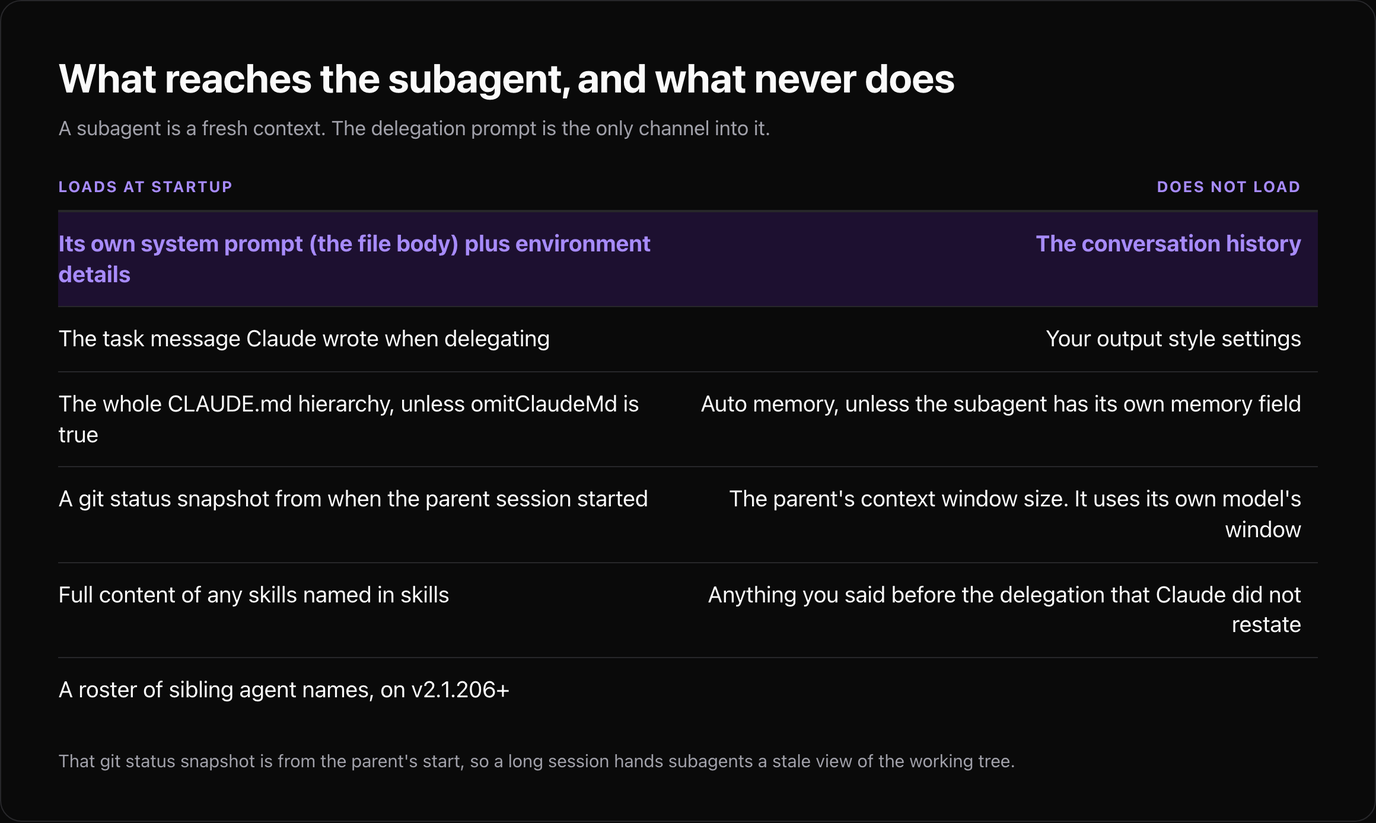
A subagent is a fresh context, which is the entire point, and also the thing that makes delegation results feel oddly amnesiac when you were expecting continuity.
| Loads at startup | Does not load |
|---|---|
| --- | --- |
| Its own system prompt (the file body) plus environment details | The conversation history |
| The task message Claude wrote when delegating | Your output style settings |
The whole CLAUDE.md hierarchy, unless omitClaudeMd: true | Auto memory, unless the subagent has its own memory field |
| A git status snapshot from when the parent session started | The parent's context window size. It uses its own model's window |
Full content of any skills named in skills | Anything you said before the delegation that Claude did not restate |
| A roster of sibling agent names, on v2.1.206+ |
Two practical consequences. First, the delegation prompt is the only channel: if the subagent needs a decision you made ten turns ago, the parent has to write it into the task message. Second, that git status snapshot is from the parent's start, so a long session hands subagents a stale view of the working tree.
Persistent memory is the escape hatch when a subagent should learn across sessions. Set memory: project and it gets a directory under .claude/agent-memory/, the first 200 lines or 25KB of its MEMORY.md load automatically, and Read, Write and Edit are enabled for it whatever else you scoped. user scope writes to ~/.claude/agent-memory/, and local keeps it out of version control.
Model, Effort and the Resolution Order
Four things can set a subagent's model, and the first match wins.
| Order | Source | Beats |
|---|---|---|
| --- | --- | --- |
| 1 | The model parameter passed to the Agent tool at invocation | Everything |
| 2 | The subagent file's model frontmatter field | 3 and 4 |
| 3 | CLAUDE_CODE_SUBAGENT_MODEL environment variable | 4 |
| 4 | The main conversation's model | Nothing |
model: inherit is the explicit way to say "whatever the parent is using". To force every subagent onto one model regardless of what their files say, set CLAUDE_CODE_SUBAGENT_MODEL and CLAUDE_CODE_SUBAGENT_MODEL_FORCE=1 together in your settings env block. That is the setting for a team that wants the cost floor rather than the per-agent choice.
Two inheritance details that are easy to get wrong: since v2.1.198 subagents inherit the main conversation's extended thinking setting, and forks skip model selection entirely and run on the parent's model. The effort field is separate from the model and inherits the session's level when omitted, so a haiku agent at max effort and an opus agent at low are both configurations you can write and probably do not want.
Delegation: description Is the Field Doing the Work
Automatic delegation matches your task against each subagent's description. Everything else in the file is what happens after the match, so a precise description is worth more than a long prompt body.
Three things make it fire reliably. Name the trigger condition rather than the capability ("use after any change to files under migrations/" beats "database expert"). Include "use proactively" if you want Claude to reach for it unprompted. And keep it short, because the combined descriptions of your non-built-in subagents have a 15,000-token budget, past which Claude Code warns at startup with the total. Twenty agents with a paragraph each is how teams get there.
When you want certainty rather than matching, skip delegation:
| Invocation | Behaviour |
|---|---|
| --- | --- |
| "Use the test-runner subagent to fix failing tests" | Claude decides whether to delegate |
@agent-test-runner | Guarantees that subagent runs |
claude --agent code-reviewer | That agent is the session |
"agent": "code-reviewer" in .claude/settings.json | Same, as a project default |
claude --agents '{...}' with JSON | Session-only agents, never written to disk |
The --agents JSON form accepts the same fields as the frontmatter, with the system prompt under a prompt key. It is the right tool for CI, where you want an agent definition that ships with the pipeline rather than the repo, and it pairs with the Claude Agent SDK for programmatic runs.
Limits, Depth, and When Delegation Costs More Than It Saves
Two numbers bound how far this scales, and both are environment variables rather than settings fields.
| Limit | Default | Change with |
|---|---|---|
| --- | --- | --- |
| Subagent nesting depth below the main conversation | 3 layers | CLAUDE_CODE_MAX_SUBAGENT_SPAWN_DEPTH (set 1 to disable nesting) |
| Concurrent subagents in a session | 20 | CLAUDE_CODE_MAX_CONCURRENT_SUBAGENTS |
Hitting the concurrency ceiling fails the spawn with Concurrent subagent limit reached, which is at least a visible error. Hitting the depth limit is quieter: the Agent tool is simply removed from the subagent's tool set, so it does the work itself instead of delegating, and the only symptom is a slower, longer turn.
The judgement call underneath all of this has not changed since the agent teams guide, and Anthropic's own Claude Code best practices frames it the same way: each delegation pays a fresh system prompt, a fresh CLAUDE.md load and a task message before it does anything useful. That is worth it for a search across many files whose answer is a paragraph, or for work you want isolated in a worktree. It is a loss for a two-file edit you could have made directly. Scoped tools and a small model cut the per-delegation cost; they do not make an unnecessary delegation free.
The fastest way past the five silent-skip conditions is to copy a file that parses. Skiln indexes installable Claude agents, skills, commands and MCP servers with their real install paths and the tools each one expects. Browse agents · Browse skills · Generate a config
Disclosure: Skiln publishes this article and runs the directory it links to.
If you want the curated end of that rather than the whole index, our nine subagents worth installing is the shortlist, and each entry there is a file you can drop into .claude/agents/ and validate with the command above.
Related Articles
- Best Claude Agents in 2026: 9 Subagents That Turn Claude Into a Team
- How to Use Claude Code Agent Teams for Complex Projects
- Claude Code Permissions in 2026: The settings.json Guide
- Claude Code Hooks: Complete Guide with 15 Ready-to-Use Examples
- Claude Code Slash Commands in 2026: The Full Reference
- Claude Code Worktrees: Run Agents in Parallel Without Collisions
Every field name, default, limit and version number above comes from Anthropic's custom subagents reference and the settings files and precedence page, with the hook event names from the hooks guide. Where another write-up disagrees with a value here, check the date on it: most of the ranking guides predate half the fields in the table above.