Claude Code Plugins vs Skills vs MCP Servers: A Developer's Decision Guide
When should you use a Claude skill vs an MCP server vs a hook vs a command? Decision flowchart, real examples, combination patterns, cost analysis, and portability comparison.

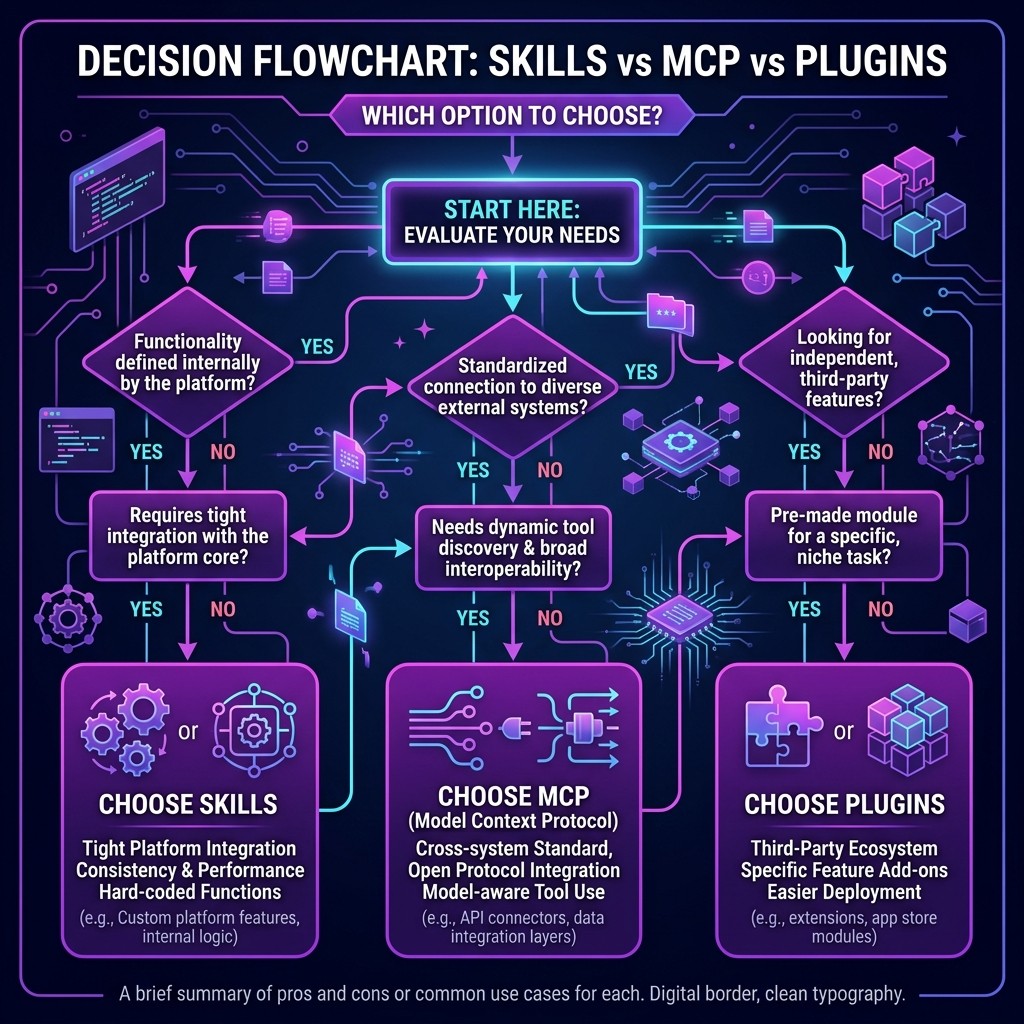
Claude Code Plugins vs Skills vs MCP Servers: A Developer's Decision Guide
Sarah Walker · Senior AI Research Editor · March 26, 2026 · 14 min read
TL;DR — The Decision Flowchart
Here is the quickest way to decide which extension type to use:
Do you need Claude to access an external tool, API, or data source?
  → YES → Use an MCP Server

Do you need to change HOW Claude writes code, communicates, or thinks?
  → YES → Use a Skill

Do you need something to happen AUTOMATICALLY when Claude acts?
  → YES → Use a Hook

Do you need a reusable prompt shortcut?
  → YES → Use a Command

Do you need multi-step autonomous execution?
  → YES → Use an Agent
If your answer is "I need more than one of these" — that is normal. Most production workflows combine 2-3 extension types. This guide covers when to use each one, when to combine them, and the tradeoffs you should know about.
Table of Contents
- Why "Plugin" Is the Wrong Word (And Why It Persists)
- The Five Extension Types: A Mental Model
- The Decision Framework: Detailed Flowchart
- When to Use Skills (With Real Examples)
- When to Use MCP Servers (With Real Examples)
- When to Use Hooks (With Real Examples)
- When to Use Commands (With Real Examples)
- Combination Patterns: How They Work Together
- Cost, Portability, and Maintenance Compared
- Frequently Asked Questions
Why "Plugin" Is the Wrong Word (And Why It Persists) {#why-plugin-is-wrong}
Let me clear up the biggest source of confusion in the Claude ecosystem before we go further.
There is no official Claude Code extension type called "plugins." Anthropic does not use the word. The five official extension types are Skills, MCP Servers, Hooks, Commands, and Agents.
So why does everyone search for "Claude plugins"? Because the concept of plugins is deeply embedded in developer vocabulary. ChatGPT had plugins. VS Code has extensions (which everyone calls plugins). WordPress has plugins. When people discover that Claude is customizable, their instinct is to search for "Claude plugins."
Google search data backs this up. "Claude code plugins" gets 3x more monthly searches than "Claude code skills" and 5x more than "Claude code MCP servers." The word "plugin" has become a gateway term — people search for it, discover that Claude's actual extension model is more nuanced, and then learn about skills, MCP servers, and the rest.
This post exists to be the destination for that search. If you got here by searching for "Claude plugins," you are in the right place. Let me show you what you actually need.
The Five Extension Types: A Mental Model {#five-extension-types}
I think about Claude's extension types as layers of a stack. Each layer operates at a different level of abstraction:
| Layer | Type | Analogy | What It Controls |
|---|---|---|---|
| ------- | ------ | --------- | ----------------- |
| Knowledge | Skills | An onboarding document for a new team member | How Claude thinks and what it knows |
| Capabilities | MCP Servers | A keycard that unlocks doors to different rooms | What tools and data Claude can access |
| Automation | Hooks | Tripwires that trigger automatic actions | What happens before/after Claude acts |
| Shortcuts | Commands | Speed dial buttons on a phone | Reusable prompt templates |
| Orchestration | Agents | A project manager delegating tasks | Multi-step autonomous workflows |
Each layer is independent. You can use skills without MCP servers. You can use hooks without commands. You can use any single layer or combine all five. But understanding what each layer controls helps you pick the right one for your situation.
The Decision Framework: Detailed Flowchart {#decision-framework}
Here is the expanded decision framework I use when someone asks "which one should I use?"
Question 1: What are you trying to change?
Claude's behavior, tone, or approach to a problem → Skill
You want Claude to follow specific coding conventions, use a particular architecture, write in a certain tone, or apply domain-specific best practices. A skill is a set of instructions that Claude reads and follows.
Example: You want Claude to always use the repository pattern when writing data access code. Create a skill that defines this convention.
Claude's access to external systems → MCP Server
You want Claude to query your database, read your GitHub issues, interact with your Slack workspace, or call an internal API. An MCP server bridges Claude to external tools.
Example: You want Claude to check the current state of your Kubernetes cluster before generating deployment manifests. Install a Kubernetes MCP server.
Automatic side effects when Claude acts → Hook
You want code to run automatically when Claude saves a file, makes a commit, or calls a specific tool. Hooks are event-driven automation.
Example: You want ESLint to auto-fix any file Claude modifies. Create a PostToolUse hook on the Write tool that runs eslint --fix on the saved file.
A reusable prompt you invoke frequently → Command
You have a prompt pattern you use repeatedly — a code review checklist, a deployment procedure, a specific generation template. A command turns it into a /slash invocation.
Example: You always ask Claude to review PRs with the same criteria. Create a /review-pr command that includes your review checklist.
Question 2: Does it need to run code?
| Type | Runs Code? | Where? |
|---|---|---|
| ------ | ----------- | -------- |
| Skill | No | Claude reads it, changes behavior accordingly |
| MCP Server | Yes | Runs as a subprocess on your machine or a remote server |
| Hook | Yes | Runs your shell scripts/commands as side effects |
| Command | No | Injects text into Claude's prompt |
| Agent | Yes | Runs as an autonomous Claude session with tool access |
If your extension needs to execute code — query a database, call an API, run a linter — it must be an MCP server or a hook. Skills and commands are purely text-based.
Question 3: Who is the audience?
Just me, on this project → Any type works. Use whatever is simplest.
My team, on this project → Skills (committed to .claude/skills/) and commands (committed to .claude/commands/) are easiest to share. MCP configs can be committed to .mcp.json. Hooks need shell script compatibility across team members' machines.
The community → Skills are the most shareable. A single markdown file, no dependencies, works anywhere. MCP servers require packaging (npm, PyPI) and runtime dependencies. Hooks are the least portable because they depend on local tooling.
When to Use Skills (With Real Examples) {#when-to-use-skills}
Skills are the right choice when you need to shape Claude's approach without giving it new tools.
Example 1: Coding Convention Enforcement
Problem: Claude generates React code with class components and CSS modules. Your team uses functional components with Tailwind CSS.
Solution: A skill file that says:
## React Conventions
- Always use functional components with hooks
- Style with Tailwind CSS utility classes, never CSS modules
- Use the `cn()` helper from `@/lib/utils` for conditional classes
- Components go in `src/components/` with PascalCase filenames
Claude reads this at session start and adjusts all React output to match your conventions.
Example 2: Domain Knowledge Injection
Problem: You are building a healthcare application with HIPAA compliance requirements. Claude does not know your specific compliance rules.
Solution: A skill that encodes your HIPAA-relevant patterns:
## HIPAA Compliance Requirements
- Never log PHI (Protected Health Information) to console or application logs
- All database fields containing PHI must use column-level encryption
- API responses must strip PHI unless the requesting role has PHI access
- Audit logs must record every PHI access with timestamp, user, and purpose
Example 3: DevOps Best Practices
Problem: Claude generates Terraform that works but violates your infrastructure standards.
Solution: A Terraform Mastery skill that enforces module structure, lifecycle rules, and naming conventions.
When Skills Are Wrong
Skills are the wrong choice when:
- You need Claude to access data it cannot currently reach (use an MCP server)
- You need guaranteed enforcement, not advisory guidance (use a hook — Claude usually follows skills but can deviate)
- You need to execute code as part of the extension (skills are passive text)
For a complete guide to skills, see our What Are Claude Skills post. To browse available skills, visit the Skiln skills directory.
When to Use MCP Servers (With Real Examples) {#when-to-use-mcp}
MCP servers are the right choice when Claude needs to interact with external systems.
Example 1: Database Access
Problem: You are debugging a data issue and need Claude to query your Postgres database to understand the schema and check data.
Solution: The Postgres MCP server. Claude can run SELECT queries, describe tables, and check data integrity — all within the conversation.
Example 2: Repository Operations
Problem: You want Claude to open a pull request, check CI status, and respond to review comments.
Solution: The GitHub MCP server. Claude gets read/write access to your repos through the GitHub API.
Example 3: Browser Automation
Problem: You want Claude to navigate a web application, take screenshots, and interact with UI elements for testing or documentation.
Solution: The Playwright MCP server. Claude controls a headless browser and can navigate, click, type, and screenshot.
When MCP Servers Are Wrong
MCP servers are the wrong choice when:
- You just need to change how Claude writes code (use a skill — cheaper and simpler)
- You need automatic side effects on Claude's actions (use a hook)
- The external system does not have a usable API (MCP servers need an interface to talk to)
For a deep dive on MCP, see our complete MCP guide. For cross-platform MCP usage, see MCP servers that work with Cursor, Copilot, and Codex.
When to Use Hooks (With Real Examples) {#when-to-use-hooks}
Hooks are the right choice when you need guaranteed automation in response to Claude's actions.
Example 1: Auto-Formatting
Problem: Claude generates code that does not match your project's formatting rules.
Solution: A PostToolUse hook on the Write tool that runs Prettier on every saved file:
{
  "hooks": {
    "PostToolUse": [{
      "matcher": "Write",
      "command": "npx prettier --write $FILE_PATH"
    }]
  }
}
Unlike a skill (which asks Claude to format code a certain way), a hook guarantees formatting by running Prettier after every file write.
Example 2: Security Gate
Problem: You want to prevent Claude from modifying certain sensitive files — production configs, encryption keys, deployment manifests.
Solution: A PreToolUse hook on the Write tool that checks the file path:
{
  "hooks": {
    "PreToolUse": [{
      "matcher": "Write",
      "command": "bash -c 'echo $FILE_PATH | grep -qE \"(production|secrets|.env)\" && exit 1 || exit 0'"
    }]
  }
}
If the file path contains "production," "secrets," or ".env," the hook blocks the write. This is enforcement, not guidance.
Example 3: Notification
Problem: You want a Slack notification every time Claude makes a git commit in your project.
Solution: A PostToolUse hook on the Bash tool that detects commit operations and sends a webhook.
When Hooks Are Wrong
Hooks are the wrong choice when:
- You want to change Claude's reasoning or output quality (use a skill)
- You need Claude to access external data (use an MCP server)
- The automation does not map to a specific Claude event (hooks are event-driven)
For 15 ready-to-use hook examples, see our hooks guide.
When to Use Commands (With Real Examples) {#when-to-use-commands}
Commands are the right choice for reusable prompt shortcuts.
Example: Code Review Command
You review PRs with the same criteria every time. Instead of typing the full prompt, create /review-pr:
<!-- .claude/commands/review-pr.md -->
Review the current PR with these criteria:
1. Are there any security vulnerabilities?
2. Are all edge cases handled?
3. Is error handling comprehensive?
4. Are there missing tests?
5. Does the code follow our conventions?

Provide a summary with PASS/FAIL for each criterion and specific line-level feedback.
Now typing /review-pr in Claude Code injects this entire prompt. Commands are simple but powerful for repetitive workflows.
When Commands Are Wrong
Commands are the wrong choice when:
- You need persistent behavioral changes (use a skill — it loads automatically every session)
- You need tool access (use an MCP server)
- You need code execution (use a hook)
Combination Patterns: How They Work Together {#combination-patterns}
The real power is in combining extension types. Here are the patterns I use most:
Pattern 1: Skill + MCP Server (The Standard Pairing)
Use case: Any workflow where Claude needs both domain knowledge and tool access.
Terraform Skill           → Claude knows how to write good HCL
  +
AWS MCP Server            → Claude can verify resources exist
  =
Production-grade IaC      → Claude writes correct Terraform that references real AWS resources
This is the most common combination. The skill shapes the output quality. The MCP server provides the data. Together, they produce results that neither could achieve alone.
Pattern 2: Skill + Hook (Knowledge + Enforcement)
Use case: When you want Claude to follow conventions AND guarantee compliance.
Coding Standards Skill    → Claude writes code following your conventions (95% compliance)
  +
PostToolUse Lint Hook     → ESLint catches the remaining 5% automatically
  =
100% Convention Compliance → Every file matches your standards, guaranteed
The skill reduces the number of violations (Claude tries to follow the rules). The hook catches anything that slips through. Belt and suspenders.
Pattern 3: MCP Server + Hook (Access + Automation)
Use case: When you want Claude to interact with a system AND trigger side effects.
GitHub MCP Server         → Claude opens PRs and reads CI status
  +
PostToolUse Notify Hook   → Slack notification when Claude opens a PR
  =
Automated PR Workflow     → Claude creates the PR, team gets notified automatically
Pattern 4: All Four (The Full Stack)
Use case: Complex, team-wide workflows.
Skills                    → Coding conventions, architecture patterns, domain knowledge
MCP Servers               → Database, GitHub, deployment pipeline access
Hooks                     → Auto-formatting, security gates, notifications
Commands                  → /review-pr, /deploy-staging, /generate-migration
This is what a mature team's Claude setup looks like. It takes time to build up to this level, but each layer adds measurable value.
Cost, Portability, and Maintenance Compared {#cost-portability}
| Dimension | Skills | MCP Servers | Hooks | Commands |
|---|---|---|---|---|
| ----------- | -------- | ------------- | ------- | ---------- |
| Cost to create | Free (write markdown) | Low-Medium (write server code or use existing) | Low (write shell scripts) | Free (write markdown) |
| Runtime cost | Zero (text, no execution) | Varies (local = free, hosted = server costs) | Minimal (script execution) | Zero (text injection) |
| Token cost | Small (skill text loaded into context) | Medium (tool calls and results add tokens) | Zero (runs outside Claude's context) | Small (prompt text loaded into context) |
| Portability | Excellent (single .md file) | Good (needs server binary + config) | Fair (needs shell compatibility) | Good (single .md file) |
| Maintenance | Low (update the markdown) | Medium (dependencies, API changes) | Low (scripts rarely change) | Low (update the markdown) |
| Cross-platform | Claude only (skills are a Claude concept) | Cross-platform (MCP works on Cursor, Copilot, Codex) | Claude only | Claude only |
| Team sharing | Easy (commit to repo) | Easy (commit config to repo) | Moderate (scripts need testing across OSes) | Easy (commit to repo) |
The Portability Winner
If you might switch between AI coding tools — using Claude sometimes and Cursor other times — MCP servers are your most portable investment. An MCP server you build for Claude works identically on Cursor, Copilot, and Codex.
Skills, hooks, and commands are Claude-specific. They are the right choice when you are committed to Claude Code, but they do not transfer to other tools.
The Token Cost Consideration
Skills and commands add text to Claude's context window. A typical skill is 500-2,000 words. With multiple skills loaded, you might use 5,000-10,000 tokens of context on skills alone. This is manageable on the 200K context window but worth being aware of if you are loading 20+ skills.
MCP server tool calls add tokens when Claude uses them — each tool call and response adds to the conversation. A database query that returns 50 rows of data adds significantly more tokens than a skill file.
Hooks add zero tokens because they execute outside Claude's context. This makes them the most "free" extension type from a token perspective.
My Recommendations for Getting Started
If you are new to Claude Code extensibility, here is the order I recommend:
- Start with 2-3 skills. Install the Superpowers skill and one domain-specific skill for your stack. This gives you immediate productivity gains with zero complexity.
- Add one MCP server. The GitHub MCP server or the Filesystem MCP server are the most universally useful. Learn how tool calls work in practice.
- Add a hook when you find a repeated annoyance. If you keep re-formatting Claude's output, that is a hook opportunity. If you keep asking Claude not to touch certain files, that is a hook opportunity.
- Create a command when you type the same prompt three times. If you are copy-pasting the same review criteria or generation template, turn it into a
/command.
- Explore agent teams when single sessions feel limiting. Once you are comfortable with the basics, multi-agent workflows unlock the next level of productivity.
Browse the full ecosystem at skiln.co — over 15,000 skills, MCP servers, agents, commands, and hooks, searchable and categorized.
Frequently Asked Questions {#faq}
What is the difference between Claude skills and MCP servers?
Claude skills are markdown files that teach Claude how to approach tasks — they shape behavior, knowledge, and output patterns. MCP servers are external programs that give Claude access to tools and data sources it cannot reach otherwise — databases, APIs, file systems, third-party services. Skills change how Claude thinks; MCP servers change what Claude can do.
Are Claude Code plugins the same as skills?
There is no official Claude Code extension type called "plugins." The term is borrowed from other ecosystems (ChatGPT, VS Code) and people use it loosely to mean skills, MCP servers, or any form of Claude customization. Anthropic's official extension types are Skills, MCP Servers, Hooks, Commands, and Agents. When someone says "Claude plugin," they usually mean a skill or an MCP server.
Can I use Claude skills and MCP servers together?
Yes, and this is the recommended approach for most workflows. A Terraform skill teaches Claude infrastructure best practices while an AWS MCP server gives Claude access to your actual AWS account. A writing skill shapes Claude's tone while a Notion MCP server lets Claude read your research notes. Skills and MCP servers complement each other — skills handle the "how" and MCP servers handle the "with what."
When should I build a hook instead of a skill?
Build a hook when you need something to happen automatically in response to Claude's actions — before a file is saved, after a commit is made, when a tool is called. Hooks run your code as side effects. Build a skill when you need to change how Claude approaches a task. The distinction: skills are advisory (Claude reads them and adjusts behavior), hooks are mandatory (your code runs regardless of what Claude decides).
Which Claude extension type is most portable across projects?
Skills are the most portable. A skill is a single markdown file that works in any Claude Code session — drop it in .claude/skills/ and it loads automatically. MCP servers require the server binary and configuration. Hooks require shell scripts or executables. Commands are lightweight (markdown files) but project-specific. For maximum portability, start with skills and add other extension types as needed. For cross-platform portability (Claude + Cursor + Copilot), MCP servers are the best investment since they work on all four major AI coding tools.