Claude Skills Not Triggering? 9 Fixes That Work in 2026
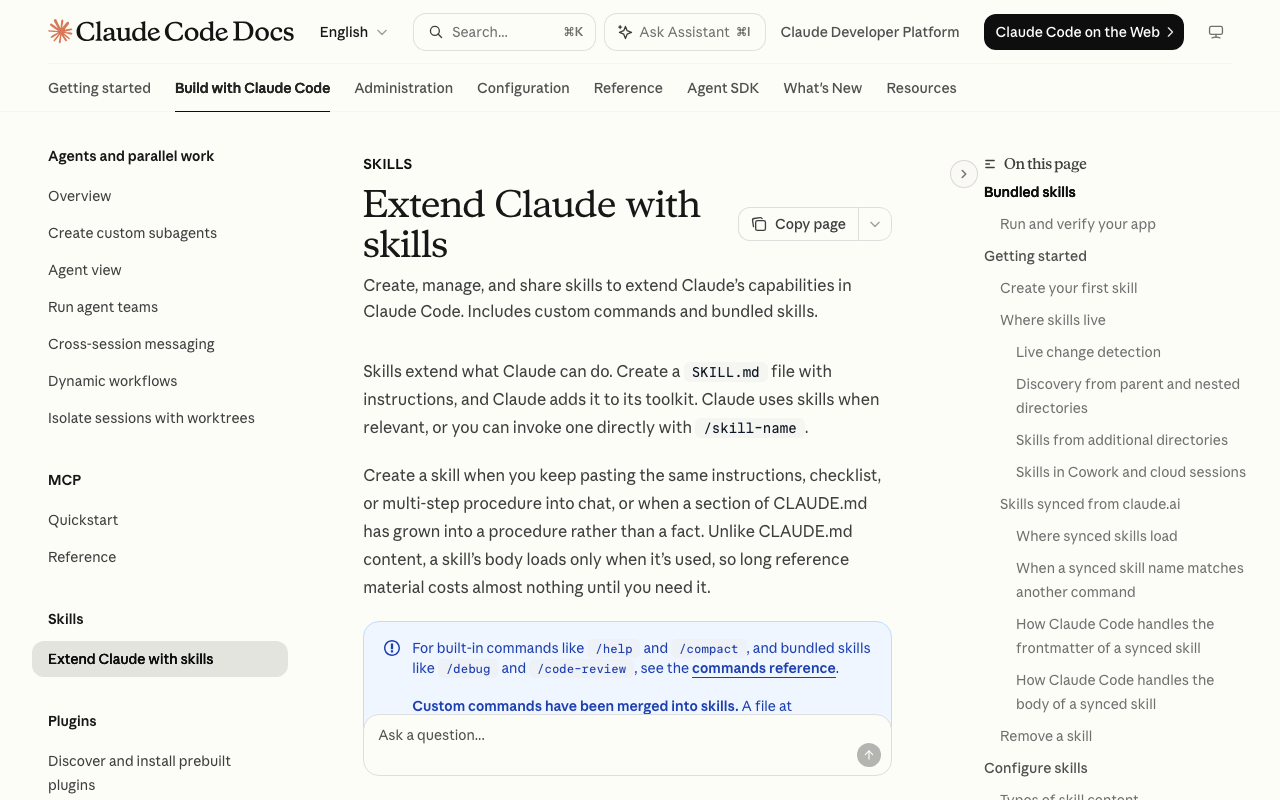
A skill Claude never saw and a skill Claude ignored produce the same silent transcript. Here are the nine causes that explain the difference, with the symptom, the fix, and the command that confirms it.

- A skill that never loads and a skill Claude chose not to use look identical from the transcript. Separate the two with
/skillsbefore you change a single line of the skill. - Four of the nine causes are structural: the file must be at
.claude/skills/<name>/SKILL.md, spelled exactly that way, with parseable frontmatter, in a directory that already existed when the session started. - The real caps are 1,536 characters for
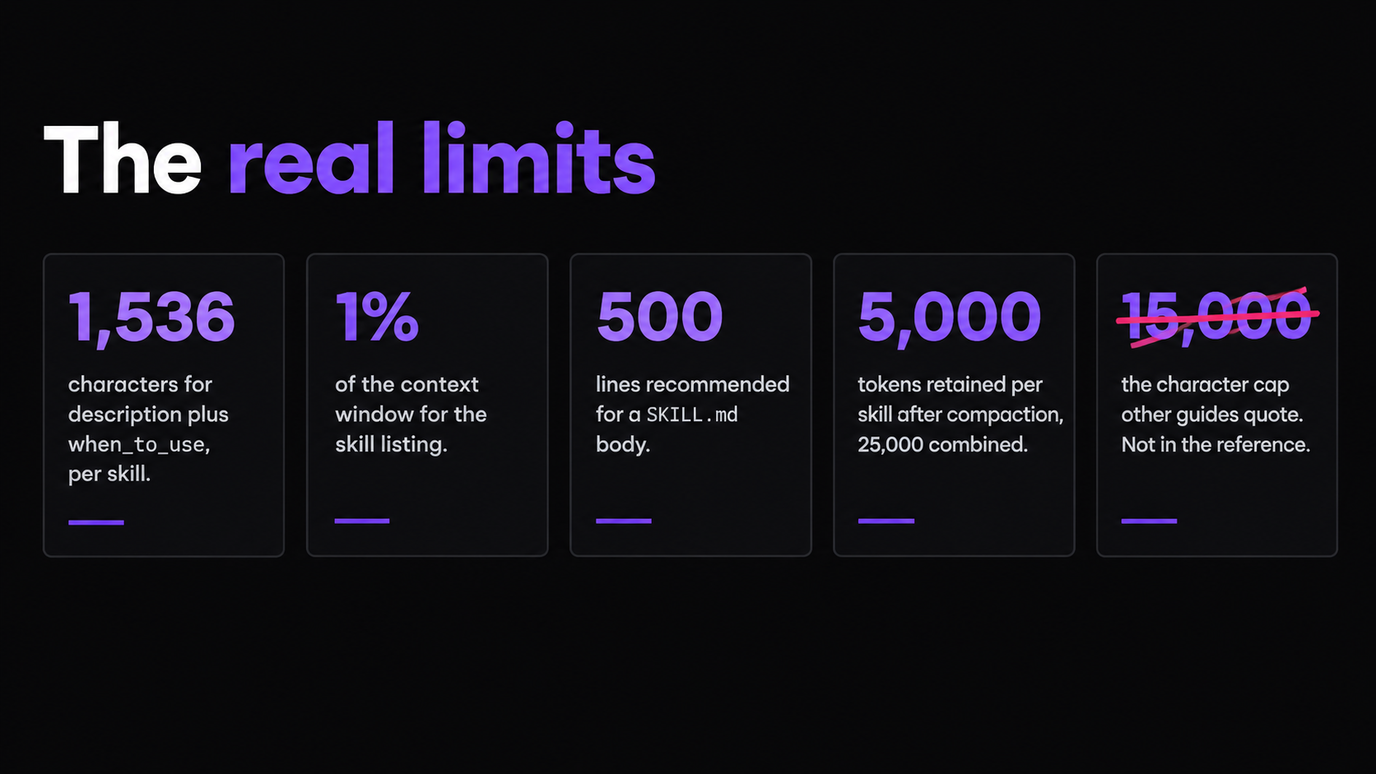
descriptionpluswhen_to_useper skill, and a listing budget of 1% of the model's context window. The widely quoted "15,000 character limit" is not in Anthropic's reference. - Editing a live SKILL.md does not need a restart. Claude Code watches the skill directories. Creating a brand new skills directory does need one.
9 causes · symptom, fix and confirming command for each
You wrote a skill, dropped it in .claude/skills/, asked Claude for the exact thing it was built to do, and nothing happened. No error, no warning, no mention of the skill. If your Claude skills are not triggering, that silence is the actual problem: skills fail closed, so a skill Claude never saw and a skill Claude saw and passed over produce the same transcript.
That ambiguity is expensive. A skill you cannot trust fires maybe two prompts in three, so you stop relying on it and start pasting the instructions back in by hand, which is the exact work the skill was meant to delete. Teams hit this hardest, because a skill that triggers on the author's machine and not on a colleague's is usually a precedence or a budget problem, not a writing problem.
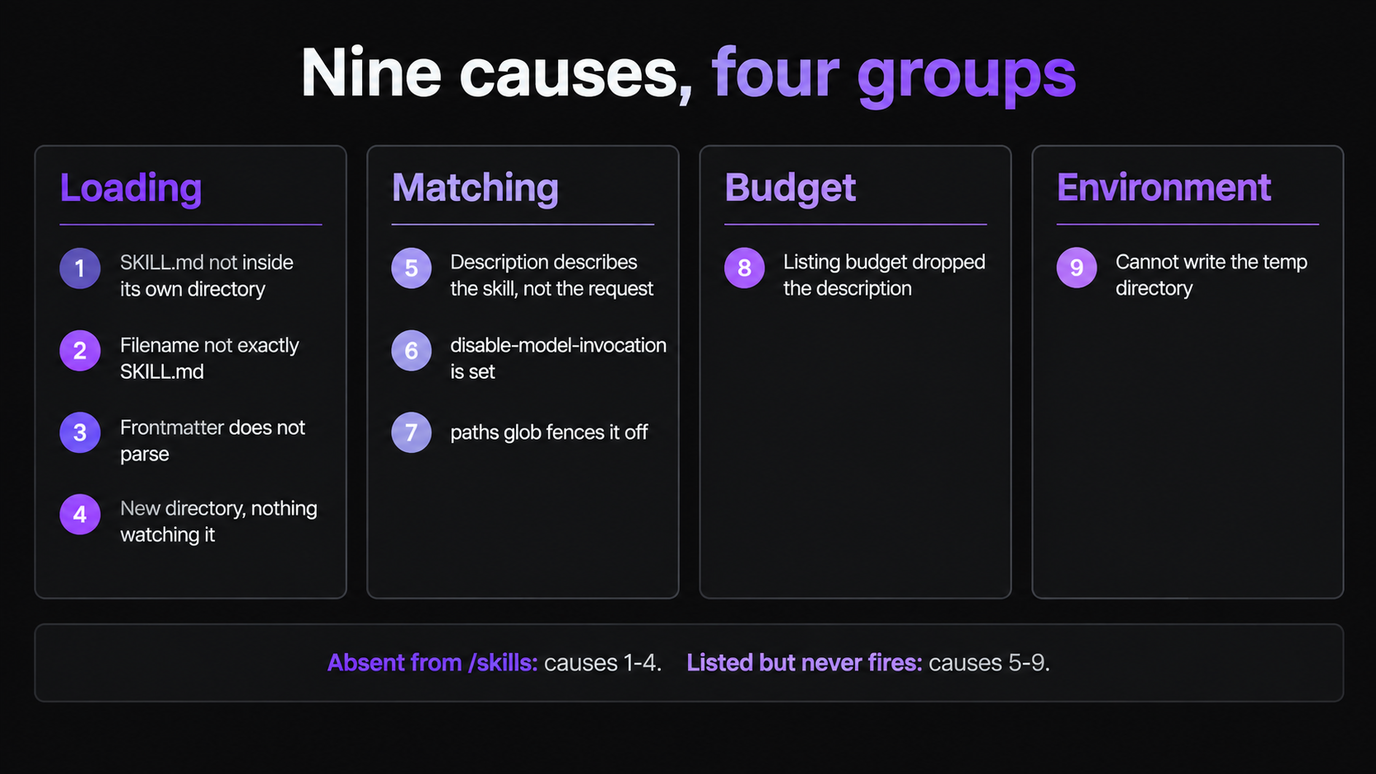
This is the catalog: nine causes, ordered roughly by how often they bite, each with the symptom that identifies it, the fix, and the command that confirms the fix worked. Four are loading failures, three are matching failures, one is a context-budget failure, and one is an environment failure that fails silently by design.
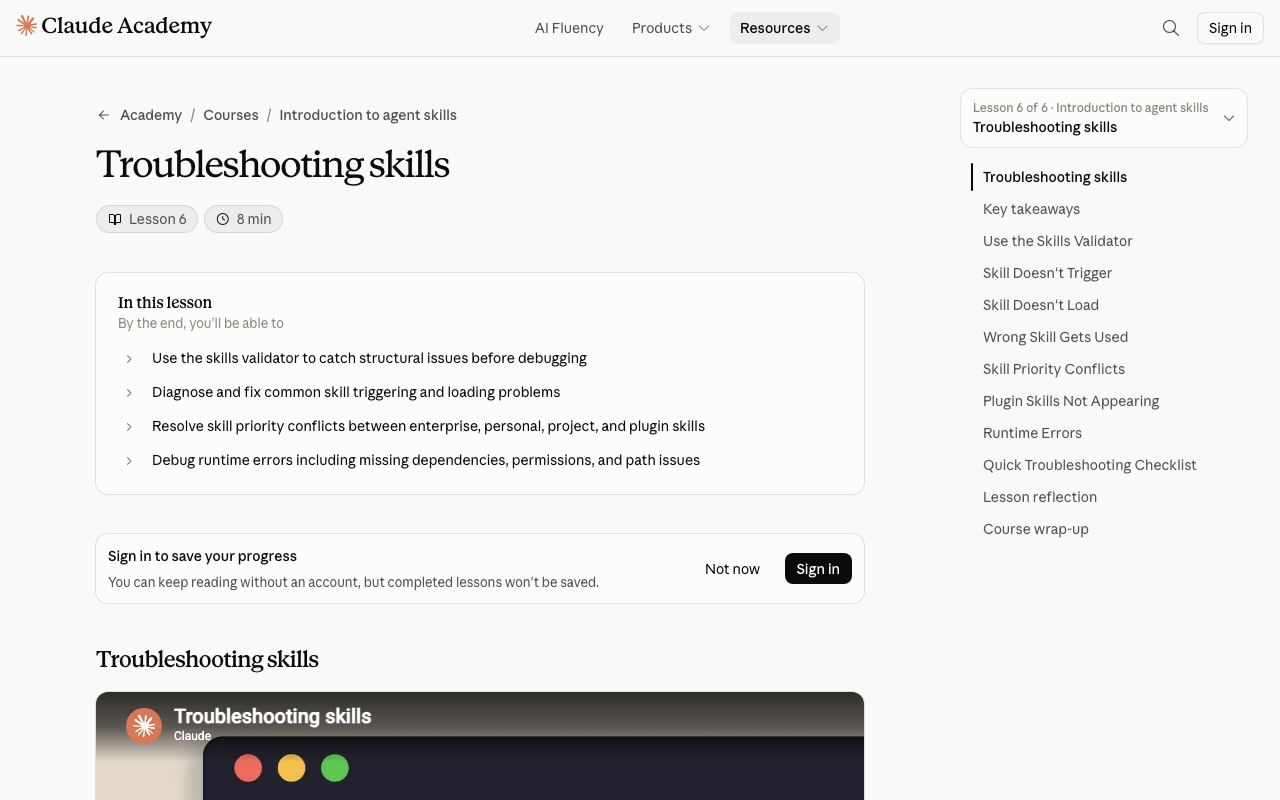
Every number and flag here is quoted from Anthropic's Claude Code skills reference and the Agent Skills troubleshooting lesson rather than from folklore. That matters more than usual on this topic, because the character limit most troubleshooting posts quote is not the one the product enforces.
Why Claude Skills Fail Silently
Skills load in two stages, and almost every failure is a failure of one stage being mistaken for the other.
Stage one is the listing. Claude Code scans the skill directories and injects each skill's description (plus when_to_use, if present) into context on every turn. This is a compressed index, not the skill itself. Stage two is the load. When your prompt matches a description, the full SKILL.md body is pulled into context and stays there across turns as a single message.
So there are only two ways to fail. Either the skill never made it into the listing, in which case no prompt can ever match it, or it made the listing and the description did not look like your request. Those two failures need completely different fixes, which is why the triage step below is not optional.
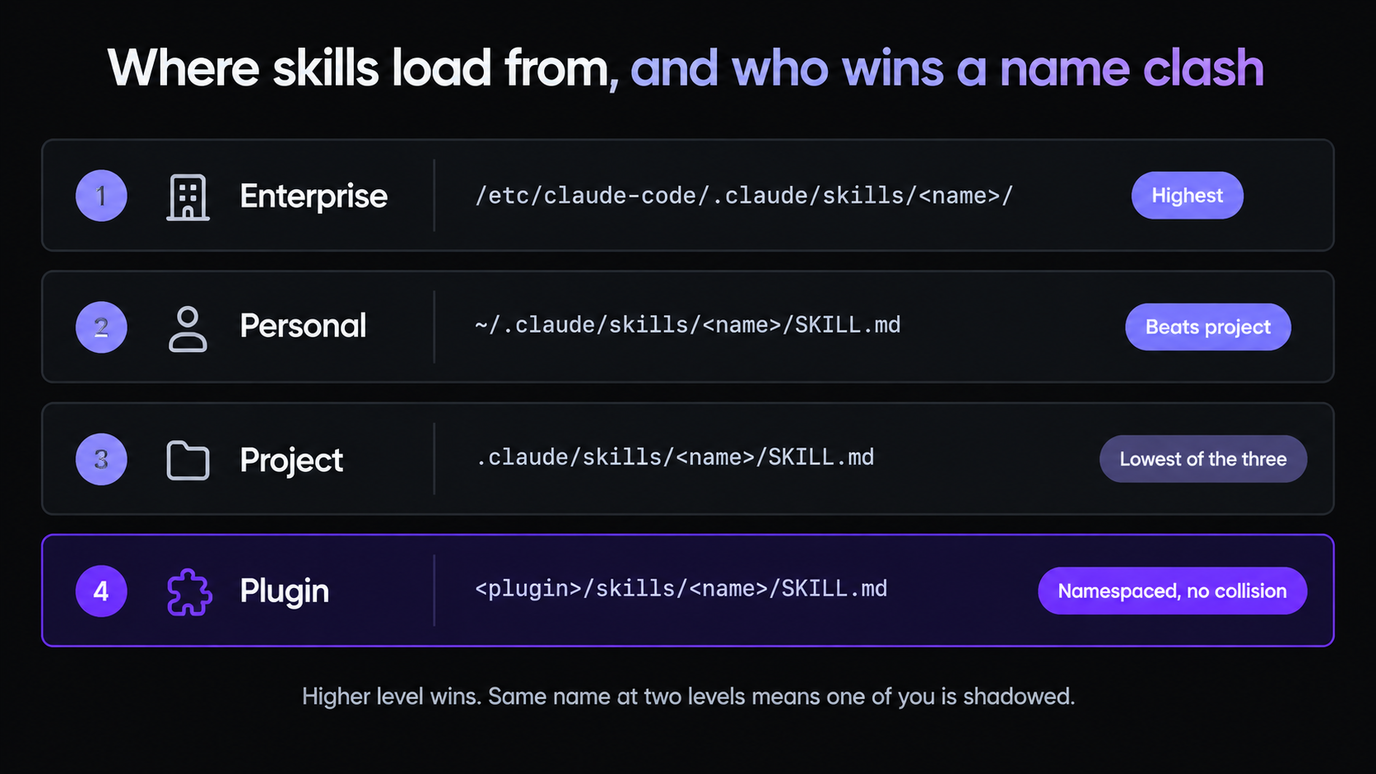
Where the file lives determines both whether it loads and who wins a name collision.
| Level | Path | Scope | Precedence |
|---|---|---|---|
| --- | --- | --- | --- |
| Enterprise | Managed settings dir, e.g. /etc/claude-code/.claude/skills/<name>/ | All users in the org | Highest |
| Personal | ~/.claude/skills/<name>/SKILL.md | All your projects | Beats project |
| Project | .claude/skills/<name>/SKILL.md | That repo only | Lowest of the three |
| Plugin | <plugin>/skills/<name>/SKILL.md | Where the plugin is enabled | Namespaced, no collision |
Project skills also load from every .claude/skills/ directory between where you started Claude Code and the repository root, and skills in nested subdirectories load the first time Claude reads or edits a file down there. That last rule surprises people: a skill under apps/web/.claude/skills/ can be genuinely absent from the listing until Claude touches a file in apps/web.
The 60-Second Triage
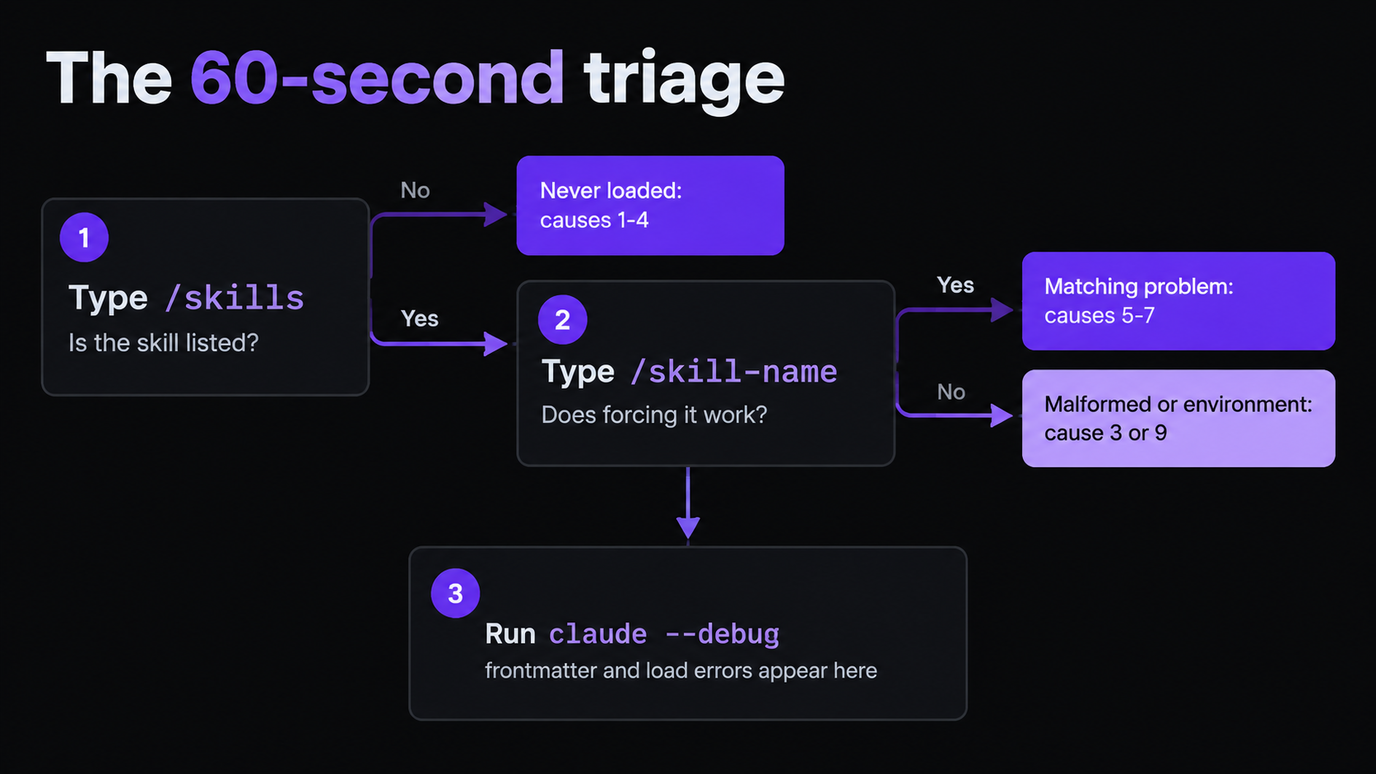
Run these three checks before editing anything. They split the nine causes into two piles and usually finish the job on their own.
1. Is the skill in the listing? Type /skills. If your skill is not there, it never loaded, and your problem is one of causes 1 to 4. If it is there, it loaded, and your problem is 5 to 9. This single check is the difference between a two-minute fix and an afternoon.
2. Does it work when you force it? Type /skill-name directly. If forcing it works, the body of the skill is fine and only the matching is broken, which narrows you to causes 5, 6 and 7. If forcing it also fails, the skill is malformed or the environment is blocking it.
3. What does the loader say? Run claude --debug and look for messages naming your skill. Frontmatter parse errors surface here and nowhere else in normal use.
| Command | What it tells you | Minimum version |
|---|---|---|
| --- | --- | --- |
/skills | Whether the skill loaded, plus the listing size after the budget is applied | — |
/doctor | Listing cost estimate, so you can see if you are near the budget | — |
/skill-doctor | Which skills are unused and eating listing budget | v2.1.252 |
claude plugin validate .claude/skills | Malformed YAML across a whole directory | v2.1.233 |
claude --debug | Frontmatter parse and load errors as they happen | — |
| Symptom | Most likely cause | Fix |
|---|---|---|
| --- | --- | --- |
Not in /skills at all | Wrong path or filename | 1, 2 |
Not in /skills, path looks right | Frontmatter did not parse | 3 |
| Appeared only after a restart | New directory, not yet watched | 4 |
In /skills, /name works, auto never does | Description does not match real prompts | 5 |
In /skills, never auto-fires, by design | disable-model-invocation is set | 6 |
| Fires in one folder, not another | paths glob is fencing it off | 7 |
| Fires on a small repo, not a large one | Listing budget dropped the description | 8 |
| Nothing loads at all, on Linux | Temp directory permissions | 9 |
| Wrong version of the skill fires | Name collision, higher level wins | See precedence table |
Loading Failures: Skills Claude Never Sees
These four share one symptom. The skill is absent from /skills, so nothing you write in it can matter yet.
1. The SKILL.md is not inside its own directory
This is the most common cause by a distance. A file dropped straight into .claude/skills/deploy.md does not load. The loader looks for a named directory containing a SKILL.md:
.claude/skills/deploy/SKILL.md      loads, invokable as /deploy
.claude/skills/deploy.md            never loads
~/.claude/skills/deploy/SKILL.md    loads for every project
For personal and project skills the directory name is the command, not the frontmatter name field. Renaming the directory renames the command. The name field only sets the display label. Plugin skills invert this: there, name sets the command segment after the plugin prefix.
Confirm with a plain ls, not with your editor's file tree, which may be hiding a nesting level.
2. The filename is not exactly SKILL.md
All caps on SKILL, lowercase on md. skill.md, Skill.md and SKILL.MD are silently ignored. This bites hardest on macOS and Windows, where the filesystem is case-insensitive, so a file that looks right in Finder is wrong on disk and wrong in git for everyone on Linux. If a skill works for you and not for a teammate, check the case in git before you check anything else.
3. The YAML frontmatter does not parse
A skill with broken frontmatter is treated as though it does not exist. The file must open with --- on the very first line, with no blank line and no byte-order mark ahead of it. The classic killer is an unquoted colon inside the description:
---
name: release-notes
description: Generates release notes: grouped by type, with PR links
---
That second colon makes the line invalid YAML, the skill vanishes, and nothing tells you. Quote the whole value when it contains a colon, and run claude plugin validate .claude/skills (v2.1.233 and later) to sweep a whole directory at once.
4. The skill directory is new and nothing is watching it
Claude Code watches ~/.claude/skills/, .claude/skills/ and any --add-dir directories during a session, so edits to an existing SKILL.md are picked up live. Most troubleshooting advice tells you to restart after every change; that has not been true for a while and it wastes context.
The exception is real, though. If you have just created the skills directory itself, restart Claude Code so it begins watching. Plugin skills are also different: changes to a plugin's hooks/, .mcp.json, agents/ or output-styles/ need /reload-plugins.
Most broken skills are hand-rolled first attempts. Skiln indexes installable Claude Skills, MCP servers and agents with their real install paths, so you can start from a SKILL.md that already loads and edit from there. Browse the skills directory or generate a config for your stack.
Disclosure: Skiln publishes this article and runs the directory it links to.
Triggering Failures: Loaded but Never Chosen
The skill is in /skills and /skill-name works. Now the problem is that your description does not look like the thing you typed.
5. The description describes the skill, not the request
Claude matches your prompt against the description text. A description written for a human reader ("helps with code quality") shares almost no vocabulary with a real request ("why is this endpoint so slow"), so it never fires. The fix is to write the description in the language of the request, including the phrasings you actually use.
There is a second field for exactly this. when_to_use is appended to description and is the right home for trigger phrases and example requests, which keeps the description itself readable.
6. Invocation is switched off in frontmatter
Two fields silently disable exactly the behaviour you are testing, and both are easy to inherit from a copied skill.
| Field | Default | Effect | Fails you when |
|---|---|---|---|
| --- | --- | --- | --- |
disable-model-invocation | false | true means only you can invoke it with /name, and its description is kept out of context entirely | Copied from a manual-only skill; also blocks preloading in subagents and scheduled tasks |
user-invocable | true | false hides it from the / menu; only Claude can invoke it | You test with /name, it is missing, and you conclude it did not load |
paths | unset | Globs that limit automatic activation to matching files | Set to src/**/*.ts and you are working in tests/ |
description + when_to_use | — | The matching text, capped at 1,536 characters combined | Long descriptions are truncated from the end |
If disable-model-invocation: true is set, the skill is working as configured. Remove the line to get automatic invocation back.
7. A paths glob is fencing the skill off
paths limits automatic loading to sessions where Claude is working with matching files. It is a good tool badly misread: a skill with paths: src/**/*.ts will not fire while you are editing tests, docs or config, and the transcript gives you no hint why. Either widen the glob or drop the field and let the description do the work.
Budget Failures: When Descriptions Get Truncated
8. The skill listing budget dropped your description
Every loaded skill spends context on every turn, so the listing has a budget: 1% of the model's context window by default. When it is full, Claude Code drops descriptions starting with the least-used skills. Your skill is still listed and /skill-name still works, but the text Claude matches against is gone or clipped, which reads exactly like a description problem.
This is the failure that explains "it works on my laptop and not on the monorepo". More skills in scope means more pressure on the same budget.
| Limit | Default | How to change it |
|---|---|---|
| --- | --- | --- |
| Skill listing budget | 1% of context window | skillListingBudgetFraction, 0.01 to 1.0 |
| Fixed listing budget | — | SLASH_COMMAND_TOOL_CHAR_BUDGET |
Per-skill description + when_to_use | 1,536 characters | skillListingMaxDescChars |
| SKILL.md body | 500 lines recommended | Move detail into referenced files |
| Retained per skill after auto-compaction | 5,000 tokens | 25,000 token combined budget |
Run /doctor for the listing cost estimate and /skill-doctor (v2.1.252 and later) to find skills that are consuming budget without ever being used. Deleting three dead skills is usually faster than raising the fraction.
Note what is not in that table: the 15,000-character cap that several troubleshooting guides quote. The per-skill cap in Anthropic's reference is 1,536 characters, and the listing cap is proportional to the context window rather than fixed. If you have been trimming to 15,000, you have been optimising against the wrong number.
Environment Failures: Permissions and Stale State
9. Claude Code cannot write its temp directory
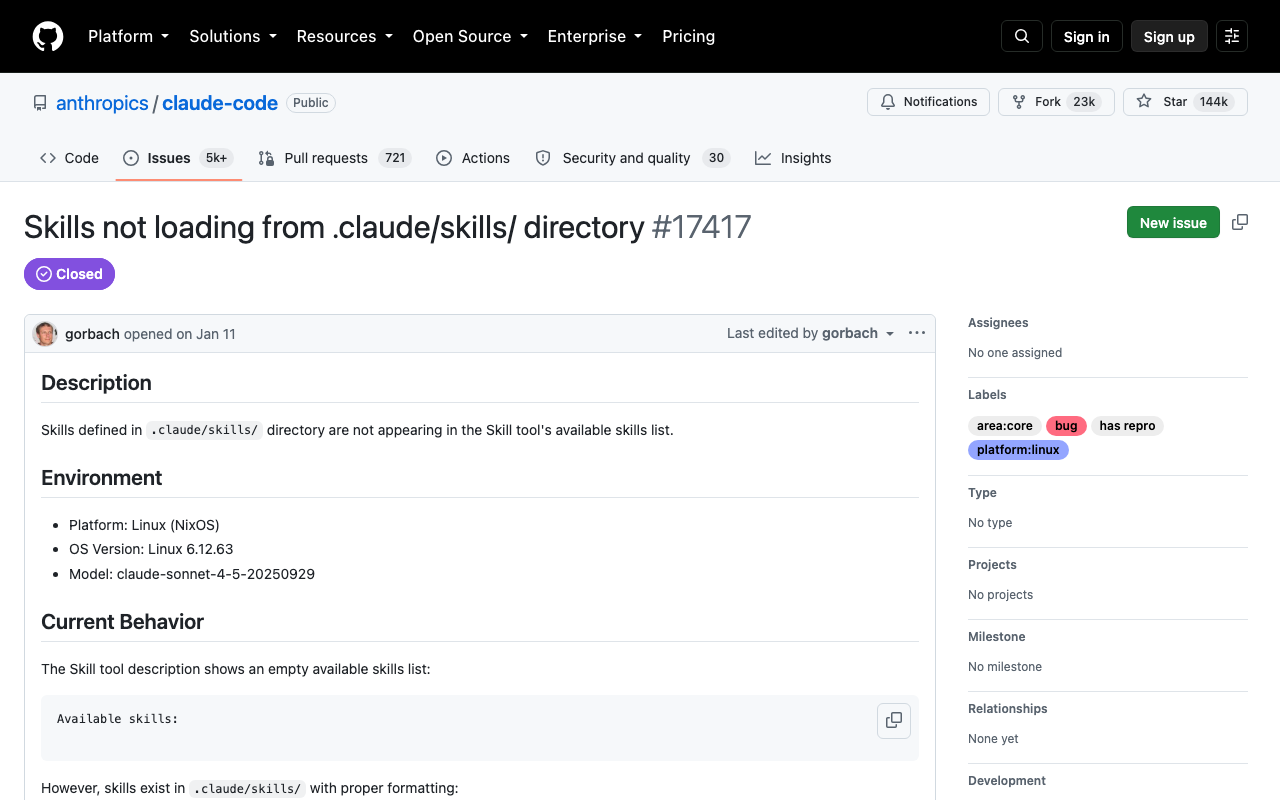
Skills are processed and cached through a per-workspace temp directory. If Claude Code cannot create it, skill loading fails without an error in the UI. The reported case is /tmp/claude/ owned by root:root with 755 permissions, which produces an EACCES: permission denied, mkdir in debug output and an empty skill list everywhere else. It was filed against Claude Code in January 2026 as issue #17417, reproduced on NixOS, where system directories are commonly created root-owned.
The fix is to give your user ownership of the directory:
sudo chown -R $USER:$USER /tmp/claude/Suspect this one when no skills load, not just yours, and when claude --debug mentions mkdir or EACCES. Anything that produces an empty listing across the board is environmental, not a problem with your YAML.
How to Write a Description That Actually Triggers
The rule is short: describe the request, not the implementation, and put the most important use case first, because truncation eats the end.
---
name: perf-profiler
description: Profiles slow endpoints and functions and reports the hot path.
when_to_use: >
  Use when the user says something is slow, asks why a request takes so
  long, asks to profile or benchmark code, or wants to find a bottleneck.
---
The description says what it produces. The when_to_use carries the vocabulary of the actual prompt: slow, why is this taking so long, profile, benchmark, bottleneck. Both count toward the same 1,536 characters, so spend them on phrasings rather than on prose.
Two failure modes are worth naming. A description so narrow that only one phrasing matches means the skill effectively does not exist. A description so broad that it mentions "code" and "files" means it fires constantly and burns context on turns that never needed it; that one is fixed by making the description specific, or by setting disable-model-invocation: true and calling it by name. Test with three or four different phrasings before you call it done, including the sloppy one you would actually type.
Name Conflicts and Precedence
When two skills share a name, the higher level wins: enterprise beats personal, personal beats project. This is the quiet cause of "my teammate gets different behaviour from the same repo" — a personal skill with the same name is shadowing the project one for one of you, and both /skills listings look correct.
Skills also override .claude/commands/ files of the same name, and override skills synced from claude.ai. Plugin skills are namespaced as plugin-name:skill-name and cannot collide.
One more thing catches people packaging skills for elsewhere: only name, description, license, compatibility, metadata and allowed-tools are part of the Agent Skills spec. Claude Code specific fields like disable-model-invocation, context and paths cause validation errors when you upload the same skill to claude.ai or the Skills API. A skill can be perfectly healthy locally and rejected on upload for a field that only ever meant something in the CLI.
The Pre-Flight Checklist
Before you publish a skill, or before you file a bug against one, walk this list. It catches all nine causes in about a minute.
ls .claude/skills/<name>/SKILL.mdreturns the file, with that exact case.- The file opens with
---on line 1, and any description containing a colon is quoted. claude plugin validate .claude/skillspasses.- The skill appears in
/skills. /skill-nameruns it successfully.disable-model-invocationis unset or false,user-invocableis unset or true.paths, if set, matches the files you are actually working in.descriptionpluswhen_to_useis under 1,536 characters and leads with the main use case./doctorshows the listing is not at budget, and/skill-doctorshows no dead weight.- Three different phrasings of a real request all trigger it.
If all ten pass and the skill still does not fire, you are almost certainly on cause 9: check claude --debug for a permissions error before assuming the model is at fault.
Skiln indexes Claude Skills, MCP servers, agents and commands from ten sources, with install paths and frontmatter you can copy. Browse skills · Best Claude Skills · Browse everything
Disclosure: Skiln publishes this article and runs the directory it links to.
Related Reading
How to Install Claude Skills from GitHub — getting the directory layout right the first time.
How to Build Your Own Claude Skill — frontmatter and body structure from scratch.
Skill Creator Guide — generating descriptions that trigger reliably.
Plugins vs Skills vs MCP Servers — when the answer is that you wanted a different mechanism.
MCP Installation Errors — the same treatment for MCP servers.
The sources for every limit and version number above: Anthropic's Claude Code skills reference and the Agent Skills troubleshooting lesson on Claude Academy. Where a number here disagrees with another guide, the reference is what the product enforces.
Published September 05, 2026 · Companion to What Are Claude Skills? and the install guide.