MCP Servers for Enterprise Teams: Security, Compliance & Scale
The enterprise MCP guide nobody has written. OAuth 2.1 auth, container isolation, audit logging, SOC2/HIPAA compliance, team management, approval workflows, and monitoring for production MCP deployments.

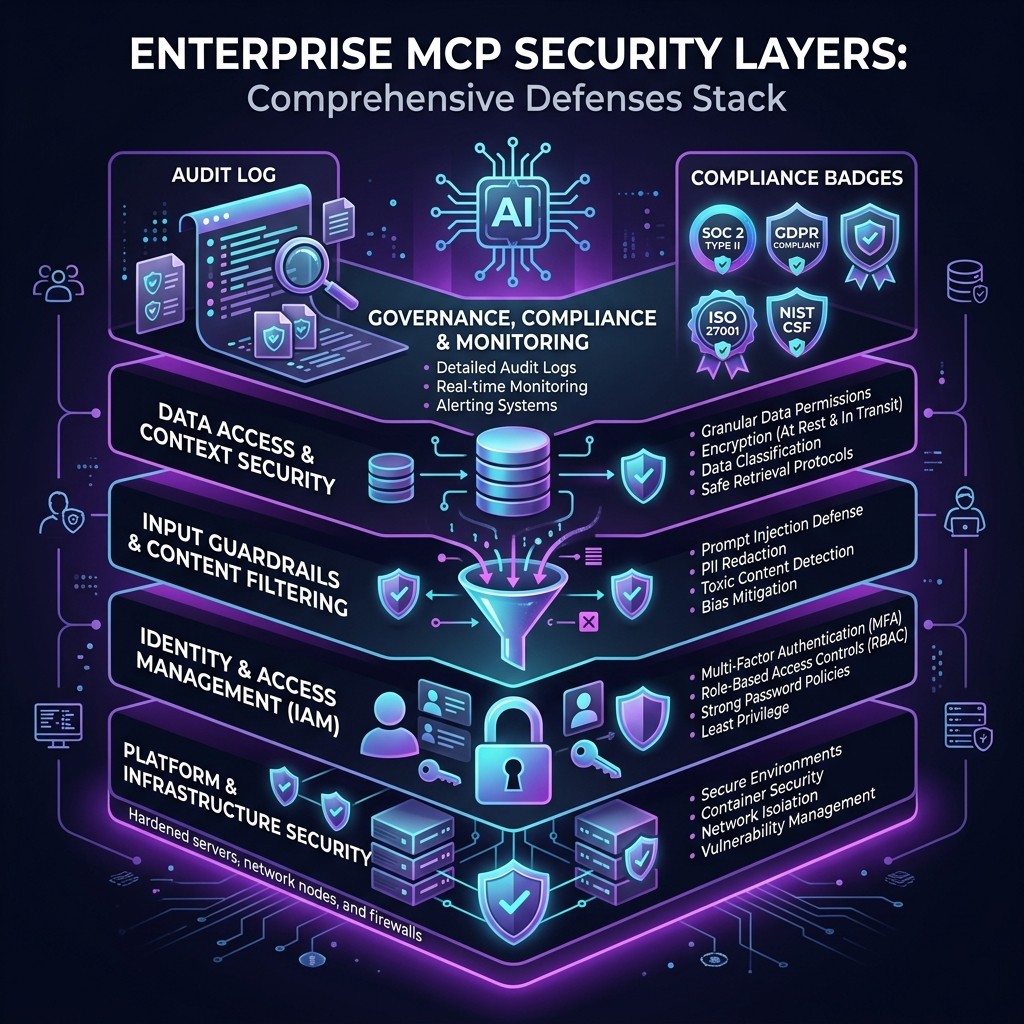
MCP Servers for Enterprise Teams: Security, Compliance & Scale
By David Henderson | March 26, 2026 | 16 min read
MCP servers are production-ready for enterprises — but only if you architect the deployment correctly. The protocol itself is sound. The security gap is in implementation: how you authenticate, isolate, audit, and govern MCP servers across teams. This guide covers every enterprise concern from OAuth and container sandboxing to SOC 2 audit trails and HIPAA-compliant data handling. If your security team is blocking MCP adoption, send them this post.
Table of Contents
- Why Enterprises Are Cautious About MCP
- Authentication and Authorization
- Container Isolation and Sandboxing
- Audit Logging and Observability
- Compliance: SOC 2, HIPAA, and GDPR
- Team Management and Governance
- Approval Workflows
- Monitoring and Alerting
- The Enterprise MCP Architecture
- Frequently Asked Questions
Why Enterprises Are Cautious About MCP {#why-enterprises-cautious}
I spend a lot of my time talking to engineering managers at mid-size and large companies who are excited about MCP servers but stuck in a procurement and security review purgatory. The conversation always follows the same pattern:
"Our developers love Claude Code. They have been using it with MCP servers for GitHub and our databases. Security found out. Now we need to formalize this."
The caution is rational. MCP servers are, by design, powerful. A database MCP server has your production credentials. A GitHub MCP server has tokens that can merge PRs and delete branches. A filesystem MCP server can read every file on a developer's machine. These are not theoretical risks — they are the intended capabilities.
The question enterprises need to answer is not "should we use MCP servers?" — developers are already using them. The question is "how do we make MCP adoption safe, compliant, and governed at scale?"
That is what this guide answers. Every section maps to a specific concern I have heard from enterprise security teams, compliance officers, and engineering leadership.
Authentication and Authorization {#auth}
The Current State
Most MCP servers today authenticate through static tokens passed as environment variables. This is the pattern from the MCP setup guide:
{
  "mcpServers": {
    "github": {
      "command": "npx",
      "args": ["-y", "@modelcontextprotocol/server-github"],
      "env": {
        "GITHUB_PERSONAL_ACCESS_TOKEN": "ghp_static_token_here"
      }
    }
  }
}
For individual developers, this is fine. For enterprises, static tokens are a compliance nightmare. They do not expire, they are not tied to user identity, they get committed to repos accidentally, and they cannot be revoked centrally.
OAuth 2.1: The Enterprise Answer
The MCP specification added OAuth 2.1 support for remote (HTTP/SSE) MCP servers. Here is how it works in practice:
- The MCP server is deployed as a remote HTTP service behind your identity provider (Okta, Azure AD, Auth0).
- When a developer's Claude Code client connects, the server initiates an OAuth 2.1 flow.
- The developer authenticates through your SSO provider.
- The server receives a scoped, time-limited access token tied to the developer's identity.
- The token expires. No static credentials stored on developer machines.
This is the pattern I recommend for every enterprise MCP deployment. The implementation looks like this on the server side:
const server = new McpServer({
  name: "enterprise-db-server",
  version: "1.0.0",
  auth: {
    type: "oauth2",
    authorizationUrl: "https://auth.yourcompany.com/authorize",
    tokenUrl: "https://auth.yourcompany.com/token",
    scopes: ["db:read", "db:write"],
    clientId: process.env.OAUTH_CLIENT_ID
  }
});
Role-Based Access Control (RBAC)
OAuth tokens carry scopes, and those scopes map to permissions within the MCP server. A junior developer might get db:read scope. A senior developer gets db:read and db:write. A DBA gets db:admin. The MCP server enforces these scopes on every tool call.
This is not theoretical — teams at companies I have consulted with are deploying this pattern today. The Supabase MCP server and the PostgreSQL MCP server both support scoped access when deployed as remote HTTP services.
Container Isolation and Sandboxing {#container-isolation}
Why Containers Matter for MCP
A locally running MCP server (via stdio transport) executes as a subprocess with the same permissions as the user who launched it. On a developer's laptop, that means access to the home directory, environment variables, network, and every file the user can read.
For enterprise environments, this is unacceptable. You need isolation — the MCP server should only access what it explicitly needs.
Docker-Based Isolation
The most practical approach is running MCP servers in Docker containers:
FROM node:20-slim
WORKDIR /app
COPY package*.json ./
RUN npm ci --production
COPY dist/ ./dist/
USER node
ENTRYPOINT ["node", "dist/index.js"]
{
"mcpServers": {
"database": {
"command": "docker",
"args": [
"run", "--rm", "-i",
"--network=database-net",
"--memory=256m",
"--cpus=0.5",
"--read-only",
"-e", "DB_CONNECTION_STRING",
"company/mcp-database-server:latest"
]
}
}
}Key isolation controls in that configuration:
--network=database-net— The container can only reach the database network, not the internet.--memory=256m— Resource limits prevent runaway processes.--read-only— The container filesystem is immutable.USER node— The server does not run as root.- No
-vvolume mounts — The container cannot access the host filesystem.
Kubernetes for Team Deployments
For centralized team deployments, MCP servers run as Kubernetes pods with network policies, resource quotas, and pod security standards:
apiVersion: v1
kind: Pod
metadata:
  name: mcp-github-server
  labels:
    app: mcp-server
    tier: development-tools
spec:
  securityContext:
    runAsNonRoot: true
    readOnlyRootFilesystem: true
    allowPrivilegeEscalation: false
  containers:
  - name: mcp-github
    image: company/mcp-github-server:1.2.0
    resources:
      limits:
        memory: "256Mi"
        cpu: "500m"
    env:
    - name: GITHUB_APP_KEY
      valueFrom:
        secretRef:
          name: github-mcp-secrets
          key: app-key
This approach gives you centralized credential management (via Kubernetes Secrets or a vault integration), network policies that restrict server-to-server communication, resource quotas, and pod security standards that prevent privilege escalation.
Audit Logging and Observability {#audit-logging}
What to Log
Every MCP interaction should produce an audit log entry containing:
- Timestamp — When the tool call was made
- User identity — Who initiated the action (from OAuth token)
- MCP server — Which server handled the request
- Tool name — Which specific tool was called
- Input parameters — What data was sent to the tool (with PII redaction if needed)
- Output summary — What the tool returned (truncated for large responses)
- Result status — Success, failure, or error
Implementation Pattern
Wrap your MCP server handlers with a logging middleware:
function auditedTool(
  name: string,
  description: string,
  schema: ZodSchema,
  handler: ToolHandler
) {
  return server.tool(name, description, schema, async (params, context) => {
    const startTime = Date.now();
    const userId = context.auth?.userId || "anonymous";

    try {
      const result = await handler(params, context);
      auditLog.info({
        event: "mcp_tool_call",
        tool: name,
        userId,
        params: redactPII(params),
        status: "success",
        durationMs: Date.now() - startTime
      });
      return result;
    } catch (error) {
      auditLog.error({
        event: "mcp_tool_call",
        tool: name,
        userId,
        params: redactPII(params),
        status: "error",
        error: error.message,
        durationMs: Date.now() - startTime
      });
      throw error;
    }
  });
}
Centralized Log Aggregation
Audit logs should flow to your existing SIEM or log aggregation platform (Splunk, Datadog, Elasticsearch). MCP servers deployed in containers can output structured JSON logs to stdout, which your container runtime forwards to the aggregation layer.
This is non-negotiable for regulated industries. Your auditors will ask "who accessed what data through the AI tool, and when?" If you cannot answer that from logs, MCP servers will not pass your compliance review.
Compliance: SOC 2, HIPAA, and GDPR {#compliance}
SOC 2 Type II
SOC 2 cares about the security, availability, processing integrity, confidentiality, and privacy of your systems. MCP servers touch several of these:
Security — Authentication (OAuth 2.1), authorization (RBAC), encryption in transit (TLS for remote servers), and access controls (container isolation). Everything we covered above maps directly to SOC 2 security criteria.
Confidentiality — MCP servers access confidential data (source code, database contents, API keys). Controls include scoped access tokens, PII redaction in logs, and network isolation that prevents data exfiltration.
Availability — Remote MCP servers need uptime monitoring, health checks, and failover. A database MCP server going down should not block your entire development team.
Processing Integrity — Audit logs demonstrate that MCP tool calls produced correct outputs and errors were handled appropriately.
HIPAA Considerations
If your codebase or databases contain Protected Health Information (PHI), MCP servers introduce specific HIPAA concerns:
- Business Associate Agreement (BAA) — Anthropic offers a BAA for Claude API usage. Ensure your MCP deployment architecture keeps PHI within your infrastructure and does not transmit it to Anthropic's servers unnecessarily.
- Minimum Necessary Rule — MCP server scopes should grant access only to the minimum data necessary for the task. A developer debugging a billing feature should not have MCP access to patient records tables.
- Access Logging — HIPAA requires audit trails for all PHI access. The audit logging pattern above satisfies this if your log retention meets the six-year HIPAA requirement.
- Encryption — PHI must be encrypted at rest and in transit. Remote MCP servers must use TLS. Container volumes containing PHI must use encrypted storage.
GDPR
For European operations, GDPR adds data residency requirements. MCP servers that process EU personal data must run in EU regions. The container/Kubernetes deployment pattern supports this — deploy the MCP server pod in your EU cluster, and data never leaves the region.
Data subject access requests (DSARs) must be answerable: "What personal data did the AI access about me?" Audit logs that include user identity and tool call parameters (redacted appropriately) support this.
Team Management and Governance {#team-management}
Centralized MCP Server Registry
Instead of letting every developer configure their own MCP servers, maintain a central registry of approved servers:
{
  "approvedServers": {
    "github": {
      "version": "1.5.2",
      "image": "registry.company.com/mcp/github-server:1.5.2",
      "securityReview": "2026-03-15",
      "approvedBy": "security-team",
      "maxScopes": ["repo:read", "repo:write", "issues:read", "issues:write", "pr:read", "pr:write"]
    },
    "postgres": {
      "version": "2.1.0",
      "image": "registry.company.com/mcp/postgres-server:2.1.0",
      "securityReview": "2026-03-10",
      "approvedBy": "security-team",
      "maxScopes": ["db:read", "db:write"]
    }
  }
}
Developers pull MCP server images from your internal registry, not from public npm or Docker Hub. Each image has been reviewed, scanned for vulnerabilities, and approved by your security team.
Server Allowlisting
Claude Code supports server allowlisting through organization settings. Teams can configure which MCP servers are permitted and block all others:
{
  "organization": {
    "allowedMcpServers": [
      "registry.company.com/mcp/*"
    ],
    "blockedMcpServers": [
      "npx *",
      "docker.io/*"
    ]
  }
}
This prevents developers from connecting unauthorized MCP servers that have not passed security review. It is the single most important governance control for enterprise MCP deployments.
Skill Governance
The same governance applies to Claude Code skills. Enterprise teams should maintain an approved skills library rather than letting developers install arbitrary skills from GitHub. Skills that instruct Claude to skip tests, bypass linting, or ignore security warnings should be explicitly blocked.
The skill installation guide covers the mechanics. For enterprises, wrap that process in a review gate.
Approval Workflows {#approval-workflows}
Tool-Level Approval
MCP's elicitation feature enables human-in-the-loop approval for sensitive operations. An enterprise database MCP server can require explicit user confirmation before executing destructive queries:
server.tool(
  "execute_sql",
  "Execute a SQL query",
  { query: z.string() },
  async ({ query }, context) => {
    if (isDestructiveQuery(query)) {
      const confirmation = await context.elicit({
        type: "confirmation",
        message: `This query will modify data:\n\n${query}\n\nApprove execution?`,
        schema: z.object({
          approved: z.boolean()
        })
      });

      if (!confirmation.approved) {
        return { content: [{ type: "text", text: "Query cancelled by user." }] };
      }
    }

    return await executeQuery(query);
  }
);
Multi-Level Approval
For highly sensitive operations (production database writes, infrastructure changes, secret rotation), implement multi-level approval where the MCP server sends a request to your internal approval system (PagerDuty, Slack workflow, custom tool) and waits for a manager or security team approval before proceeding.
Hooks as Guardrails
Claude Code hooks provide another approval layer. A PreToolUse hook can intercept any MCP tool call and enforce policy before it executes:
# Pre-tool hook: block production database writes outside change windows
if [[ "$MCP_TOOL" == "execute_sql" && "$MCP_SERVER" == "production-db" ]]; then
  current_hour=$(date +%H)
  if [[ $current_hour -lt 10 || $current_hour -gt 14 ]]; then
    echo "BLOCKED: Production DB writes only allowed 10:00-14:00 UTC"
    exit 1
  fi
fi
Monitoring and Alerting {#monitoring}
Health Checks
Remote MCP servers should expose health endpoints:
app.get("/health", (req, res) => {
  const checks = {
    server: "healthy",
    database: checkDatabaseConnection(),
    memory: process.memoryUsage().heapUsed < MAX_HEAP,
    uptime: process.uptime()
  };

  const status = Object.values(checks).every(c => c) ? 200 : 503;
  res.status(status).json(checks);
});
Metrics to Track
| Metric | Why It Matters | Alert Threshold |
|---|---|---|
| -------- | --------------- | ----------------- |
| Tool call latency (p50, p95, p99) | Slow servers degrade developer experience | p95 > 5s |
| Error rate | Failed tool calls indicate server or upstream issues | > 5% in 5 min window |
| Concurrent connections | Capacity planning | > 80% of limit |
| Token refresh failures | Auth infrastructure issues | Any failure |
| Memory usage | Resource leak detection | > 80% of limit |
| Audit log volume | Anomaly detection (unusual access patterns) | 3x normal volume |
Anomaly Detection
Monitor audit logs for unusual patterns:
- A developer account making 100x more database queries than normal (potential credential compromise)
- Tool calls outside business hours (if unexpected for your team)
- Access to tables or repos outside a developer's normal scope
- Rapid successive tool calls that suggest automated abuse
These patterns feed into your existing SIEM alerting rules.
The Enterprise MCP Architecture {#enterprise-architecture}
Putting it all together, here is the reference architecture I recommend for enterprise MCP deployments:
Developer Machine
├── Claude Code (host)
├── Local MCP Servers (stdio, for non-sensitive tools)
│   ├── Filesystem (project directory only)
│   └── Memory (local knowledge graph)
└── Remote MCP Clients (HTTP/SSE)
    └── Connect to →

Enterprise MCP Gateway (Kubernetes)
├── OAuth 2.1 / SSO Authentication Layer
├── RBAC Policy Engine
├── Audit Log Aggregator → SIEM
├── Rate Limiter
└── MCP Server Pods
    ├── GitHub MCP Server (v1.5.2, approved)
    ├── PostgreSQL MCP Server (v2.1.0, approved)
    ├── Slack MCP Server (v1.3.0, approved)
    └── Custom Internal MCP Servers
The key architectural decisions:
- Non-sensitive tools run locally (filesystem with scoped access, memory server). They are fast and do not require network calls.
- Sensitive tools run remotely behind the enterprise gateway. Credentials live in the cluster, not on developer machines.
- Authentication is centralized through your existing SSO provider.
- All tool calls are logged and forwarded to your SIEM.
- Server versions are pinned and updated through a controlled release process.
This architecture satisfies SOC 2, HIPAA, and GDPR requirements while giving developers the full power of MCP-connected AI coding tools. It is the pattern I recommend for any company with more than 20 developers using AI coding tools.
For teams just getting started, the MCP security checklist is a simpler starting point. For the full protocol background, start with the complete MCP guide.
Frequently Asked Questions {#faq}
Is MCP ready for enterprise production use?
The protocol is stable and production-ready. The challenge is not MCP itself — it is how you deploy and govern MCP servers within your organization. With OAuth authentication, container isolation, audit logging, and a centralized server registry, MCP deployments meet enterprise security standards.
Do we need to build our own MCP servers or can we use community ones?
Start with official servers from Anthropic and service providers (Supabase, Cloudflare, etc.) — these are well-maintained and security-audited. For internal APIs and proprietary systems, you will need custom servers. Community servers should pass your security review before deployment. The Skiln.co directory helps identify well-maintained options.
How does MCP fit with our existing security tooling?
MCP audit logs integrate with standard SIEM platforms (Splunk, Datadog, ELK). Container deployments work with your existing vulnerability scanning, network policies, and secret management. OAuth 2.1 integrates with your identity provider. The architecture is designed to fit into existing enterprise security stacks, not replace them.
What about data residency and sovereignty?
MCP servers deployed in your infrastructure keep data within your infrastructure. Remote MCP servers deployed in EU Kubernetes clusters keep EU data in the EU. The key is ensuring that the AI model (Claude, GPT, etc.) does not transmit sensitive data outside your compliance boundary — which is a model-layer concern, not an MCP-layer concern.
How do we handle MCP server updates and vulnerability management?
Pin server versions in your internal registry. Use container image scanning (Trivy, Snyk) to detect vulnerabilities. Establish an update cadence — monthly for non-critical patches, immediate for security vulnerabilities. The centralized registry pattern ensures all developers get the same reviewed version.
Can we restrict which MCP tools individual developers can access?
Yes. RBAC scopes on OAuth tokens control which tools a developer can call. The MCP server enforces scopes on every tool call. A developer with read-only database scope cannot call write or delete tools, even if those tools are exposed by the server.
What is the cost of running enterprise MCP infrastructure?
Minimal. MCP servers are lightweight processes. A Kubernetes deployment with five server pods, an auth proxy, and a log aggregator runs on a single small node. The infrastructure cost is negligible compared to the developer productivity gains. The real cost is the engineering time to set up the governance layer — budget two to four weeks for a team of two engineers.