Claude Code Plugin Manifest in 2026: Full Reference
The manifest is optional, four of its fields delete the directory they look like they extend, and a plugin that passes validation can still be missing half its components. Here is what plugin.json actually does.


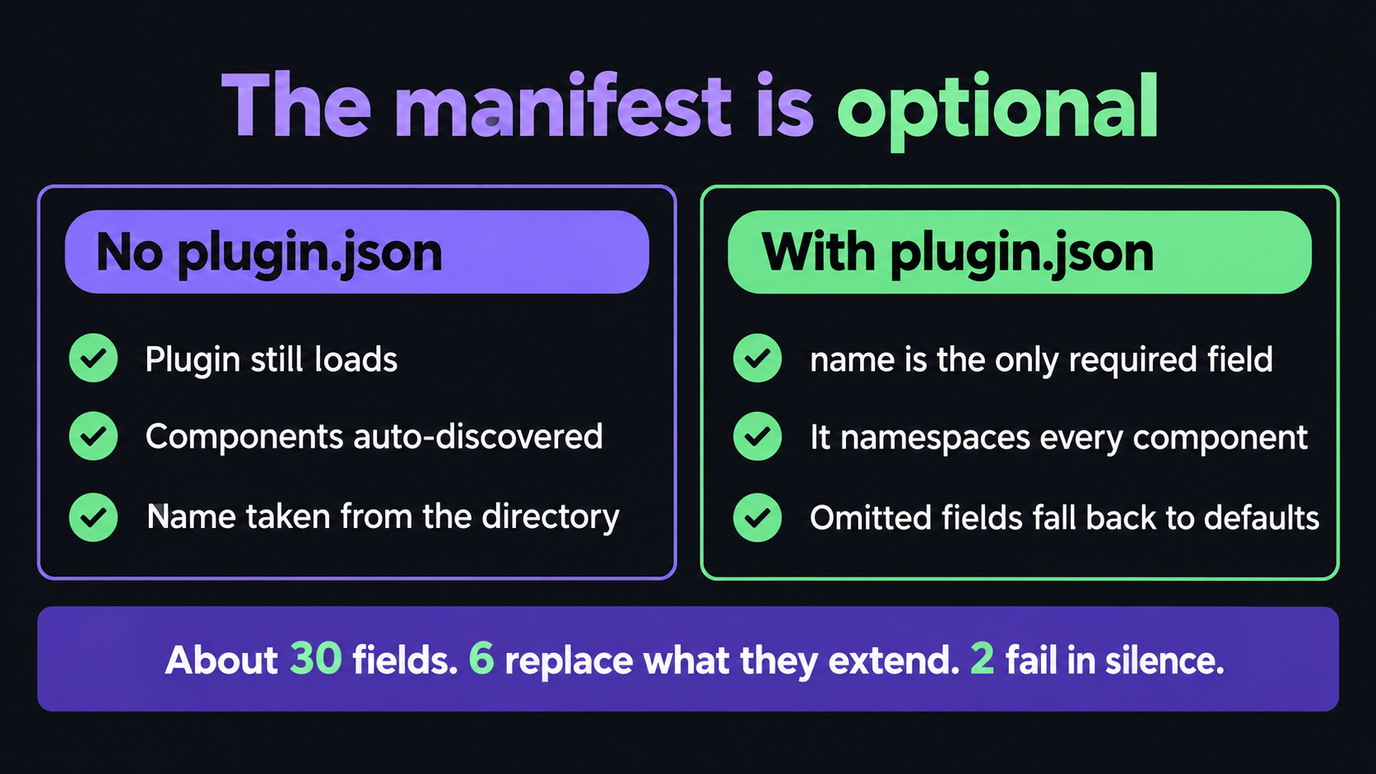
- The manifest is optional. A plugin with no
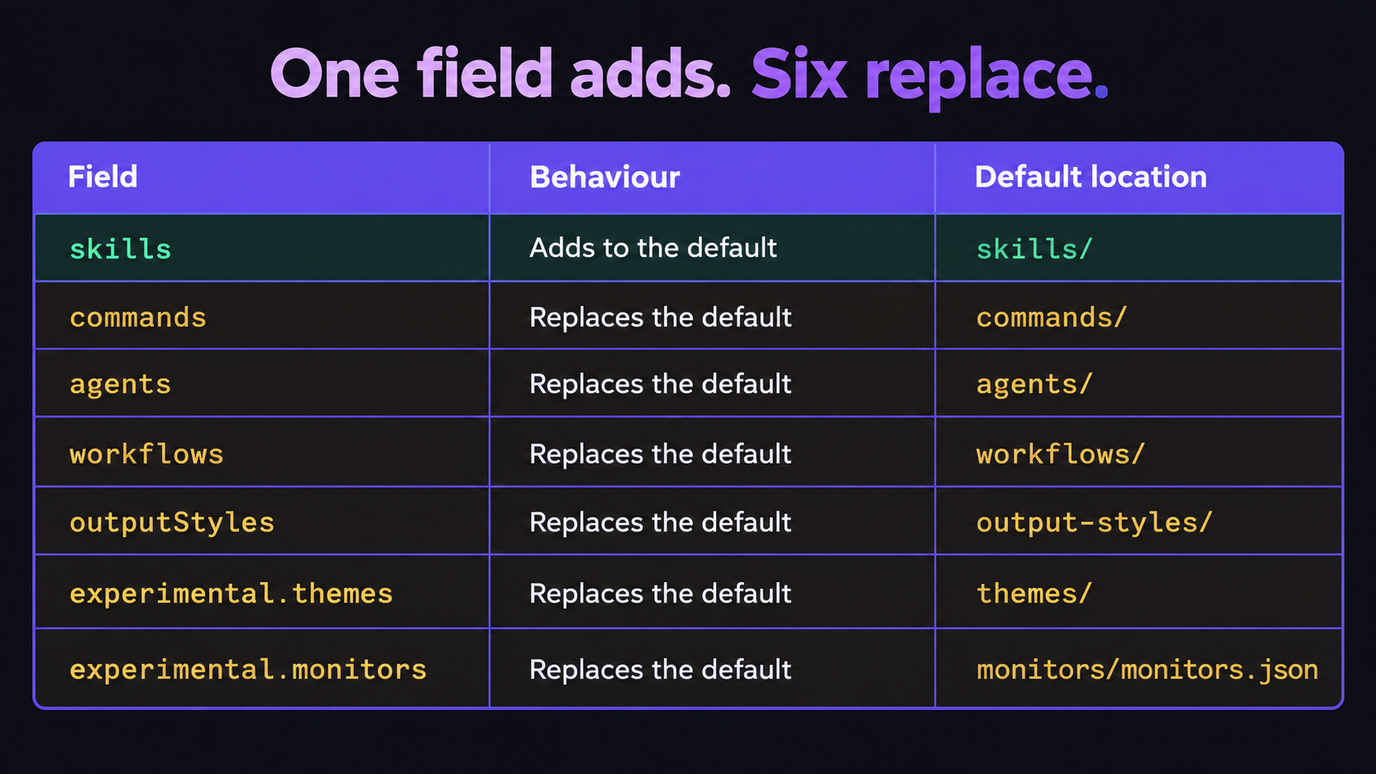
.claude-plugin/plugin.jsonstill loads: Claude Code discovers components in the default folders and takes the name from the directory. commands,agents,workflowsandoutputStylesreplace their default directory.skillsis the only path field that adds to it.- A wrong type is a load error for most fields, but
experimentalandmetadataare ignored in silence and only ever reported as warnings. - A marketplace entry with
"strict": falsebecomes the whole definition, and aplugin.jsonthat also declares components then fails to load. claude plugin validatepasses plugins that are quietly broken. Use--strictin CI, and know what it still lets through.
~30 manifest fields · 6 that replace what they extend · 2 that fail in silence · every value quoted from the reference

You added one line to plugin.json so Claude Code would pick up an extra command file, restarted, and the eleven commands already in commands/ vanished. Nothing errored. claude plugin validate says the plugin is fine, because it is fine: commands replaces the default directory rather than extending it, and the only field that behaves the other way round is skills.
That is the shape of nearly every problem on this topic. A Claude Code plugin manifest fails by loading successfully with less in it than you wrote. Components go missing rather than throwing, a marketplace entry can overrule fields you set, and two of the manifest's own fields discard bad values without complaint.
So this is the reference for the mechanics rather than a field list: what the loader does with each field, which source wins when two of them disagree, and the handful of rules that decide whether the thing you built is loaded whole or loaded hollow.
Every field name, type, default and version number below is checked against Anthropic's plugins reference and plugin marketplaces reference rather than other write-ups, which matters more than usual here: the most-repeated claim in the ecosystem is that Claude Code cannot recognise a plugin without a manifest, and that is not what the documentation says.
The Manifest Is Optional, and Only One Field Is Required
Start with the correction, because it changes how you read everything after it. If .claude-plugin/plugin.json is absent, Claude Code auto-discovers components in their default locations and derives the plugin name from the directory name. A folder with a skills/ directory in it is already a working plugin.
If you do include a manifest, name is the only field you must set.
| Field | Required | Rules |
|---|---|---|
| --- | --- | --- |
name | Yes, if a manifest exists | kebab-case, no spaces, no control characters, no bidirectional-formatting characters. This is what namespaces every component |
| Everything else | No | Omitted fields fall back to defaults or to auto-discovery |
| (no manifest at all) | — | Components auto-discovered, name taken from the directory |
There is a second auto-loading rule worth knowing before you write any manifest at all. A plugin with a SKILL.md at its root, no skills/ subdirectory and no skills field is automatically loaded as a single-skill plugin. You do not need "skills": ["./"], and adding it is where people start fighting the loader instead of using it.
So the question is never "do I need a manifest". It is "does the default layout already describe my plugin", and for a single skill or a conventional skills/ + agents/ + hooks/ tree the answer is usually yes.
Every Metadata Field, and What It Actually Does
These are the fields that carry information rather than paths. Two of them do more than look pretty, and one of them is the field people reach for when they want a home for data Claude Code does not understand.
| Field | Type | What it does |
|---|---|---|
| --- | --- | --- |
$schema | string | Editor autocomplete only. Claude Code ignores it at load time |
displayName | string | UI label; may contain spaces and any casing. Never used for namespacing. A marketplace entry's value wins over it |
version | string | Semantic version. Pins the plugin to that version string |
description | string | One-line explanation, shown in listings |
author | object | name, email, url |
homepage / repository / license | string | Documentation URL, source URL, SPDX identifier |
keywords | array | Discovery tags. A string here instead of an array is a load error |
metadata | object | Free-form. Non-object values are ignored, with a warning |
defaultEnabled | boolean | Whether the plugin starts enabled before the user has an opinion. Defaults to true |
dependencies | array | Other plugins this one needs, optionally with a semver constraint |
defaultEnabled is the one to get right on a plugin that costs money or reaches an external service. Ship it false and the plugin installs dormant. The precedence is worth memorising because it is not the order you would guess: the user's own enabledPlugins setting beats a dependency requirement, which beats defaultEnabled. Once a user has set a state, changing defaultEnabled in a later release does not flip them back.
And because name is the namespace, renaming a published plugin breaks every user's invocation. That is what the marketplace renames map exists for, which the next-to-last section covers.
The Path Fields That Replace What They Look Like They Extend
This is the section that costs people the most time, and none of the four guides currently ranking for this keyword mentions it.
| Field | Behaviour | Default location |
|---|---|---|
| --- | --- | --- |
skills | Adds to the default | skills/ is always scanned as well |
commands | Replaces the default | commands/ |
agents | Replaces the default | agents/ |
workflows | Replaces the default | workflows/ |
outputStyles | Replaces the default | output-styles/ |
experimental.themes | Replaces the default | themes/ |
experimental.monitors | Replaces the default | monitors/monitors.json |
hooks / mcpServers / lspServers | Own merge rules | hooks/hooks.json, .mcp.json, .lsp.json |
To keep the default folder and add something, list both paths:
{
  "commands": ["./commands/", "./extras/special.md"]
}
Four more path rules, each of which turns into a missing component rather than an error:
- Paths are relative to the plugin root and start with
./. Onlyskillsalso accepts".", and before v2.1.221 the bare"."failed validation, so use"./"if you support older clients. - Forward slashes only. A backslash in a path is rejected on macOS and Linux even when the path stays inside the plugin.
- A path that resolves outside the plugin root is refused with
path escapes plugin directory, and the plugin loads without that component rather than failing. - A skill's invocation name comes from the
namein its frontmatter, not from its folder, so it stays stable across installs. Without frontmatter it falls back to the directory basename.
Where Every File Goes, and the One Directory Rule That Breaks Plugins
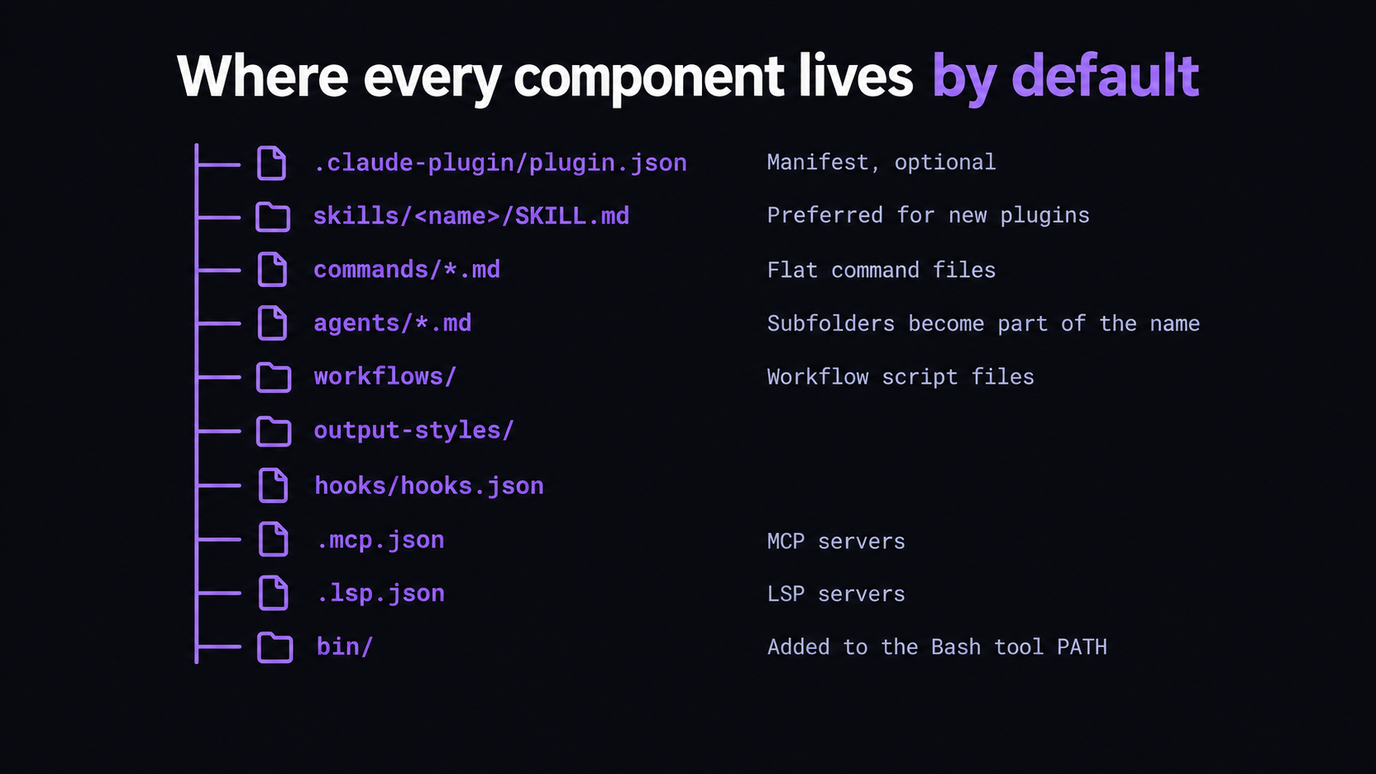
The .claude-plugin/ directory holds plugin.json and nothing else. Every other folder lives at the plugin root. Putting commands/ or skills/ inside .claude-plugin/ is the single most common structural failure, and it does not error either: the plugin loads with no components.
| Component | Default location | Note |
|---|---|---|
| --- | --- | --- |
| Manifest | .claude-plugin/plugin.json | Optional; the only thing in this directory |
| Skills | skills/ | Preferred for new plugins |
| Commands | commands/*.md | Flat skill files, kept for compatibility |
| Agents | agents/*.md | Subfolders become part of the agent name |
| Workflows | workflows/ | Workflow script files |
| Output styles | output-styles/ | |
| Hooks | hooks/hooks.json | |
| MCP servers | .mcp.json | |
| LSP servers | .lsp.json | |
| Executables | bin/ | Added to the Bash tool PATH. Cannot be included if the plugin is distributed via org settings |
| Settings | settings.json | Only the agent and subagentStatusLine keys are supported |
One more that surprises people: a CLAUDE.md at the plugin root is not loaded as project context. If your plugin needs to teach Claude something, that belongs in a skill, an agent or a hook.
The fastest way to get a manifest right is to read one that ships. Skiln indexes installable Claude agents, skills, commands and MCP servers with their real install paths and the components each one declares, so you can compare your tree against something that loads. Browse agents · Browse skills · Generate a config
Disclosure: Skiln publishes this article and runs the directory it links to.
What Happens to a Field Claude Code Does Not Like
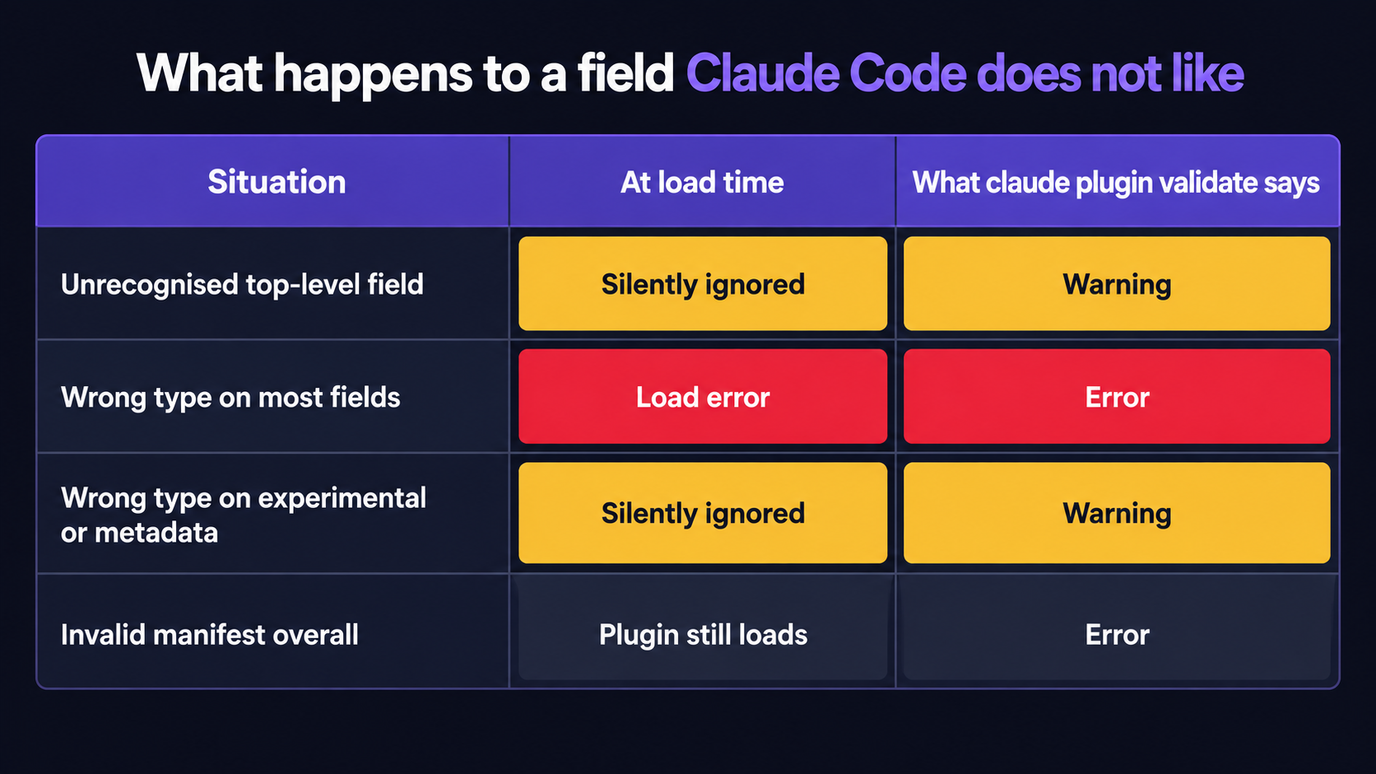
Three different behaviours hide behind "my manifest is wrong", and knowing which one you are looking at tells you whether to expect an error message at all.
| Situation | At load time | What claude plugin validate says |
|---|---|---|
| --- | --- | --- |
| Unrecognised top-level field | Silently ignored | Warning, and if the name is one or two characters off a real field it suggests the likely one |
| Wrong type on most fields | Load error | Error |
Wrong type on experimental or metadata | Silently ignored | Warning |
| Invalid manifest overall | Plugin still loads | Error |
The ignore-unknown-fields rule is deliberate and useful: you can keep another ecosystem's metadata in the same file, so one plugin.json can double as an npm package.json without either tool complaining. It is also why a typo like "skils" costs you a whole component tree and produces nothing louder than a warning you have to ask for.
That is what --strict is for, and it is the one line of CI worth adding today:
claude plugin validate ./my-plugin --strictWith --strict, warnings become errors, so a misspelled field fails the build instead of shipping.
The Three Path Variables, and the One to Write State To
Claude Code substitutes three variables into plugin content, and exports all three to hook processes and to MCP and LSP subprocesses.
| Variable | Resolves to | Use it for |
|---|---|---|
| --- | --- | --- |
${CLAUDE_PLUGIN_ROOT} | The plugin's install directory | Bundled scripts, binaries and config files |
${CLAUDE_PLUGIN_DATA} | ~/.claude/plugins/data/{id}/ | Installed dependencies, generated code, caches |
${CLAUDE_PROJECT_DIR} | The project root | Project-local scripts and config |
Never write state under ${CLAUDE_PLUGIN_ROOT}. For a copied plugin that path changes on every update: the previous version's directory is marked orphaned and swept about fourteen days later, which is long enough for the bug to look like something else entirely. ${CLAUDE_PLUGIN_DATA} survives updates and the uninstall grace period, and is removed only when the plugin is uninstalled from every scope.
Substitution reaches skill and agent content, hook and monitor commands, an MCP stdio server's command, args and env, an HTTP or SSE server's url and headers, and an LSP server's command, args, env and workspaceFolder. In shell-form hooks, wrap the placeholder in double quotes, or use the exec form with args so each path stays one argument. The same care applies to permission rules that match on command text, where an unquoted path changes what a rule matches.
Values declared under userConfig arrive the same way, as ${user_config.KEY}, and are also exported as CLAUDE_PLUGIN_OPTION_. One exception catches people: shell-form hooks and monitor commands reject ${user_config.*} substitution outright. Read the exported environment variable there instead.
The Marketplace Entry Can Overrule Your Manifest
A marketplace is a repository with .claude-plugin/marketplace.json at its root, listing entries that each need a name and a source. What is less obvious is that the entry and the manifest describe the same plugin, and they do not always agree.
| Field | Which one wins |
|---|---|
| --- | --- |
displayName | Marketplace entry |
defaultEnabled | Marketplace entry |
version | plugin.json, per the plugins reference. The entry's version is what pins update delivery, so set it deliberately in both places rather than assuming one is decorative |
| Any display field the entry leaves unset | plugin.json |
Then there is strict, which defaults to true and is the field most likely to break a plugin you did not change:
strict: true—plugin.jsonis the authority. The marketplace entry may supplement it with extra components, and the two are merged.strict: false— the marketplace entry is the entire definition. Ifplugin.jsonalso declares components, that is a conflict and the plugin fails to load.
strict: false is required if the entry uses headersHelper, so a marketplace operator can turn it on for reasons that have nothing to do with your plugin.
Two more entry-level facts worth having before you publish. renames maps a former plugin name to its current one, or to null if it was removed, which is how you rename without stranding existing users (v2.1.193+). And a long list of marketplace names is reserved, including claude-plugins-official, anthropic-marketplace, agent-skills and, from v2.1.275, the package-manager names npm, pip, uv, cargo, github and gh, in any casing.
What claude plugin validate Catches, and What It Lets Through
Validation is a linter, not a gate. It reads the manifest and the component files and reports problems; the loader is more forgiving than the linter, which is why a plugin can validate clean and still be missing half of itself, and why a plugin with an invalid manifest can still load.
| Checked | Not checked |
|---|---|
| --- | --- |
JSON syntax in plugin.json and marketplace.json | Whether a replaced default directory left components stranded |
| Required fields present, field types correct | Whether your hook scripts run |
kebab-case name format, reserved marketplace names | Whether an MCP server starts |
Path escapes such as ../../../etc/passwd | Whether ${CLAUDE_PLUGIN_ROOT} is quoted correctly in a shell-form hook |
renames cycles and termination | Runtime behaviour of any kind |
| Agent frontmatter that is missing or unparseable (as a warning) |
The asymmetry in that last row is the one to remember. A plugin's agent file with unparseable frontmatter still loads, named after its filename and described as "Agent from
From v2.1.233 you can also validate a plugin that has no manifest by pointing at the component directory directly, for example claude plugin validate ./my-plugin/agents.
One last mechanism that runs without being asked: if a plugin root contains both package.json and a supported lockfile, Claude Code installs its dependencies when copying the plugin into the cache. It accepts bun.lock, bun.lockb, npm-shrinkwrap.json and package-lock.json in that order, always with frozen resolution, --ignore-scripts and a sixty-second timeout. A project with only yarn.lock or pnpm-lock.yaml is skipped, as is a bun lockfile sitting next to a bunfig.toml. A failed install never blocks the plugin from loading and the reason appears only in debug output, which is how a plugin ends up running against a half-populated node_modules.
The Manifest I Actually Ship
After all of that, the working version is short. Most fields exist for marketplace presentation, and the default layout covers the rest.
{
  "$schema": "https://json.schemastore.org/claude-code-plugin-manifest.json",
  "name": "deploy-tools",
  "description": "Deployment checks and release helpers",
  "version": "1.3.0",
  "author": { "name": "Platform Team" },
  "repository": "https://github.com/acme/deploy-tools",
  "license": "MIT",
  "keywords": ["deployment", "ci"],
  "defaultEnabled": false
}
The $schema line is the cheapest thing in that file and the one I would add first: Claude Code ignores it at load time, but the published JSON Schema gives your editor autocomplete and red squiggles on exactly the typos that validate only reports as warnings.
Not a single path field, because skills/, agents/ and hooks/hooks.json are already where the loader looks. Add a path field only when you genuinely need a non-default location, and when you do, re-read the replace-versus-add table first. The other habit worth keeping is running claude plugin validate . --strict in CI, which catches the typo class that otherwise reaches users as a silently missing feature, much like the environment variables whose bad values are discarded rather than rejected.
Related Articles
- Claude Code Environment Variables in 2026: Full Reference
- Claude Code Subagents in 2026: The Config Reference
- Claude Code Permissions in 2026: The settings.json Guide
- Claude Code Slash Commands in 2026: The Full Reference
- Best Claude Code Plugins in 2026: 7 Bundles Worth Installing
- Claude Code Plugins vs Skills vs MCP Servers: A Decision Guide