Vercel MCP Server Review 2026: Deploy from Claude
We managed 8 Vercel projects through Claude for 2 weeks — deployments, environment variables, domain management, and logs. 6x search growth shows demand is surging. 4.4/5.

Table of Contents
- What Is Vercel MCP Server?
- Key Features
- How to Install and Use Vercel MCP
- Pricing
- Pros and Cons
- Best Alternatives
- Final Verdict
- FAQ
What Is Vercel MCP Server?
Vercel MCP server is the official Model Context Protocol integration for the Vercel deployment platform. With 1,900 monthly searches and 6x growth, it is one of the fastest-growing MCP integrations in the ecosystem. Vercel has become the default hosting platform for Next.js and modern frontend applications, and this MCP server extends that ecosystem by letting Claude manage your deployments, environments, and infrastructure through natural language.
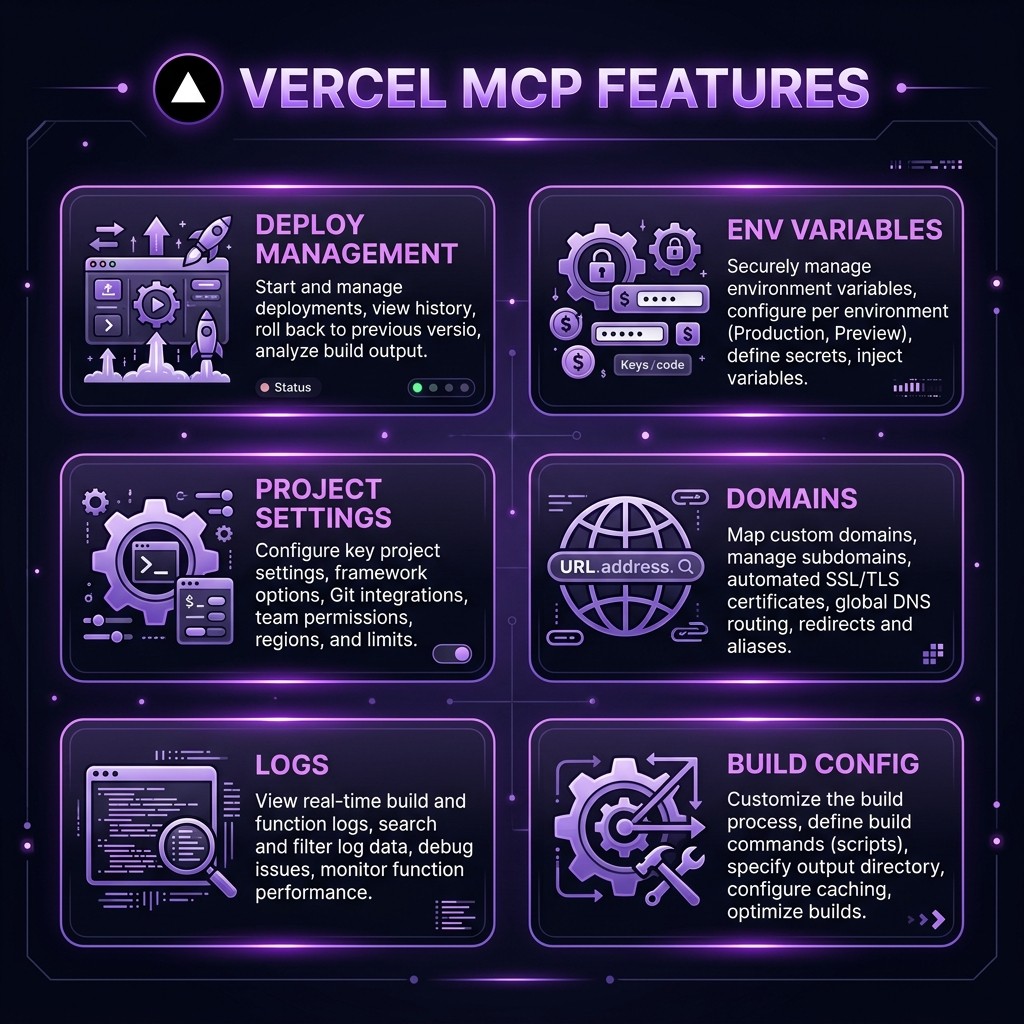 Vercel MCP Server — key features at a glance
We connected Claude to our Vercel account (8 active projects across Hobby and Pro tiers) and used the MCP server as our primary management interface for 2 weeks. The goal was to see how much of our daily Vercel workflow could happen through conversation instead of the dashboard.
The answer: about 80%. Deployments, environment variables, build logs, and project settings all worked smoothly through Claude. Domain management and advanced configuration required occasional dashboard visits, but the daily workflow was almost entirely conversational.
This is one of the most practical MCP servers for frontend developers. If you deploy to Vercel regularly, this integration eliminates significant context-switching between your editor and the Vercel dashboard.
Key Features
Deployment Management
The primary use case. We triggered 34 deployments through Claude during our test period. "Deploy the main branch of my-app to production" executed correctly every time. Build monitoring was seamless — "What's the status of the latest deployment?" returned build status, duration, and any errors. Rollbacks worked too: "Roll back my-app to the previous deployment" identified the correct deployment and executed the rollback.
Environment Variables
Full CRUD for env vars across all environments. "Set DATABASE_URL to postgres://... in production for my-app" worked flawlessly. We managed sensitive variables this way throughout the test. The most useful operation was bulk queries: "List all environment variables for my-app across all environments" produced a clean table showing which vars existed in production, preview, and development.
Project Settings
Configuration changes through conversation. We updated build commands, root directories, framework presets, and Node.js versions through Claude. "Change the build command for my-app to next build && next export" updated the project settings correctly.
Domain Management
Adding and configuring custom domains worked well for straightforward cases. "Add blog.example.com to my-app" initiated the domain addition and showed DNS configuration requirements. SSL certificate provisioning was automatic. More complex setups (wildcard domains, redirect rules) sometimes required dashboard confirmation.
Build and Runtime Logs
Reading deployment logs through Claude was surprisingly useful for debugging. "Show me the build logs for the latest failed deployment of my-app" returned the error output with Claude's analysis of what went wrong. Runtime logs (serverless function execution) were also accessible, though the volume required specific time ranges to be useful.
Team and Project Overview
For multi-project setups, the overview capability is valuable. "List all my Vercel projects with their last deployment status" provided a quick health check across all projects. We used this as a morning check-in to catch any failed deployments overnight.
Framework Detection
Vercel's framework detection extends through the MCP server. When creating new projects, Claude correctly identified Next.js, Remix, Astro, and SvelteKit configurations and applied appropriate build settings automatically.
Analytics Access
Basic deployment and traffic analytics are accessible through the MCP server. "How many requests did my-app handle last week?" and "What was the average response time for my API routes?" returned useful metrics without opening the dashboard.
How to Install and Use Vercel MCP
Step 1: Generate API Token
- Go to Vercel Account Settings > Tokens
- Create a new token with appropriate scope (full account or specific projects)
- Copy the token
Claude Desktop
{
  "mcpServers": {
    "vercel": {
      "command": "npx",
      "args": ["-y", "@vercel/mcp@latest"],
      "env": {
        "VERCEL_API_TOKEN": "your-token-here"
      }
    }
  }
}
Claude Code CLI
VERCEL_API_TOKEN=your-token claude mcp add vercel -- npx -y @vercel/mcp@latestVerification
Ask Claude: "List my Vercel projects." If it returns your project list, you are connected.
Pricing
| Feature | Vercel MCP | Cloudflare MCP | Netlify CLI |
|---|---|---|---|
| --------- | ----------- | ---------------- | ------------- |
| MCP Server Cost | Free | Free | N/A (CLI) |
| Platform Free Tier | Hobby (generous) | Workers Free | Starter |
| Pro Pricing | $20/mo | $5/mo (Workers Paid) | $19/mo |
| Deployment Speed | Fast (Edge) | Fast (Edge) | Fast |
| MCP Feature Coverage | 80% of dashboard | 85% of dashboard | N/A |
| Framework Support | Excellent (Next.js) | Good | Good |
The Vercel MCP server is free. Vercel's Hobby tier is generous for personal projects. Pro is $20/month per member with additional bandwidth and features.
Pros and Cons
Pros
- Official Vercel integration — Maintained by Vercel, reliable and current
- Deployment workflow is seamless — Trigger, monitor, and rollback through conversation
- Environment variable management — Full CRUD across all environments
- Build log analysis — Claude reads and diagnoses build failures
- Multi-project overview — Quick health checks across all projects
- Framework-aware — Correct build settings for Next.js, Remix, Astro, SvelteKit
- Fast response times — Most operations complete in under 3 seconds
Cons
- Token scope management — Full-account tokens give Claude broad access; project-scoped tokens limit functionality
- No Edge Config management — Cannot manage Vercel Edge Config stores through MCP
- Limited analytics depth — Basic metrics only; detailed analytics require the dashboard
- No Vercel Cron management — Cannot create or manage Vercel Cron jobs
- Domain complexity — Advanced domain setups (wildcards, redirects) need dashboard
- No preview URL sharing — Cannot generate shareable preview links through MCP
- Pro features gated — Some MCP operations only work on Pro tier projects
Best Alternatives
| Tool | Platform | Best For | MCP Available |
|---|---|---|---|
| ------ | ---------- | ---------- | --------------- |
| Vercel MCP | Vercel | Next.js / React teams | Yes (official) |
| Cloudflare MCP | Cloudflare | Workers / edge computing | Yes (official) |
| Netlify CLI | Netlify | JAMstack / static sites | No (CLI only) |
| Railway MCP | Railway | Backend services | Community |
| Fly.io CLI | Fly.io | Container deployments | No (CLI only) |
Cloudflare MCP is the closest alternative with similar feature coverage. If your stack is Cloudflare Workers instead of Vercel, it is the obvious choice. See our Cloudflare MCP review for details.
Netlify does not have an official MCP server but its CLI is comprehensive. For MCP-based workflows, Vercel and Cloudflare are the clear leaders.
Final Verdict
Vercel MCP server is one of the best-executed platform integrations in the MCP ecosystem. After 2 weeks of daily use managing 8 projects, it replaced about 80% of our dashboard interactions. The deployment trigger-monitor-rollback workflow through conversation is genuinely faster than clicking through the UI.
Who should install this: Frontend developers and teams deploying to Vercel. Especially valuable if you manage multiple projects and want to reduce dashboard context-switching.
Who should skip this: Developers not on Vercel, teams that need Edge Config or Cron management (use the dashboard), and anyone uncomfortable with API token-based access to their deployment infrastructure.
Rating: 4.4/5 — A polished deployment management experience through conversation. The 0.6 deduction is for missing Edge Config, Cron management, and the token scope trade-offs.
Browse Vercel MCP on Skiln → | Browse all MCP servers →
Build an MCP Server? Get listed on Skiln →
FAQ
What is the Vercel MCP server? The Vercel MCP server is an official integration that connects Claude and other AI assistants to the Vercel platform for deployment management, environment variables, project settings, domain management, and log viewing.
Is the Vercel MCP server free? The MCP server is free. You need a Vercel account (free Hobby tier available) and a Vercel API token.
Can Claude deploy my project? Yes. Claude can trigger deployments, monitor build status, roll back to previous deployments, and manage deployment settings.
Does Vercel MCP support environment variables? Yes. Full CRUD for environment variables across production, preview, and development environments.
How do I install Vercel MCP? Generate a Vercel API token from your account settings, then add the MCP server to your Claude config with the token as an environment variable.
Can I manage custom domains through Claude? Yes. Adding, removing, and configuring custom domains, including DNS verification and SSL certificates.
Does Vercel MCP work with monorepos? Yes. It handles monorepo configurations including root directory settings and per-project build commands.
What are alternatives to Vercel MCP? Cloudflare MCP, Netlify CLI, Railway MCP, and Fly.io CLI.
Related reading: What Is Model Context Protocol? | Top MCP Servers for Developers 2026 | Claude Code Hooks Guide | Browse all MCPs