Slack MCP Server Review 2026: Let Claude Handle Your Slack
We connected Claude to our Slack workspace for 2 weeks. Message reading, channel search, thread replies — all through natural language. Honest review with pros, cons, and alternatives. 4.4/5.

Table of Contents
- What Is Slack MCP Server?
- Key Features
- How to Install and Use Slack MCP
- Pricing
- Pros and Cons
- Best Alternatives
- Final Verdict
- FAQ
What Is Slack MCP Server?
Slack MCP server is a Model Context Protocol integration that connects Claude directly to your Slack workspace. With 2,900 monthly searches, it is one of the most sought-after MCP integrations — and for good reason. Slack is where modern teams live, and having an AI assistant that can read, search, and respond within that environment is a genuine productivity multiplier.
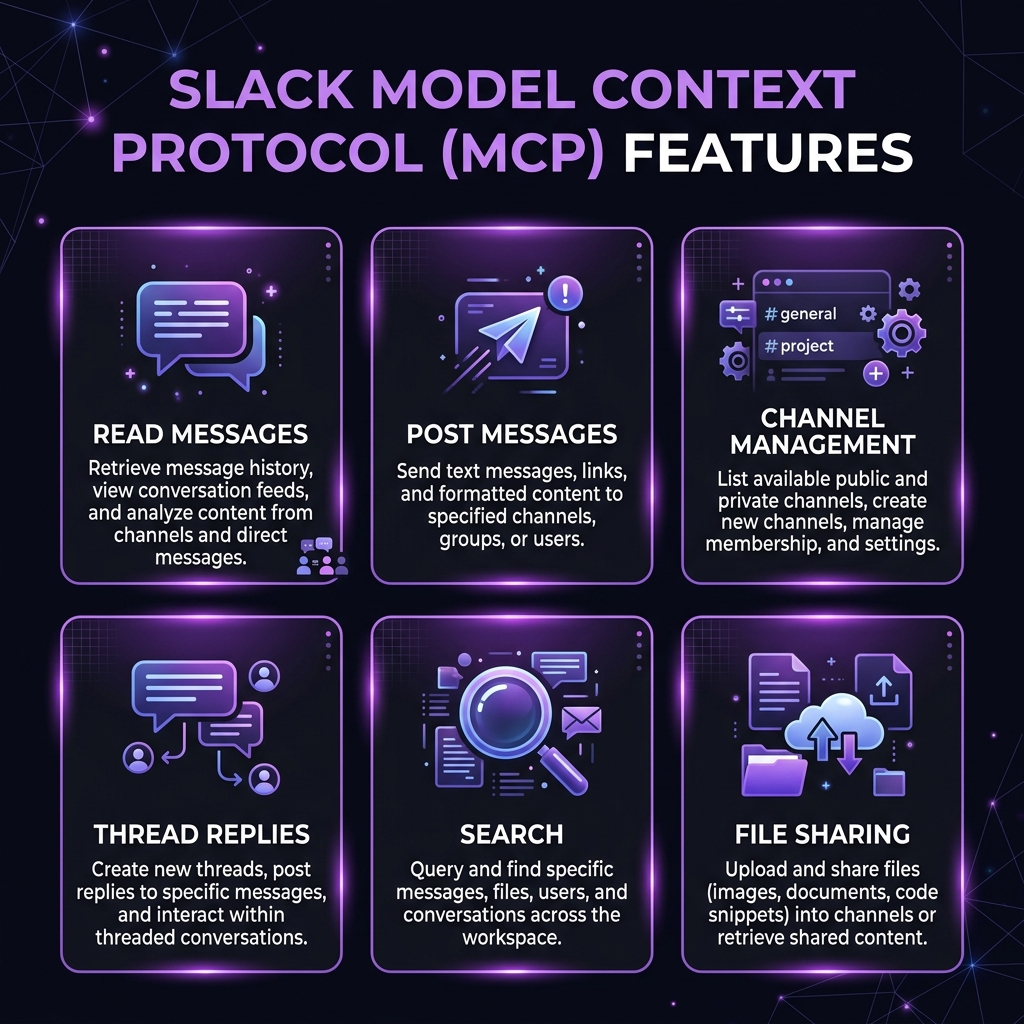 Slack MCP Server — key features at a glance
We connected Claude to our 45-person workspace and used the Slack MCP as our primary tool for message management over 2 weeks. The core use cases that emerged were: morning catch-up summaries (reading overnight messages across 12 channels), drafting context-aware replies to technical discussions, searching for decisions buried in long threads, and posting status updates to multiple channels simultaneously.
The MCP server works by bridging Slack's Web API through the Model Context Protocol, exposing tools for reading channel history, posting messages, searching across the workspace, and managing threads. It requires a custom Slack App with appropriate bot scopes — a one-time setup that takes about 15 minutes. From there, it is one of the most useful MCP servers we have tested.
Key Features
Message Reading and History
The core use case. We asked Claude to "summarize what happened in #engineering overnight" every morning for 2 weeks. It read the message history, identified key discussions, flagged action items, and produced a clean 3-paragraph summary. This alone saved us 20-30 minutes of scrolling daily. The history retrieval supports configurable message counts and time ranges.
Message Posting and Replies
Claude can post messages to any channel the bot has access to and reply within existing threads. We used this for drafting technical responses — "Read the last 10 messages in the #api-design thread and draft a reply explaining our rate limiting approach." The drafts were consistently good and needed only minor editing before posting. We strongly recommend setting up a confirmation step before Claude posts anything.
Channel Management
The MCP server can list channels, get channel info, and manage channel membership. We found this most useful for auditing — "Which channels have had no messages in the last 30 days?" identified 8 dead channels we archived. Channel creation and archiving are also supported.
Thread Navigation
Slack threads are where context goes to hide. The MCP server's ability to read entire threads and summarize them was one of our most-used features. "What was the conclusion of the thread about database migration in #backend?" saved us from scrolling through 47-message threads repeatedly.
Workspace Search
Full-text search across the workspace. "Find all messages mentioning the payment gateway outage from last week" returned relevant messages across channels. The search respects Slack's standard search operators and supports date ranges, user filters, and channel filters.
File Sharing
The MCP server supports uploading files to channels and threads. We used this to share Claude-generated reports, code snippets, and analysis documents directly into relevant channels. Download of files shared by others is also supported.
User and Presence Queries
Querying user information and online status. "Who is currently online in the #on-call channel?" and "What timezone is @sarah in?" are small conveniences that add up throughout the day.
Emoji Reactions
A small but delightful feature — Claude can add emoji reactions to messages. We set up a workflow where Claude reacted with a checkmark to messages it had already processed during our morning summary routine, making it easy to track what had been reviewed.
How to Install and Use Slack MCP
Step 1: Create a Slack App
- Go to api.slack.com/apps
- Click "Create New App" > "From scratch"
- Name it (e.g., "Claude MCP") and select your workspace
Step 2: Configure Bot Scopes
Under OAuth & Permissions > Bot Token Scopes, add:
channels:read— List channelschannels:history— Read channel messageschat:write— Post messagessearch:read— Search messagesusers:read— Query user infofiles:read— Read shared filesfiles:write— Upload filesreactions:write— Add emoji reactions
Step 3: Install and Get Token
Click "Install to Workspace," authorize, and copy the Bot User OAuth Token (xoxb-...).
Claude Desktop
{
  "mcpServers": {
    "slack": {
      "command": "npx",
      "args": ["-y", "@anthropic/slack-mcp@latest"],
      "env": {
        "SLACK_BOT_TOKEN": "xoxb-your-token-here"
      }
    }
  }
}
Claude Code CLI
SLACK_BOT_TOKEN=xoxb-your-token claude mcp add slack -- npx -y @anthropic/slack-mcp@latestVerification
Ask Claude: "List the channels in my Slack workspace." If it returns your channel list, you are connected.
Pricing
| Feature | Slack MCP | Discord MCP | Teams MCP |
|---|---|---|---|
| --------- | ----------- | ------------- | ----------- |
| MCP Server Cost | Free | Free | Free |
| Platform Cost | Free-$12.50/user/mo | Free-$4.99/mo | M365 license |
| Setup Complexity | Medium (Slack App) | Low | High (Azure AD) |
| API Rate Limit | Tier-based | 50 req/sec | 60 req/min |
| Message History | Full (paid plans) | Full | Full |
| File Support | Yes | Yes | Yes |
| Enterprise Ready | Yes (Grid) | No | Yes |
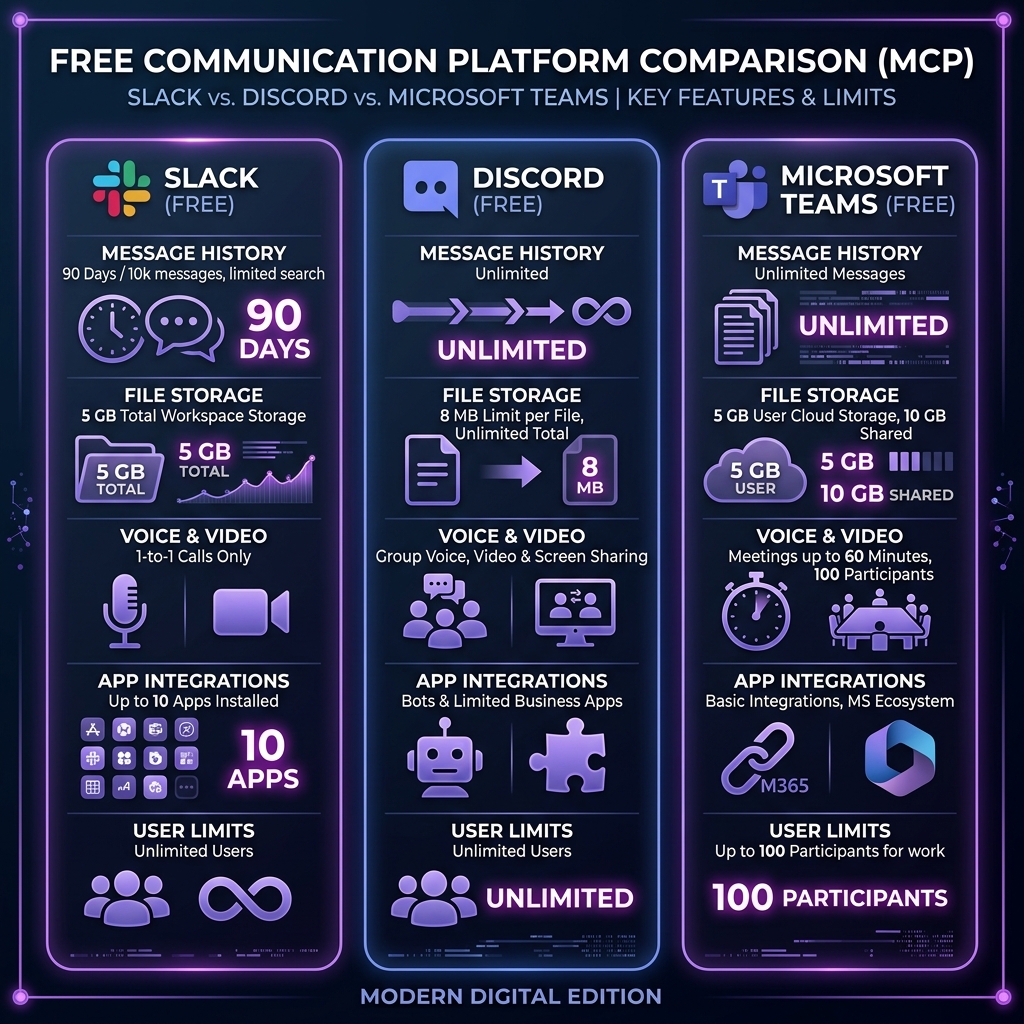 Slack MCP pricing — how it compares to alternatives
The Slack MCP server is free. Your Slack workspace pricing determines available features (free tier has limited message history).
Pros and Cons
Pros
- Morning catch-up summaries are transformative — 20-30 minutes saved daily on channel reading
- Thread summarization — Extracts conclusions from long threads instantly
- Context-aware reply drafting — Claude reads the conversation before composing responses
- Bulk operations — Post to multiple channels, search across workspace
- File sharing integration — Share generated content directly into channels
- Comprehensive scope control — You decide exactly what Claude can access
- Works with existing Slack App infrastructure — No new vendor to onboard
Cons
- 15-minute setup process — Creating and configuring a Slack App is not trivial
- No real-time streaming — Claude polls for messages, no live notification feed
- Rate limiting under heavy use — Slack's API rate limits can throttle high-volume operations
- DM access requires explicit scoping — Separate permissions needed for direct messages
- No message editing — Can post new messages but cannot edit existing ones
- Security surface area — Bot token with broad scopes is a security consideration
- Free Slack tier limits — Message history is limited on Slack's free plan
Best Alternatives
| Tool | Platform | Best For | Setup Effort |
|---|---|---|---|
| ------ | ---------- | ---------- | ------------- |
| Slack MCP | Slack | Teams on Slack | Medium |
| Discord MCP | Discord | Dev communities | Low |
| Teams MCP | Microsoft 365 | Enterprise M365 | High |
| Telegram MCP | Telegram | Personal/bots | Low |
| Matrix MCP | Matrix/Element | Self-hosted chat | Medium |
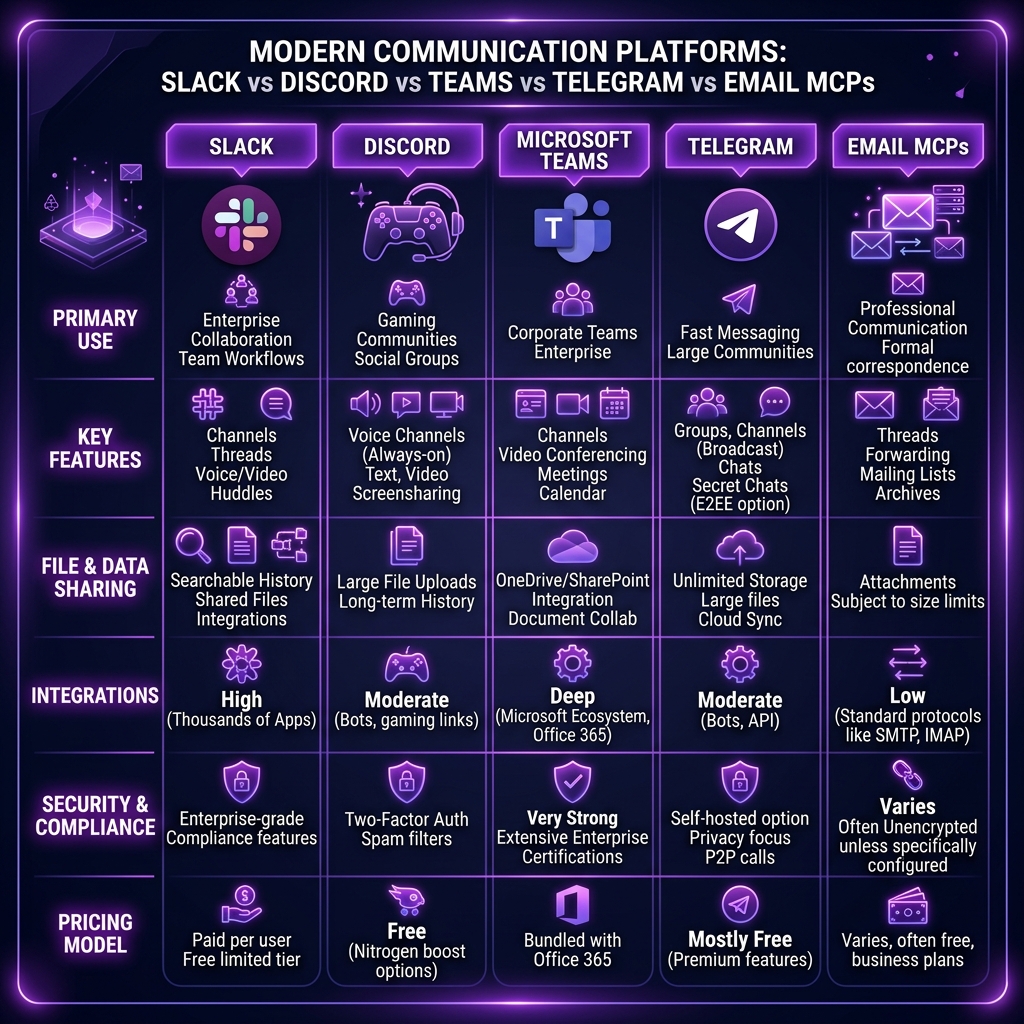 Slack MCP vs top alternatives — feature comparison
Discord MCP is simpler to set up and works well for developer communities and open-source projects. It lacks Slack's enterprise features but the bot token process is more straightforward.
Microsoft Teams MCP is necessary for organizations on Microsoft 365 but requires Azure AD app registration, making setup significantly more complex than Slack's approach.
Telegram MCP is the lightest option — ideal for personal automation and bot workflows where you want Claude to send notifications or respond to messages.
Final Verdict
The Slack MCP server delivers real daily value once you get past the initial Slack App setup. After 2 weeks, the morning summary workflow and thread summarization became indispensable for our team. The 20-30 minutes saved on daily catch-up alone makes the 15-minute setup investment pay for itself on day one.
Who should install this: Teams that live in Slack and want AI-assisted message management. Especially valuable for team leads who need to stay across multiple channels, and for anyone who dreads Monday morning catch-up.
Who should skip this: Teams not on Slack, organizations with strict bot-token security policies, and individuals who prefer the manual Slack experience. If your workspace has fewer than 5 active channels, the overhead may not be worth it.
Rating: 4.4/5 — A genuine productivity win for Slack-heavy teams. The 0.6 deduction is for setup friction, rate limiting concerns, and the inability to edit posted messages.
Browse Slack MCP on Skiln → | Browse all MCP servers →
Build an MCP Server? Get listed on Skiln →
FAQ
What is the Slack MCP server? The Slack MCP server is a Model Context Protocol integration that connects AI assistants like Claude to Slack workspaces. It enables reading messages, posting replies, searching channels, managing conversations, and sharing files through natural language.
Is the Slack MCP server free? The MCP server is free and open source. You need a Slack workspace with a custom Slack App configured with the appropriate bot scopes. Slack itself has free and paid tiers.
Can Claude read my Slack DMs? Only if you explicitly grant the bot token the im:history and im:read scopes. By default, most setups only include channel-level permissions. You control exactly what Claude can access through Slack App scopes.
Does the Slack MCP support file uploads? Yes, the MCP server supports file sharing to channels and threads using Slack's files.upload API. File downloads from Slack messages are also supported.
How do I install the Slack MCP server? Create a Slack App at api.slack.com, add bot scopes, install it to your workspace, copy the Bot User OAuth Token, and add it to your MCP client configuration.
Can Claude post in Slack channels automatically? Yes, once configured with the chat:write scope, Claude can post messages, reply to threads, and send DMs. We recommend requiring confirmation before posting.
What are alternatives to Slack MCP? Discord MCP, Microsoft Teams MCP, Telegram MCP, and direct Slack API integration via webhooks.
Does the Slack MCP work with Slack Enterprise Grid? Yes, but you need workspace-level admin approval for the custom Slack App. Enterprise Grid deployments may have additional security policies.
Related reading: What Is Model Context Protocol? | Top MCP Servers for Developers 2026 | MCP Server Security Guide | Browse all MCPs