Obsidian MCP Server Review 2026: Claude Meets Your Knowledge Base
We connected Claude to a 3,000-note Obsidian vault and tested search, creation, and link management for 2 weeks. Multiple implementations, tricky setup. Honest review. 4.3/5.

Table of Contents
- What Is Obsidian MCP Server?
- Key Features
- How to Install and Use Obsidian MCP
- Pricing
- Pros and Cons
- Best Alternatives
- Final Verdict
- FAQ
What Is Obsidian MCP Server?
Obsidian MCP server connects AI assistants to Obsidian, the popular markdown-based knowledge management application. With 2,900 monthly searches, the demand is clear — Obsidian users want their AI assistant to understand their knowledge base. The Model Context Protocol makes this connection possible, but the implementation landscape is fragmented.
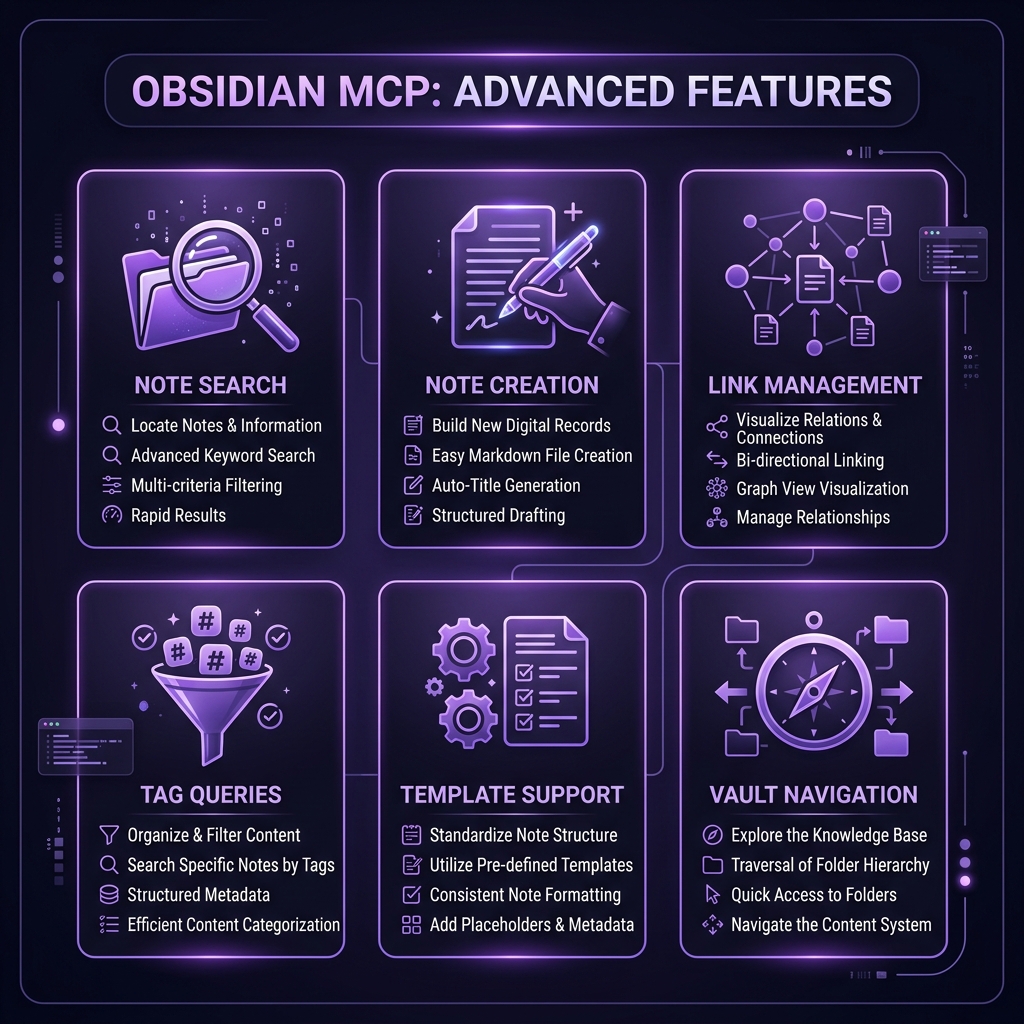 Obsidian MCP Server — key features at a glance
Unlike the other MCP servers in our top servers roundup, Obsidian does not have a single official MCP implementation. There are at least 5 community-built options: direct file system access servers, REST API bridges through Obsidian's Local REST API plugin, and hybrid approaches. We tested three of them over 2 weeks with a real 3,000-note vault covering technical documentation, meeting notes, and research.
The strongest approach we found uses Obsidian's Local REST API community plugin as a bridge. This plugin exposes your vault through a local HTTP API, and the MCP server connects to that API. It is an extra moving part, but it provides the most reliable and feature-complete experience.
Obsidian's strength has always been local-first, markdown-based, and endlessly extensible. Adding AI through MCP fits naturally — your notes stay on your machine, Claude accesses them through a local connection, and nothing leaves your system unless you choose to share it.
Key Features
Note Search
Full-text search across the entire vault. We tested with queries ranging from specific ("find my notes about PostgreSQL connection pooling") to vague ("what did I write about the Q4 architecture decision?"). Specific queries returned accurate results in under 2 seconds. Vague queries were hit-or-miss — when the note titles or prominent content matched, results were good. Deep content buried in long notes sometimes missed.
Note Creation and Editing
Claude can create new notes with proper frontmatter, tags, and internal links. We used this to generate meeting note templates, draft technical specifications, and create literature review summaries. The editing capability lets Claude append to existing notes, which we used for a running research log — "Add today's findings about WebSocket performance to my research-websockets note."
Internal Link Management
This is where Obsidian MCP delivers unique value. Claude can analyze your link graph, identify orphaned notes (no incoming or outgoing links), suggest connections between related notes, and create bidirectional links. We ran a vault audit and Claude identified 127 orphaned notes and suggested link connections for 89 of them. About 70% of the suggestions were genuinely useful.
Tag and Frontmatter Queries
Querying by tags ("show me all notes tagged #project-alpha") and frontmatter properties ("find notes with status: review") worked reliably. We used this for project management within Obsidian — Claude could generate status reports by querying tagged notes.
Template-Based Generation
When creating notes, Claude can follow existing templates in your vault. We set up templates for meeting notes, architecture decisions, and bug reports. Claude consistently followed the template structure when creating new notes of those types.
Daily Note Integration
The MCP server integrates with Obsidian's daily notes. "Add this task to today's daily note" and "What did I write in yesterday's daily note?" worked as expected, making Claude a natural extension of the daily journaling workflow.
Vault Statistics
Claude can report on vault health — total notes, orphaned notes, most-linked notes, tag distribution, and content gaps. We used this monthly to maintain vault quality.
Dataview Query Support
For vaults using the Dataview plugin, some MCP implementations support running Dataview queries through Claude. "Show me all notes created this week that are tagged as drafts" executed as a Dataview query and returned structured results.
How to Install and Use Obsidian MCP
Recommended Approach: Local REST API Bridge
Step 1: Install Local REST API Plugin
In Obsidian, go to Settings > Community Plugins > Browse. Search for "Local REST API" and install it. Enable the plugin and note the port (default: 27123) and API key.
Step 2: Configure MCP Server
Claude Desktop
{
  "mcpServers": {
    "obsidian": {
      "command": "npx",
      "args": ["-y", "obsidian-mcp-server@latest"],
      "env": {
        "OBSIDIAN_API_URL": "http://localhost:27123",
        "OBSIDIAN_API_KEY": "your-api-key-here"
      }
    }
  }
}
Claude Code CLI
OBSIDIAN_API_URL=http://localhost:27123 OBSIDIAN_API_KEY=your-key claude mcp add obsidian -- npx -y obsidian-mcp-server@latestStep 3: Verify
Obsidian must be running with the Local REST API plugin active. Ask Claude: "How many notes are in my vault?" If it returns a count, the connection is working.
Important: Obsidian Must Be Running
Unlike file-system-based MCP servers, the REST API approach requires Obsidian to be open. If you close Obsidian, Claude loses access. This is the main trade-off of the REST API approach versus direct file access.
Pricing
| Feature | Obsidian MCP | Notion MCP | Filesystem MCP |
|---|---|---|---|
| --------- | ------------- | ----------- | ---------------- |
| MCP Server Cost | Free | Free | Free |
| App Cost | Free (personal) | Free-$10/user/mo | N/A |
| Setup Complexity | Medium-High | Medium | Low |
| Search Quality | Good | Good | Basic |
| Link Management | Excellent | Good | None |
| Offline Access | Yes (local) | No (cloud) | Yes (local) |
| Data Privacy | Full (local) | Cloud-dependent | Full (local) |
All Obsidian MCP implementations are free. Obsidian itself is free for personal use and $50/year for commercial use.
Pros and Cons
Pros
- Local-first privacy — Your notes never leave your machine; Claude accesses them through a local connection
- Link graph intelligence — Orphan detection and link suggestions are genuinely useful for vault maintenance
- Natural vault interaction — Creating, searching, and editing notes through conversation feels intuitive
- Template support — Follows your existing note templates for consistent output
- Tag and frontmatter queries — Structured queries across your knowledge base
- Daily note integration — Seamless journaling and task management workflow
- No vendor lock-in — Your notes remain plain markdown files regardless of the MCP server
Cons
- Multiple competing implementations — No single "official" server; quality varies between options
- Setup complexity — Requires Obsidian plugin installation and MCP configuration
- Obsidian must be running — REST API approach requires the app to be open
- Search misses deep content — Vague queries sometimes fail to find notes where the relevant content is buried
- No mobile vault access — MCP only works with the desktop Obsidian app
- Write operations can be risky — No undo for MCP-initiated edits; backup your vault
- Plugin dependency chain — Relies on community plugins that may not be maintained long-term
Best Alternatives
| Tool | Approach | Best For | Privacy |
|---|---|---|---|
| ------ | ---------- | ---------- | --------- |
| Obsidian MCP | Local REST API | Obsidian power users | Full (local) |
| Notion MCP | Cloud API | Notion-based knowledge bases | Cloud |
| Filesystem MCP | Direct file access | Simple markdown collections | Full (local) |
| RAG Pipeline | Vector DB + embeddings | Large knowledge bases | Configurable |
| Apple Notes MCP | macOS API | Apple ecosystem users | Full (local) |
Notion MCP is the most polished alternative if you use Notion for knowledge management. It has a cleaner API and single official implementation, but your data lives in the cloud.
Filesystem MCP provides basic read/write access to markdown files without requiring Obsidian to be running. You lose link management, tag queries, and Dataview support, but setup is trivial.
RAG pipelines are the most powerful option for very large knowledge bases (10,000+ notes) where semantic search significantly outperforms keyword matching.
Final Verdict
Obsidian MCP delivers genuine value once you get past the setup hurdles. The link graph management alone justified the effort for our 3,000-note vault, and the daily note integration became part of our morning routine. But the fragmented implementation landscape, setup complexity, and requirement for Obsidian to be running hold it back from a higher rating.
Who should install this: Obsidian power users with large vaults who want AI-assisted knowledge management. Especially valuable if you have thousands of notes and struggle with discoverability and link maintenance.
Who should skip this: Casual Obsidian users with small vaults (under 100 notes), anyone uncomfortable with community plugins and multi-step setup, and users who need mobile access to the MCP connection.
Rating: 4.3/5 — Powerful when working, but the setup experience needs improvement. The 0.7 deduction is for implementation fragmentation, setup complexity, and the Obsidian-must-be-running requirement.
Browse Obsidian MCP on Skiln → | Browse all MCP servers →
Build an MCP Server? Get listed on Skiln →
FAQ
What is the Obsidian MCP server? The Obsidian MCP server connects AI assistants like Claude to your Obsidian vault, enabling note search, content creation, link management, tag queries, and template-based note generation through natural language.
Is the Obsidian MCP server free? Yes, the community-built MCP servers for Obsidian are free and open source. Obsidian itself is free for personal use ($50/year for commercial use).
Which Obsidian MCP implementation is best? The most stable option as of March 2026 is the REST API approach using Obsidian's Local REST API plugin combined with an MCP bridge.
Can Claude edit my existing Obsidian notes? Yes, Claude can read, edit, append to, and create notes in your vault. We recommend backing up your vault before granting write access.
Does Obsidian MCP support backlinks? Yes, Claude can query backlinks, create new internal links between notes, and analyze your link graph.
How do I set up Obsidian MCP? Install the Local REST API plugin in Obsidian, enable it, note the port and API key, then configure the MCP server in your Claude client with those credentials.
Can Claude search my entire vault? Yes. Full-text search across all notes, including frontmatter, tags, and content. Our 3,000-note vault searched in under 2 seconds.
What are alternatives to Obsidian MCP? Notion MCP, filesystem MCP, RAG pipelines with vector databases, and Apple Notes MCP.
Related reading: What Is Model Context Protocol? | Top MCP Servers for Developers 2026 | MCP Server Security Guide | Browse all MCPs