How to Automate Your Restaurant with AI
Step-by-step guide to automating restaurant operations with AI. Covers Claude Code Restaurant Operations AI ($59) and OpenClaw Restaurant Ops ($49). Menu optimization, review management, inventory, and more.

How to Automate Your Restaurant with AI
I spent a week helping my friend Marcus automate his 60-seat Mediterranean restaurant in Austin. Marcus is a fantastic chef and a terrible administrator. He opens at 11 AM and is still at the restaurant at midnight — not because of the cooking, but because of the reviews, the inventory, the scheduling, the social media, the vendor emails, the financial reports. The operational overhead was crushing him.
Seven days later, Marcus had AI handling his review responses, generating his social media content, optimizing his menu pricing, tracking his inventory, and producing his weekly financial reports. His "office time" dropped from 4 hours per day to 45 minutes. He called it the most impactful change he had made since opening.
This article walks through exactly how we did it, using two products from the Skiln store: the Claude Code Restaurant Operations AI ($59) and the OpenClaw Restaurant Ops ($49). You do not need both — I will explain which one fits your situation and when using both makes sense.
The Problem: Restaurant Admin Is a Black Hole
Before we get into solutions, let me quantify the problem. I tracked Marcus's non-cooking administrative tasks for one week:
| Task | Weekly Hours | When It Happens |
|---|---|---|
| ------ | ------------- | ----------------- |
| Review responses (Google, Yelp, TripAdvisor) | 4.5 hrs | Throughout the day, worst on weekends |
| Social media (photos, captions, posting) | 3 hrs | Sporadic, often forgotten |
| Inventory counting and ordering | 3 hrs | Tuesday and Friday mornings |
| Menu pricing analysis | 1.5 hrs | Monthly, but always overdue |
| Scheduling and staff communication | 2 hrs | Sunday evenings |
| Financial reporting | 2 hrs | End of week |
| Vendor communication | 1.5 hrs | As needed |
| Reservation management and inquiries | 2 hrs | Throughout the day |
| Marketing (email, promotions, events) | 1.5 hrs | When he remembers |
| Total | 21 hrs | — |
Twenty-one hours per week on admin. That is a part-time job on top of running the actual restaurant. And Marcus is better than most — plenty of restaurant owners spend 30+ hours because they do not have systems.
The Two AI Options
Skiln sells two restaurant-specific AI products. Here is the honest comparison:
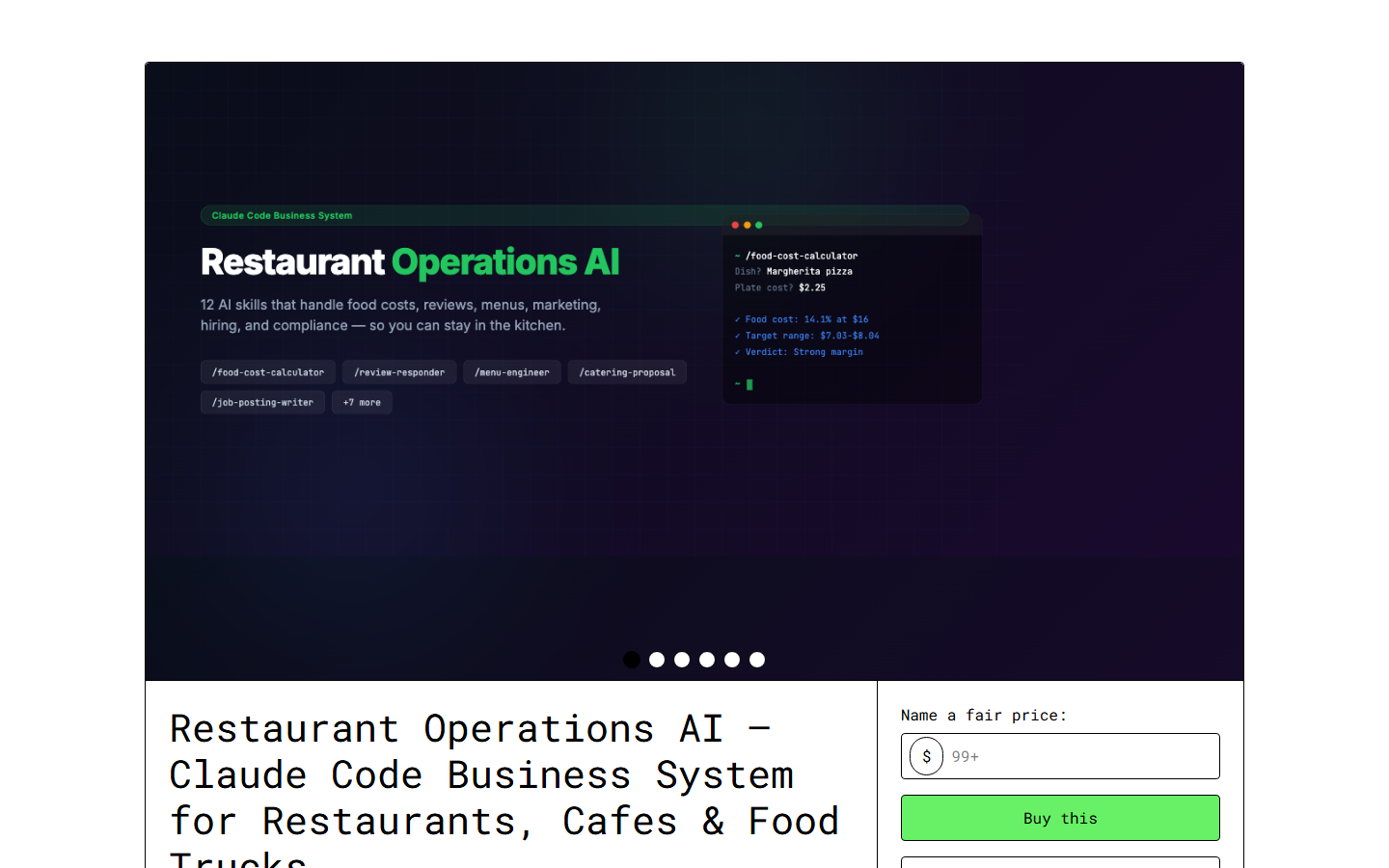
Claude Code Restaurant Operations AI ($59)
What it is: A CLAUDE.md configuration file, custom skills, SOP templates, and prompt libraries that turn Claude Code into a restaurant operations assistant.
How it works: You open Claude Code and talk to it. "Write responses to today's reviews." "Analyze my food costs for this month." "Create next week's social media posts." Claude handles each task using the pre-configured skills.
Best for: Solo owner-operators who want a single conversational assistant. You give it tasks, it does them.
Setup time: 15 minutes.
View Claude Code Restaurant AI
OpenClaw Restaurant Ops ($49)
What it is: Four pre-configured AI agents that coordinate with each other through the OpenClaw framework.
The agents:
- Front-of-House Agent — Handles reservations, review responses, customer inquiries, and phone/email communication
- Back-of-House Agent — Manages inventory, food costs, supplier orders, waste tracking, and recipe scaling
- Marketing Agent — Creates social media content, email campaigns, seasonal promotions, and loyalty communications
- Manager Agent — Coordinates the other three, generates reports, handles scheduling, and escalates decisions that need human input
How it works: The agents run semi-autonomously. The FOH agent monitors your review platforms and drafts responses without being asked. The BOH agent tracks inventory levels and alerts you when it is time to reorder. The Marketing agent generates a week's worth of social content every Monday morning. The Manager agent produces a daily briefing.
Best for: Restaurant owners who want AI that works proactively, not just reactively. You check in and approve things rather than initiating every task.
Setup time: 30-45 minutes.
When to Use Both ($108 Total)
Here is what Marcus and I ended up doing: we use Claude Code as the personal assistant (for ad-hoc requests, brainstorming, complex analysis) and OpenClaw agents for the recurring automated operations.
The Claude Code kit handles: one-off menu consultations, custom event planning, complex vendor negotiations, financial deep-dives.
The OpenClaw kit handles: daily review responses, weekly social media, ongoing inventory monitoring, automated reporting.
This combination covers both reactive assistance (I need help with this right now) and proactive automation (this should happen every day without me asking). If your budget allows $108, this is the setup I recommend.
Automation 1: Review Responses (2 Hours Saved Per Day)
This was the first thing we automated because it had the highest impact-to-effort ratio.
The Problem
Marcus had 147 unresponded reviews across Google (89), Yelp (41), and TripAdvisor (17). Some were months old. The positive reviews got no acknowledgment. The negative reviews festered. His Google Business profile showed a 4.2-star average, but the lack of management responses was dragging down his visibility.
The Setup (Claude Code)
The Restaurant AI skill for review responses works like this:
- You paste the review text into Claude Code (or connect a review monitoring service)
- Claude analyzes the sentiment, identifies specific compliments or complaints
- It drafts a response matching your restaurant's voice and personality
- You review, adjust if needed, and post
The skill includes response frameworks:
- Positive reviews — Thank specifically for what they praised, mention a detail that shows you read carefully, invite them back with a personal touch
- Negative reviews — Acknowledge the issue without being defensive, explain what happened (if you know), describe what you have done to prevent it, offer to make it right
- Mixed reviews — Appreciate the positives, address the negatives constructively, end on a forward-looking note
The Setup (OpenClaw)
The FOH agent automates this further. Once connected to your Google Business API, it:
- Monitors new reviews automatically
- Drafts responses within 30 minutes of each review posting
- Queues them for your approval (or posts automatically if you enable that)
- Tracks response metrics (response time, sentiment shift, review velocity)
Marcus chose the approval mode for the first month to build trust, then switched to auto-post for positive reviews (4-5 stars) while keeping human approval for anything below 4 stars.
The Results
Within three weeks:
- Response rate went from 12% to 100%
- Average response time dropped from 3 days to 35 minutes
- Google Business profile engagement increased 40%
- Marcus told me two customers specifically mentioned the thoughtful review responses when they returned
Time saved: approximately 4 hours per week.
Automation 2: Social Media Content (3 Hours Saved Per Week)
The Problem
Marcus's Instagram was a ghost town. He would post a food photo when he remembered, with a caption like "Tonight's special" and no hashtags. His last post was 6 weeks old.
The Setup
The Marketing skill (Claude Code) and Marketing Agent (OpenClaw) both handle this, with different approaches.
Claude Code approach: Every Monday, you tell Claude "Create this week's social media content." It generates 5-7 posts based on your menu, seasonal ingredients, upcoming events, and local food trends. Each post includes a caption, hashtags, and a suggestion for what photo to take.
OpenClaw approach: The Marketing Agent generates the content automatically every Monday morning. It creates a mix of content types:
- 2 dish features with storytelling captions
- 1 behind-the-scenes post (kitchen prep, sourcing)
- 1 community/seasonal post (local events, holiday tie-ins)
- 1 customer-focused post (review highlight, customer story)
- 1 promotional post (special, happy hour, event)
- 1 educational post (cooking tip, ingredient spotlight)
The agent stores the content in a queue. Marcus approves and adds photos throughout the week. The agent even suggests optimal posting times based on his audience engagement data.
The Results
Marcus went from posting once every 6 weeks to 5-7 times per week. Follower growth tripled. More importantly, he started hearing "I saw your post and had to come in" from new customers. Social media went from a guilt-inducing obligation to a revenue driver that required 20 minutes of his time per week (taking photos and approving posts).
Automation 3: Menu Optimization (The Biggest Financial Impact)
The Problem
Marcus had not analyzed his menu pricing in eight months. Some dishes were underpriced (losing money on every sale). Others were overpriced (people were not ordering them). He had no idea which dishes had the best profit margins because he was not tracking plate-level food costs.
The Setup
The menu optimization skill requires input data:
- Current menu with prices
- Ingredient costs (from your suppliers)
- Sales data by dish (from your POS, even approximate counts work)
- Local competitor pricing (Claude can research this with web access)
Claude analyzes the data and produces:
- Food cost percentage by dish — The actual margin on every item
- Menu engineering matrix — Classifies every dish as a Star (high profit, high popularity), Plow Horse (low profit, high popularity), Puzzle (high profit, low popularity), or Dog (low profit, low popularity)
- Price adjustment recommendations — Specific dollar amounts with reasoning
- Menu placement suggestions — Where high-margin items should appear on the physical/digital menu
- Elimination candidates — Dishes that should be removed or reworked
The Results
Marcus implemented the pricing recommendations over two menu updates. The changes:
- Increased average ticket by $3.40 (from $24.80 to $28.20)
- Improved overall food cost from 34% to 29%
- Eliminated 4 dishes that were costing him money on every order
- Repositioned 3 high-margin dishes to prominent menu locations
On 200 covers per week, the $3.40 increase in average ticket translates to an additional $680/week — about $35,000 per year. From a one-time $59 purchase and 2 hours of implementation.
This is why I tell every restaurant owner to start with menu optimization after the initial review response setup. The ROI is absurd.
Automation 4: Inventory Management (Preventing Waste and Stockouts)
The Problem
Marcus was ordering based on gut feel. Sometimes he would over-order produce and throw away $200 worth of wilted greens on Sunday. Other times he would run out of a key ingredient mid-service and have to 86 a popular dish.
The Setup
The BOH agent (OpenClaw) or inventory skill (Claude Code) tracks:
- Current inventory levels (you input after counting, or connect to your POS)
- Historical usage patterns by day of week and season
- Upcoming reservations (which predict demand)
- Supplier lead times and minimum orders
Based on this data, the AI:
- Predicts daily usage for each ingredient
- Generates purchase orders timed to your supplier delivery schedule
- Flags items approaching spoilage
- Alerts you to unusual consumption patterns (potential theft or waste)
- Suggests menu specials to use up excess inventory before it spoils
The Results
Marcus reduced food waste by approximately 40% in the first month. The "use it up" specials — where the AI suggests dishes that use ingredients approaching their peak — became a customer favorite. "Chef's Special" now means "we are turning tomorrow's waste into tonight's profit."
Estimated savings: $400-600/month in reduced waste.
Automation 5: Financial Reporting (2 Hours Saved Per Week)
The Problem
Marcus's "financial reporting" was opening Square, staring at the revenue number, and hoping it was higher than last week. No food cost tracking. No labor cost analysis. No trend reporting. His accountant got raw bank statements and did the best she could.
The Setup
The reporting skill takes your POS data (sales, labor hours) and inventory data (costs, waste) and generates:
- Daily flash report — Revenue vs. same day last week, cover count, average ticket, notable items
- Weekly P&L summary — Revenue, food cost, labor cost, other expenses, net margin
- Monthly trends — Charts showing trajectory of key metrics
- Anomaly alerts — Spikes or drops that need attention
The Manager Agent (OpenClaw) generates these automatically and delivers them to Marcus every morning. The daily flash report hits his inbox at 6 AM so he starts the day knowing exactly where things stand.
The Results
For the first time, Marcus can see his business metrics in real-time instead of waiting for his quarterly accountant meeting. He caught a labor cost spike in week two (a new server was clocking in 30 minutes early every shift) and addressed it immediately. Previous to automated reporting, that would have gone unnoticed for months.
The Complete Setup Timeline
Here is how I would recommend rolling this out:
Day 1: Setup and Review Responses (1-2 hours)
- Install Claude Code or OpenClaw (or both)
- Configure the restaurant AI with your business details
- Start responding to reviews immediately — this is your quick win
Week 1: Social Media and Basic Reporting (1 hour)
- Configure social media content generation
- Set up basic daily reporting
- Approve and post your first week of AI-generated social content
Week 2: Menu Optimization (2-3 hours)
- Gather your food costs and sales data
- Run the menu engineering analysis
- Plan your first round of menu adjustments
Week 3: Inventory Management (2 hours)
- Input your current inventory and supplier info
- Let the system learn your usage patterns
- Start receiving purchase order recommendations
Week 4: Full Automation (1 hour)
- Review everything that is running
- Adjust autonomy levels (what needs approval vs. what runs automatically)
- Set up financial reporting with full data integration
By the end of month one, you should be saving 15-20 hours per week on administrative tasks. That is not an exaggeration — that is what Marcus experienced, and he is not unusual.
What AI Cannot Do for Your Restaurant
I want to be honest about the limitations:
It cannot replace human hospitality. The greeting, the eye contact, the intuition about when a table needs attention — that is your team, not AI.
It cannot handle emergencies. A kitchen fire, a health inspection, a walk-out during Friday rush — these require human judgment and presence.
It cannot create your identity. Your restaurant's soul — the food philosophy, the ambiance, the culture — that comes from you. AI amplifies your vision; it does not create one.
It cannot guarantee accuracy. Every AI output should be reviewed, especially early on. The review responses, social posts, and financial reports are drafts until you approve them. Trust builds over time as you see consistent quality.
The Investment Math
Let us run the numbers for a restaurant doing $15,000/week in revenue:
| Investment | Cost |
|---|---|
| ----------- | ------ |
| Claude Code Restaurant AI | $59 (one-time) |
| OpenClaw Restaurant Ops | $49 (one-time) |
| Claude Pro subscription | $20/month |
| Total first month | $128 |
| Ongoing monthly | $20 |
| Returns | Monthly Value |
|---|---|
| --------- | -------------- |
| Menu optimization (higher margins) | $2,700/month |
| Reduced food waste | $500/month |
| Time savings (15 hrs/week at $30/hr) | $1,800/month |
| Increased social media-driven traffic | Hard to quantify, but real |
| Better review management (reputation) | Hard to quantify, but real |
| Conservative estimated return | $5,000/month |
A $128 investment that returns $5,000/month. I do not know a better ROI in the restaurant industry.
Getting Started
If you are ready to automate:
- Choose your product — Claude Code Restaurant AI ($59) for simple conversational assistance, OpenClaw Restaurant Ops ($49) for autonomous agents, or both ($108) for the full setup
- Download and install from the Skiln store
- Start with review responses — your quickest win
- Expand weekly — add one new automation per week
- Measure results — track your time savings and financial impact
Marcus's restaurant is running better than it has in years, and he is finally leaving before midnight. The AI did not make him a better chef — he was always that. It freed him from the admin prison so he could actually focus on the craft.
Your restaurant deserves the same.
Matty Reid is the Editor-in-Chief at Skiln. He spent a week embedded in a working restaurant to write this piece. Questions about restaurant AI? hello@skiln.co.
Related reading: