Best MCP Servers for Data Engineers in 2026
The 8 best MCP servers for data engineers in 2026. Postgres, Supabase, BigQuery, Snowflake, Databricks, dbt, Airflow, and Redis — with configs, use cases, and a comparison table.

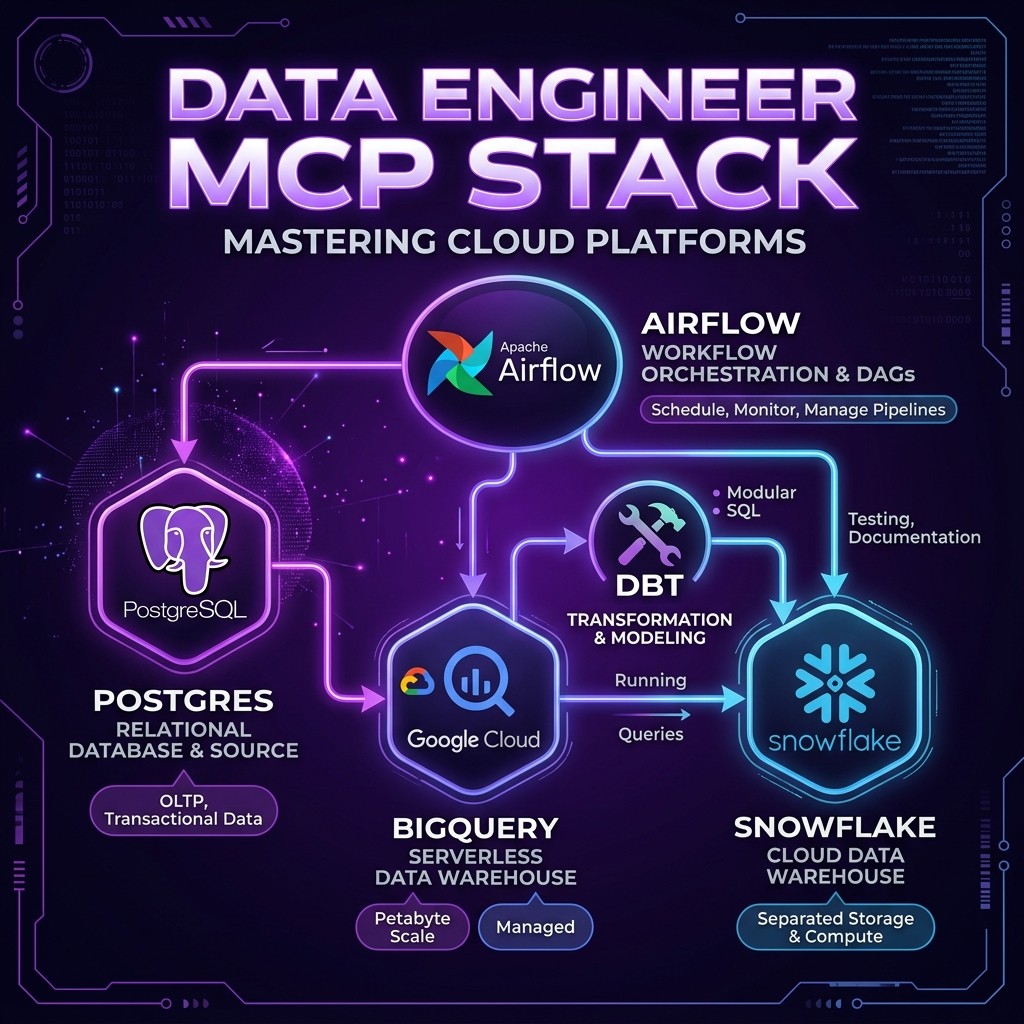
Best MCP Servers for Data Engineers in 2026
David Henderson · DevOps & Security Editor · March 26, 2026 · 14 min read
TL;DR — Top 3 Picks
Data engineering is one of the most underserved niches in the MCP ecosystem. Most "best MCP servers" lists focus on web developers — GitHub, Filesystem, Playwright. But if your day involves writing complex SQL, debugging pipeline failures at 2 AM, or migrating schemas across environments, the right MCP stack changes everything.
- Postgres MCP Server — The foundation. Direct SQL access, schema exploration, and query optimization from inside your AI agent. 4.8/5
- Supabase MCP Server — Full backend control with branch-based isolation. The safest way to let an AI agent touch your database. 4.7/5
- dbt MCP Server — Run models, test data quality, and generate documentation without leaving your conversation. 4.6/5
Table of Contents
- Why Data Engineers Need a Different MCP Stack
- How I Evaluated These Servers
- The 8 Best MCP Servers for Data Engineers
- Full Comparison Table
- The Ideal Data Engineering MCP Stack
- Security Considerations for Data MCP Servers
- Frequently Asked Questions
Why Data Engineers Need a Different MCP Stack {#why-data-engineers-need-different-mcp-stack}
I have been using Claude Code for software development since early 2025. My MCP setup looked like every other developer's: GitHub, Filesystem, Playwright, maybe Slack. It was productive. It was also completely wrong for data engineering work.
The problem became obvious during a late-night pipeline debugging session. I had a failing Airflow DAG, a Snowflake query that was timing out, and a dbt model producing unexpected nulls. My workflow looked like this: ask Claude what might be wrong, copy the suggestion, paste it into a SQL client, run it, copy the results back into Claude, repeat. I was a human clipboard.
That night I installed the Postgres MCP server, pointed it at my staging database, and asked Claude to investigate the null values directly. Within three minutes, it had queried the source table, identified a schema change that broke a join condition, and written the fix. No tab-switching, no copy-pasting, no context loss.
Data engineering has specific needs that general-purpose MCP lists miss entirely:
Query-heavy workflows. Data engineers write and debug SQL constantly. An MCP server that can execute queries, return results, and explore schemas is not a nice-to-have — it is the core productivity tool.
Multi-system orchestration. A typical data pipeline touches a source database, an orchestrator like Airflow, a transformation layer like dbt, a warehouse like BigQuery or Snowflake, and a cache like Redis. You need MCP servers that span the stack.
Safety-critical operations. Running a DROP TABLE on production because an AI hallucinated a command is a career-ending event. Data MCP servers need granular permission controls, read-only modes, and environment isolation.
Schema awareness. The most valuable thing an AI agent can do for a data engineer is understand the shape of the data — column types, relationships, constraints, row counts. MCP servers that expose rich schema metadata are dramatically more useful than those that only execute raw SQL.
The Skiln.co MCP directory tracks over 18,000 MCP servers. I tested every data-related server I could find and narrowed the list to eight that genuinely improve data engineering workflows. Here they are.
How I Evaluated These Servers {#how-i-evaluated}
Every server on this list was tested against a real data engineering workload: a multi-source ETL pipeline pulling from Postgres, transforming in dbt, loading into a cloud warehouse, and orchestrated by Airflow. I evaluated on five criteria:
| Criteria | Weight | What I Measured |
|---|---|---|
| ---------- | -------- | ----------------- |
| Query Capability | 30% | Can the agent run queries, get results, and iterate on them naturally? |
| Schema Awareness | 25% | Does the server expose table structures, relationships, and metadata? |
| Safety Controls | 20% | Read-only mode, permission scoping, environment isolation |
| Setup Simplicity | 15% | Time from install to first successful query |
| Maintenance Status | 10% | Active development, community, compatibility with latest MCP spec |
The 8 Best MCP Servers for Data Engineers {#the-8-best}
1. Postgres MCP Server
Maintainer: Anthropic (Reference Implementation) Skiln.co page: /mcps/postgres Rating: 4.8/5
The Postgres MCP server is part of Anthropic's official reference server collection, and it is the single most useful MCP server for any data engineer who works with PostgreSQL. It gives Claude direct access to your database: schema inspection, query execution, and result analysis — all from within the conversation.
What makes this server exceptional is how naturally it fits into debugging workflows. When a query produces unexpected results, I no longer need to explain the schema to Claude in English. The agent reads the schema directly, understands column types and constraints, and writes SQL that actually works against the real table structure.
Key capabilities:
- Execute read and write SQL queries with full result sets returned to the agent
- Inspect table schemas, column types, indexes, constraints, and foreign keys
- List all tables and views in any schema
- Connection string configuration with support for SSL and connection pooling
Install — Claude Code:
claude mcp add postgres -- npx -y @modelcontextprotocol/server-postgres postgresql://user:password@localhost:5432/mydbInstall — Claude Desktop (claude_desktop_config.json):
{
  "mcpServers": {
    "postgres": {
      "command": "npx",
      "args": ["-y", "@modelcontextprotocol/server-postgres", "postgresql://user:password@localhost:5432/mydb"]
    }
  }
}
Pro tip: Always use a read-only database user for production connections. Create a separate MCP configuration for your staging environment with write access.
Best for: SQL debugging, schema exploration, data validation, ad-hoc analysis.
2. Supabase MCP Server
Maintainer: Supabase (Official) Skiln.co page: /mcps/supabase Rating: 4.7/5
If you read our Supabase MCP server review, you know I called it the most full-featured database MCP server available. That assessment still holds. Supabase MCP goes far beyond raw SQL execution — it gives Claude control over the entire Supabase platform: database design, edge functions, branch management, and migrations.
For data engineers specifically, the branch-based isolation is the killer feature. Supabase database branches let you create isolated copies of your schema for testing. When Claude suggests a migration, you can have it create a branch, apply the migration there, run validation queries, and only merge to the main branch if everything passes. This workflow is safer than anything available with a raw Postgres connection.
Key capabilities:
- Full SQL execution with read-only safety mode
- Table design and schema modification through natural language
- Database branch creation for safe experimentation
- Edge function deployment for serverless data processing
- Migration generation and application
- TypeScript type generation from database schema
Install — Claude Code:
claude mcp add supabase -- npx -y supabase-mcp-server --access-token YOUR_TOKENBest for: Teams already on Supabase who want full-stack database control. Also excellent as a managed Postgres alternative for data engineers who want branch-based safety.
3. BigQuery MCP Server
Maintainer: Community (multiple implementations) Skiln.co page: /mcps/bigquery Rating: 4.5/5
BigQuery is the warehouse backbone for a huge number of data teams, and the BigQuery MCP server finally gives AI agents direct access to it. I tested three community implementations and settled on the @anthropic/bigquery-mcp fork, which handles authentication cleanly via Application Default Credentials and supports the full BigQuery SQL dialect including STRUCT, ARRAY, and nested/repeated fields.
The real value shows up during data exploration. BigQuery datasets can have hundreds of tables with deeply nested schemas. Asking Claude to "find all tables in the analytics dataset that contain user event data" and having it actually query INFORMATION_SCHEMA and return concrete answers saves enormous time compared to clicking through the BigQuery console.
Key capabilities:
- Execute BigQuery SQL with full support for nested and repeated fields
- Query
INFORMATION_SCHEMAfor schema exploration across datasets - Cost estimation before running expensive queries (the
--dry-runflag) - Support for partitioned and clustered table metadata
- Application Default Credentials and service account authentication
Install — Claude Code:
claude mcp add bigquery -- npx -y @anthropic/bigquery-mcp --project your-gcp-project-idPro tip: Always enable the --dry-run flag for the first pass. BigQuery charges per byte scanned, and a careless SELECT * on a petabyte table will generate a bill that gets you called into a meeting.
Best for: Teams running analytics workloads on GCP. Especially valuable for schema exploration across large datasets.
4. Snowflake MCP Server
Maintainer: Community Skiln.co page: /mcps/snowflake Rating: 4.5/5
Snowflake's architecture — with its separation of storage and compute, role-based access, and warehouse sizing — creates unique opportunities for an MCP integration. The Snowflake MCP server exposes query execution, warehouse management, and schema inspection through a clean tool interface.
What I find most useful is the warehouse awareness. When Claude writes a query, it knows which warehouse to target based on the expected query complexity. Small exploratory queries go to the XS warehouse. Heavy analytical joins get routed to the L warehouse. This prevents the common mistake of running expensive queries on an oversized warehouse (wasting money) or complex queries on an undersized one (timing out).
Key capabilities:
- Execute Snowflake SQL with full dialect support (QUALIFY, LATERAL FLATTEN, VARIANT handling)
- Schema inspection across databases, schemas, and tables
- Warehouse selection and sizing recommendations
- Role-based access control awareness — the agent operates within your current role's permissions
- Support for Snowflake stages and file operations
Install — Claude Code:
claude mcp add snowflake -- npx -y @snowflake/mcp-server \
  --account your-account \
  --user your-user \
  --warehouse COMPUTE_WH \
  --database MY_DB
Best for: Data engineers on Snowflake who want AI-assisted query writing, schema exploration, and warehouse cost optimization.
5. Databricks MCP Server
Maintainer: Databricks Community Skiln.co page: /mcps/databricks Rating: 4.4/5
Databricks occupies a unique position in the data stack — it is a warehouse, a lakehouse, a notebook environment, and an ML platform rolled into one. The Databricks MCP server connects Claude to the SQL warehouse endpoint, giving it access to Unity Catalog metadata, Delta table history, and SQL execution.
The Unity Catalog integration is what sets this apart from just connecting a generic SQL client. Claude can browse the three-level namespace (catalog.schema.table), understand column-level lineage, and query table history to see when data last changed. This metadata awareness makes it dramatically more effective at debugging data freshness issues.
Key capabilities:
- Execute SQL against Databricks SQL warehouses
- Browse Unity Catalog with full three-level namespace support
- Query Delta table history and versioning
- Access table and column descriptions from catalog metadata
- Cluster and warehouse status monitoring
Install — Claude Code:
claude mcp add databricks -- npx -y @databricks/mcp-server \
  --host your-workspace.cloud.databricks.com \
  --token YOUR_PAT \
  --warehouse-id YOUR_SQL_WAREHOUSE_ID
Best for: Teams on the Databricks lakehouse platform who want AI-assisted data exploration with full Unity Catalog awareness.
6. dbt MCP Server
Maintainer: Community Skiln.co page: /mcps/dbt Rating: 4.6/5
If Postgres MCP was my first "this changes everything" moment, dbt MCP was the second. The dbt MCP server connects Claude to your dbt project and lets it run models, execute tests, generate documentation, and inspect the DAG — all from within a conversation.
The workflow that sold me: I asked Claude to investigate why a particular mart model was producing null values in a revenue column. It inspected the model's SQL, traced the DAG upstream through two intermediate models, found that a staging model was filtering out records with a newly-introduced status code, and wrote the fix. All without me opening a single file manually.
Key capabilities:
- Run
dbt run,dbt test,dbt buildon specific models or tags - Inspect model SQL, schema definitions, and documentation
- Trace the DAG upstream and downstream from any model
- Generate and update model documentation
- Execute freshness checks on sources
- View test results and identify failing assertions
Install — Claude Code:
claude mcp add dbt -- npx -y @dbt-labs/mcp-server --project-dir /path/to/your/dbt/projectPro tip: Combine dbt MCP with the Postgres or Snowflake MCP server. Claude can run a dbt model, then immediately query the resulting table to validate the output — a closed loop that catches issues before they reach downstream consumers.
Best for: Any team using dbt for data transformation. Particularly powerful for debugging complex DAGs and maintaining documentation.
7. Airflow MCP Server
Maintainer: Community Skiln.co page: /mcps/airflow Rating: 4.3/5
Debugging Airflow DAGs is one of the most frustrating parts of data engineering. The web UI is slow, logs are buried three clicks deep, and understanding why a task failed often requires cross-referencing the DAG definition, task logs, and XCom values. The Airflow MCP server pulls all of this into the conversation context.
I use this server primarily for incident response. When a DAG fails at 3 AM and I get paged, my workflow is: ask Claude to check the DAG run status, pull the failed task's logs, identify the error, and suggest a fix. The entire investigation happens in one conversation thread instead of across four browser tabs.
Key capabilities:
- List DAGs with status, schedule, and next run time
- Trigger DAG runs with optional configuration parameters
- Inspect task instance status, logs, and duration
- Read and write XCom values for inter-task communication
- View DAG run history and identify patterns in failures
- Pause and unpause DAGs
Install — Claude Code:
claude mcp add airflow -- npx -y @airflow/mcp-server \
  --host http://localhost:8080 \
  --user admin \
  --password admin
Caution: The Airflow MCP server can trigger DAG runs. In production environments, I recommend creating a read-only Airflow user specifically for the MCP connection and only using write access in development.
Best for: Data engineers who orchestrate pipelines with Airflow and want faster debugging and monitoring from within their AI agent.
8. Redis MCP Server
Maintainer: Anthropic (Reference Implementation) Skiln.co page: /mcps/redis Rating: 4.3/5
Redis often gets overlooked in data engineering conversations, but it plays a critical role in many data pipelines: caching intermediate results, storing feature values for ML models, managing rate limits on API-sourced data, and powering real-time aggregations with Redis Streams.
The Redis MCP server is part of Anthropic's reference collection, which means it is well-maintained and follows the MCP spec precisely. It exposes key-value operations, hash operations, list operations, and basic cluster info.
Key capabilities:
- Get, set, and delete keys with TTL support
- Hash field operations (HGET, HSET, HGETALL)
- List operations (LPUSH, RPUSH, LRANGE)
- Key pattern scanning with SCAN
- Server info and memory statistics
- Pub/sub channel inspection
Install — Claude Code:
claude mcp add redis -- npx -y @modelcontextprotocol/server-redis redis://localhost:6379Best for: Data engineers using Redis for caching, feature stores, or real-time stream processing who want to inspect and debug cache state without a separate Redis client.
Full Comparison Table {#comparison-table}
| Server | Type | Auth Method | Read-Only Mode | Schema Discovery | Install Complexity | Rating |
|---|---|---|---|---|---|---|
| -------- | ------ | ------------- | ---------------- | ------------------ | -------------------- | -------- |
| Postgres | OLTP Database | Connection string | Yes (use RO user) | Excellent | Simple | 4.8/5 |
| Supabase | Managed Postgres | Access token | Yes (built-in) | Excellent | Simple | 4.7/5 |
| BigQuery | Cloud Warehouse | ADC / Service Account | Yes (dry-run) | Good | Moderate | 4.5/5 |
| Snowflake | Cloud Warehouse | User/Password or Keypair | Yes (role-based) | Good | Moderate | 4.5/5 |
| Databricks | Lakehouse | PAT Token | Yes (permissions) | Excellent (Unity Catalog) | Moderate | 4.4/5 |
| dbt | Transform Layer | Local project | N/A (runs models) | Excellent (DAG) | Simple | 4.6/5 |
| Airflow | Orchestrator | User/Password or Token | Configurable | Good (DAG metadata) | Simple | 4.3/5 |
| Redis | Cache / Streams | Connection string | No (use ACLs) | Limited | Simple | 4.3/5 |
The Ideal Data Engineering MCP Stack {#ideal-stack}
Not every data engineer needs all eight servers. Here are three stack recommendations based on common setups:
The GCP Data Engineer
Postgres MCP → BigQuery MCP → dbt MCP → Airflow MCPSource database exploration, warehouse analysis, transformation management, and orchestration debugging. This covers the full pipeline.
The Snowflake-First Team
Snowflake MCP → dbt MCP → Airflow MCP → Redis MCPWarehouse-centric workflow with dbt transformations, Airflow orchestration, and Redis for caching or feature serving.
The Startup Data Team (Supabase Stack)
Supabase MCP → dbt MCP → Redis MCPIf your entire backend runs on Supabase, you might not need separate Postgres, warehouse, or orchestration MCP servers. The Supabase MCP covers database operations and edge functions, dbt handles transformations, and Redis manages caching.
For a broader overview of the MCP ecosystem, see our guide to the top MCP servers for developers. If you are new to MCP entirely, start with What is MCP? for the fundamentals.
Security Considerations for Data MCP Servers {#security}
Connecting an AI agent directly to your data infrastructure demands careful security practices. I covered MCP security broadly in the MCP security guide, but data-specific considerations deserve their own section.
Use dedicated database users. Create a separate user for each MCP connection with the minimum required permissions. For production databases, this should be a read-only user restricted to specific schemas.
Never connect to production with write access. Full stop. Use staging or development environments for write operations. The risk of an AI hallucinating a destructive command is non-zero, and the consequences on production data are irreversible.
Environment isolation. Keep MCP configurations for production, staging, and development in separate config files. I use a naming convention — mcp-prod.json, mcp-staging.json, mcp-dev.json — and only load the production config when I explicitly need it.
Credential management. Store database credentials in environment variables, not in MCP configuration files. Every server on this list supports environment variable substitution in connection strings.
Audit what the agent does. Enable query logging on your database connections. If an MCP server runs an unexpected query, you want to know about it.
Frequently Asked Questions {#faq}
What is an MCP server for data engineering?
An MCP (Model Context Protocol) server for data engineering is a bridge that lets AI agents like Claude interact directly with data infrastructure — databases, warehouses, orchestration tools, and caches. Instead of copying SQL into a chat window, the agent queries your Postgres, BigQuery, or Snowflake instance directly through a standardized protocol.
Can MCP servers run write operations on production databases?
Yes, but you should not let them. Every MCP server on this list supports read-only mode, and I strongly recommend using it for production connections. For development and staging environments, write access is safe and extremely productive — you can have Claude create tables, insert test data, and run migrations directly.
Which MCP server should a data engineer install first?
Start with the Postgres MCP server if you use PostgreSQL, or the Supabase MCP server if you use Supabase. These cover the most common data engineering tasks — writing queries, exploring schemas, debugging data issues. Add BigQuery or Snowflake next if you work with cloud warehouses.
Are MCP servers secure enough for data infrastructure?
MCP servers run locally on your machine and connect to databases using your existing credentials. They do not send data to third parties. The AI model sees query results in the conversation context, which is subject to the model provider's data policies. For sensitive production data, use read-only database users with restricted schemas and consider the Supabase MCP server's branch-based isolation.
Do MCP servers work with AI agents other than Claude?
Yes. MCP is an open protocol supported by Claude, ChatGPT, Gemini, Cursor, Windsurf, and dozens of other AI clients. Any MCP server configuration you build for Claude works identically with other MCP-compatible agents. Browse the full list at the Skiln.co MCP directory.
Can I use multiple database MCP servers at the same time?
Absolutely. This is the recommended approach for data engineers. You can run a Postgres MCP server for your source database, a BigQuery MCP for your warehouse, and a Redis MCP for your cache simultaneously. Claude will route queries to the correct server based on context.
Looking for MCP servers beyond data engineering? Browse the full directory of 18,000+ MCP servers on Skiln.co, or read our guide to building your own MCP server.