Cursor Rules vs Claude Skills: Which Approach Wins?
Cursor Rules vs Claude Skills — format differences, capabilities, ecosystem size, portability, and when to use each. A detailed comparison for developers choosing between them.

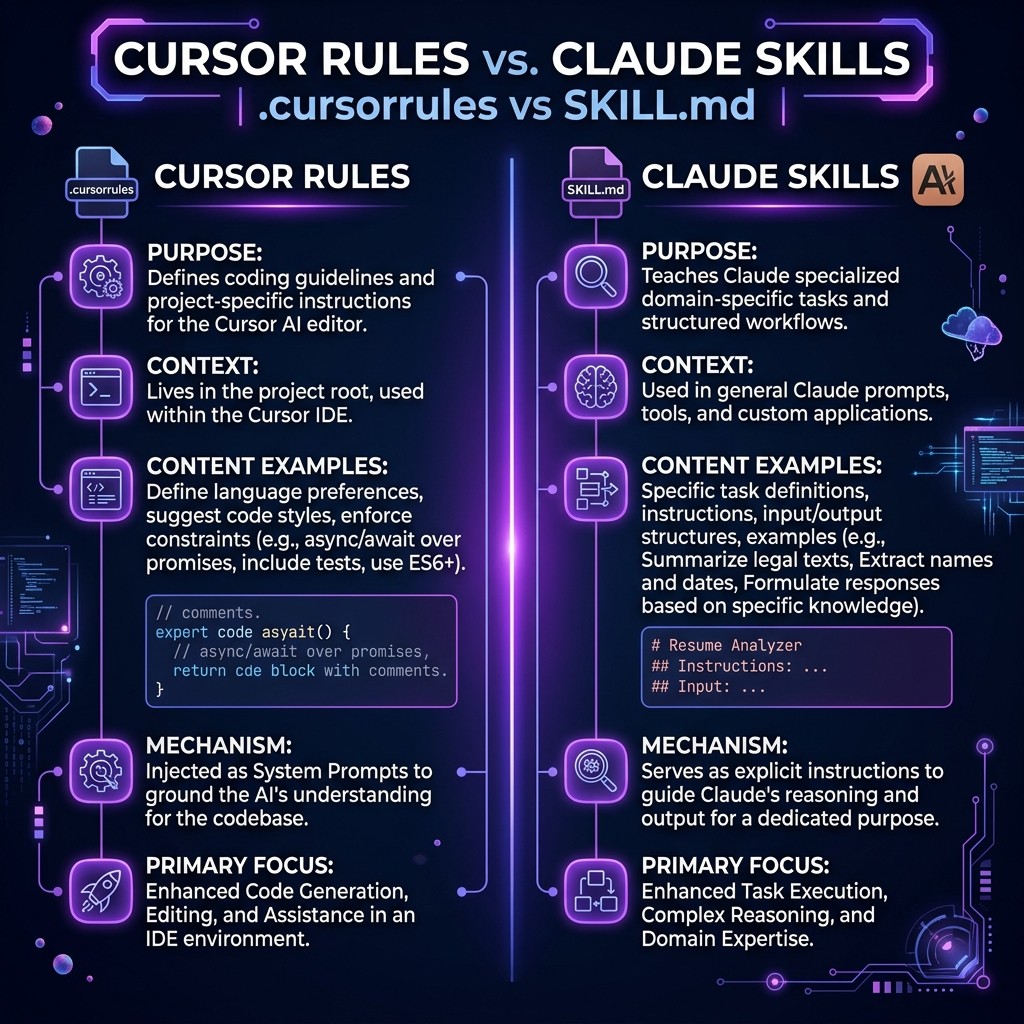
Cursor Rules vs Claude Skills: Which Approach Wins?
David Henderson · DevOps & Security Editor · March 26, 2026 · 14 min read
TL;DR — Quick Answer
Cursor Rules and Claude Skills do the same fundamental thing: they give an AI coding assistant project-specific instructions. The difference is which tool they target.
| Cursor Rules | Claude Skills | |
|---|---|---|
| --- | --- | --- |
| File | .cursorrules | CLAUDE.md or .claude/skills/*.md |
| Works with | Cursor IDE | Claude Code, Claude Desktop |
| Format | Markdown/text | Markdown |
| Scope | Project-level only | Project-level or global |
| Ecosystem | ~5,000-8,000 rules | 60,000+ skills |
| Distribution | cursor.directory, GitHub | Skiln.co, SkillsDirectory, GitHub |
| Portability | Cursor only | Claude ecosystem (CLI, Desktop, API) |
Bottom line: If you use Cursor, use Cursor Rules. If you use Claude Code, use Claude Skills. If you use both, use both. They are not mutually exclusive, and converting between them takes about 30 seconds.
Table of Contents
- Why This Comparison Matters Now
- What Are Cursor Rules?
- What Are Claude Skills?
- Format Comparison: Side by Side
- Capabilities Deep Dive
- Ecosystem Size and Quality
- Portability and Lock-In
- When to Use Cursor Rules
- When to Use Claude Skills
- Can You Use Both?
- Migration Guide: Converting Between Formats
- Frequently Asked Questions
Why This Comparison Matters Now {#why-this-matters}
I get asked this question at least twice a week: "Should I use Cursor Rules or Claude Skills?"
The confusion is understandable. Both are text files that instruct an AI how to behave in your project. Both use markdown. Both shape things like coding standards, architecture patterns, and tool preferences. From the outside, they look identical.
But the developer tooling landscape split in 2025 and has been diverging since. One camp lives in Cursor — an AI-native IDE with deep inline code editing. The other camp lives in Claude Code — a CLI agent that operates autonomously across your codebase. Each camp developed its own instruction format, its own ecosystem, and its own best practices.
The split created real friction. Teams with members using different tools need to maintain parallel instruction files. Developers switching between tools lose their customizations. Open source projects do not know which format to include.
This guide resolves the confusion. I have used both Cursor and Claude Code extensively, maintained instruction files for both, and tracked both ecosystems through the Skiln.co directory (which indexes both Claude Skills and Cursor Rules). Here is the complete comparison.
What Are Cursor Rules? {#what-are-cursor-rules}
Cursor Rules are instruction files that tell Cursor's AI assistant how to behave within a specific project. You create a .cursorrules file (or .cursor/rules/*.md files in newer versions) in your project root, and Cursor's AI reads those instructions before responding to any prompt.
A typical .cursorrules file contains:
- Tech stack declarations — "This project uses Next.js 15, TypeScript, Tailwind CSS, and Prisma"
- Coding conventions — "Always use functional components, prefer named exports, use arrow functions"
- Architecture patterns — "Follow feature-based folder structure, use server components by default"
- Forbidden patterns — "Never use
anytype, never use inline styles, never usevar" - Style preferences — "Use early returns, keep functions under 30 lines, prefer composition over inheritance"
Here is a minimal example:
# Project Rules

## Stack
- Next.js 15 with App Router
- TypeScript strict mode
- Tailwind CSS with shadcn/ui
- Prisma with PostgreSQL

## Conventions
- Use functional components with arrow syntax
- Prefer named exports over default exports
- Use `pnpm` for package management
- Write tests with Vitest

## Forbidden
- No `any` types
- No inline styles
- No barrel exports (index.ts re-exports)
- No `useEffect` for data fetching (use server components)
Cursor reads this file automatically. Every time the AI responds — whether through inline autocomplete, chat, or Composer — it follows these rules.
What Are Claude Skills? {#what-are-claude-skills}
Claude Skills are markdown instruction files that shape how Claude Code (and Claude Desktop) approaches tasks. They can be placed at two levels:
- Project-level:
CLAUDE.mdin the project root, or.claude/skills/*.mdfor multiple skills - Global:
~/.claude/skills/*.md— applies to every Claude Code session regardless of project
Skills go beyond simple rules. They can include:
- Role definitions — "You are a senior backend engineer specializing in distributed systems"
- Workflow procedures — Step-by-step processes for complex tasks
- Decision frameworks — When to choose one pattern over another
- Tool integration guides — How to use specific MCP servers or external tools
- Examples with expected output — Showing Claude exactly what you want
Here is a minimal example:
# Project Skill

## Role
You are a senior full-stack developer working on a SaaS application.

## Stack
- Next.js 15 with App Router
- TypeScript strict mode
- Tailwind CSS with shadcn/ui
- Supabase (Postgres + Auth)
- Deployed on Vercel

## Workflow
1. Before writing code, outline the approach in 2-3 sentences
2. Write the implementation
3. Write tests for the implementation
4. Review your own code for edge cases

## Conventions
- Functional components, arrow syntax, named exports
- Use `pnpm` for package management
- Server components by default, client components only when needed
- All database access through Supabase client library
For a complete guide to skills, read What Are Claude Skills?. For installation instructions, see How to Install Claude Skills.
Format Comparison: Side by Side {#format-comparison}
| Aspect | Cursor Rules | Claude Skills |
|---|---|---|
| -------- | ------------- | --------------- |
| File format | .cursorrules (single file) or .cursor/rules/*.md | CLAUDE.md (single file) or .claude/skills/*.md |
| Syntax | Plain text or markdown | Markdown |
| Max recommended size | ~4,000 tokens | No hard limit (Claude has 200K+ context) |
| Multiple files | Yes (.cursor/rules/ directory) | Yes (.claude/skills/ directory) |
| Global rules | ~/.cursorrules (limited support) | ~/.claude/skills/ (fully supported) |
| Conditional loading | No | No (but skills can include conditional logic in their text) |
| Version | Cursor-specific format | Follows standard markdown |
| Comments | Standard markdown | Standard markdown |
The most meaningful difference is scope. Cursor Rules are primarily project-level — they apply to the open project in Cursor. Claude Skills support both project-level and global installation, meaning you can have a core set of skills (like coding standards or security practices) that apply to every project, plus project-specific skills that layer on top.
The second meaningful difference is context budget. Cursor's AI has a limited context window and the .cursorrules file consumes part of it. Large rule files can crowd out actual code context. Claude Code's context window is significantly larger (200K+ tokens), so skills can be more detailed without the same trade-off.
Capabilities Deep Dive {#capabilities}
What Cursor Rules Can Do That Claude Skills Cannot
Inline autocomplete shaping. Cursor Rules influence the autocomplete suggestions that appear as you type. Claude Skills do not have an equivalent because Claude Code does not do inline autocomplete — it is a conversation-based agent.
Composer integration. Cursor's Composer mode uses rules to guide multi-file edits within the IDE. The visual editing experience — seeing proposed changes across files in a diff view — is native to Cursor and not replicated by Claude Skills.
IDE-native context. Cursor Rules benefit from Cursor's awareness of the open file, cursor position, selected text, and visible code. This tight IDE integration means rules can influence behavior at a very granular level.
What Claude Skills Can Do That Cursor Rules Cannot
Autonomous multi-step workflows. Claude Skills can define complex procedures with multiple phases — research, plan, implement, test, review. Claude Code executes these autonomously, running terminal commands, creating files, and iterating. Cursor Rules shape responses but do not drive autonomous workflows.
MCP server coordination. Skills can include instructions for how to use specific MCP servers — which tools to call, in what order, with what parameters. This allows skills to orchestrate external services (databases, APIs, browsers) in ways Cursor Rules cannot.
Sub-agent spawning. Advanced Claude Skills (like Superpowers) can instruct Claude Code to spawn parallel sub-agents for different parts of a task. This capability does not exist in the Cursor Rules model.
Global installation. Skills installed globally (~/.claude/skills/) apply to every project automatically. This is powerful for enforcing organization-wide standards, security practices, or personal coding preferences across all repositories.
Hooks integration. Claude Skills can reference and coordinate with Claude Code hooks — lifecycle automation that runs code before or after specific Claude events. This creates workflows where a skill defines the process and hooks automate the surrounding steps.
Ecosystem Size and Quality {#ecosystem}
Claude Skills: 60,000+ and Growing
The Claude Skills ecosystem is significantly larger, tracked across multiple directories:
- Skiln.co — 16,000+ indexed entries from 11 sources
- SkillsDirectory — Community-curated catalog
- OneSKILL — Focused skills marketplace
- GitHub — Thousands of standalone repos and collections
Popular skills include Superpowers (structured dev workflows), Frontend Design (visual quality), Playwright Pro (testing), and security-focused skills from Trail of Bits and Snyk. The best Claude skills for developers guide ranks the top 15.
Cursor Rules: 5,000-8,000 and Steady
The Cursor Rules ecosystem is smaller but well-curated:
- cursor.directory — The primary community catalog
- GitHub — Collections like awesome-cursorrules
- Skiln.co/cursor — 98 curated high-quality rules
Cursor Rules tend to be more focused than Claude Skills — they define coding standards and stack preferences rather than complex workflows. The most popular rules target specific frameworks (Next.js, React, Vue, SvelteKit) and languages (TypeScript, Python, Rust).
Quality Comparison
Cursor Rules have a higher average quality because the ecosystem is smaller and more curated. The cursor.directory community actively reviews submissions and rejects low-quality entries.
Claude Skills have a wider quality distribution. The top skills are exceptional — Superpowers, for example, is one of the most sophisticated AI instruction sets ever written. But the long tail includes many low-effort skills that add little value. The sheer volume means discovery is harder, which is exactly the problem Skiln.co exists to solve.
Portability and Lock-In {#portability}
This is where the comparison gets interesting.
Cursor Rules lock you into Cursor. The .cursorrules file only works with the Cursor IDE. If you switch to VS Code, Windsurf, Zed, or any other editor, your rules do not come with you. The instructions themselves are plain text and can be manually copied, but there is no automatic portability.
Claude Skills lock you into the Claude ecosystem — which is broader than you might think. A Claude Skill works with Claude Code (CLI), Claude Desktop (app), and any tool that reads CLAUDE.md files. This includes IDE extensions that integrate Claude, CI/CD pipelines that use Claude, and third-party tools built on the Claude API. The lock-in surface is larger than a single IDE.
The real lock-in is zero for content, non-zero for format. Both Cursor Rules and Claude Skills are plain markdown text. Converting the content from one format to the other takes 30 seconds of copy-paste. The lock-in is only in the file naming convention and any tool-specific syntax (like referencing MCP tools or hooks).
When to Use Cursor Rules {#when-cursor}
Use Cursor Rules if:
- Cursor is your primary editor. If you spend most of your coding time in Cursor, use Cursor Rules. They integrate with autocomplete, chat, and Composer natively.
- You need inline autocomplete guidance. If your main pain point is getting better code suggestions as you type, Cursor Rules directly address this.
- Your team standardized on Cursor. If everyone on the team uses Cursor, a shared
.cursorrulesfile in the repo ensures consistent AI behavior across the team. - You want simplicity. Cursor Rules are straightforward — one file, simple format, immediate effect. No skills directories, no global versus local decisions, no hooks.
When to Use Claude Skills {#when-claude}
Use Claude Skills if:
- Claude Code is your primary AI tool. If you work from the terminal and use Claude Code as an autonomous agent, skills are the natural choice.
- You need autonomous workflows. If your tasks involve multi-step processes (research, plan, build, test, deploy), skills can encode these workflows in ways Cursor Rules cannot.
- You use MCP servers. Skills and MCP servers are designed to work together. If your workflow involves database queries, GitHub operations, or browser automation through MCP, skills coordinate these tools naturally.
- You want global standards. If you need consistent coding standards across all your projects, global skills (
~/.claude/skills/) are the cleanest solution. - You are building for the ecosystem. If you want to publish and share your instruction files with other developers, the Claude Skills ecosystem is 8-12x larger and has more distribution channels.
For more on what skills can do, read our guide to Claude Skills or the how to build a Claude skill tutorial.
Can You Use Both? {#use-both}
Yes. Many developers do.
A project can contain both a .cursorrules file and a CLAUDE.md file (or .claude/skills/ directory) without any conflict. Cursor reads .cursorrules and ignores Claude files. Claude Code reads CLAUDE.md and ignores .cursorrules. They coexist peacefully.
The practical pattern for teams that use both tools:
- Create a shared
project-conventions.md— Your stack, coding standards, architecture decisions, and forbidden patterns. This content is tool-agnostic.
- Reference it from both formats:
.cursorrules: ``` Follow the conventions in project-conventions.md for all code generation.
Additional Cursor-specific rules:
- Prefer inline suggestions over chat for small changes
- Use Composer for multi-file edits
`CLAUDE.md`:Follow the conventions in project-conventions.md for all code generation.
Additional Claude-specific rules:
- Use the Supabase MCP server for all database operations
- Run tests after every implementation change
- Create git commits with conventional commit messages
3. **Maintain tool-specific instructions separately.** Cursor-specific rules go in `.cursorrules`. Claude-specific rules (MCP server usage, hook coordination, workflow procedures) go in `CLAUDE.md`.

This pattern avoids duplication while giving each tool the instructions it needs.

---

## Migration Guide: Converting Between Formats {#migration}

### Cursor Rules to Claude Skills

1. Copy the content of `.cursorrules` into a new `CLAUDE.md` file
2. Remove any Cursor-specific references (Composer, inline autocomplete)
3. Add Claude-specific features if desired (MCP server instructions, workflow procedures, role definitions)
4. Optionally split into multiple files under `.claude/skills/`

### Claude Skills to Cursor Rules

1. Copy the content of `CLAUDE.md` (or relevant skill files) into `.cursorrules`
2. Remove Claude-specific references (MCP servers, hooks, sub-agents, terminal commands)
3. Trim to focus on coding standards, stack preferences, and patterns (Cursor's context budget is tighter)
4. Keep it under ~4,000 tokens for best performance

### What Transfers Cleanly

- Tech stack declarations
- Coding conventions and style rules
- Architecture patterns and decisions
- Forbidden patterns and anti-patterns
- File naming conventions
- Testing standards

### What Does Not Transfer

- MCP server instructions (Claude only)
- Autonomous workflow procedures (Claude only)
- Inline autocomplete preferences (Cursor only)
- Composer-specific instructions (Cursor only)
- Hook integration rules (Claude only)
- Sub-agent coordination (Claude only)

---

## Frequently Asked Questions {#faq}

### What is the difference between Cursor Rules and Claude Skills?

Cursor Rules (`.cursorrules` files) are instruction files for the Cursor IDE's AI assistant. Claude Skills (`CLAUDE.md` or `.claude/skills/*.md`) are instruction files for Claude Code and Claude Desktop. Both shape AI behavior with project-specific rules, but they target different tools and have different capabilities. Cursor Rules integrate with inline autocomplete and Composer. Claude Skills support autonomous workflows, MCP server coordination, and global installation.

### Can I use Cursor Rules and Claude Skills together?

Yes. Keep a `.cursorrules` file and a `CLAUDE.md` in the same project. Each tool reads its own format and ignores the other. Many teams maintain a shared `project-conventions.md` referenced by both files to avoid duplicating content.

### Which has a bigger ecosystem, Cursor Rules or Claude Skills?

Claude Skills have a significantly larger ecosystem with 60,000+ published skills. Cursor Rules have approximately 5,000-8,000 published rules. However, Cursor Rules tend to have higher average quality due to tighter curation. The best approach is to browse both: [skiln.co/skills](https://skiln.co/skills) for Claude Skills and [skiln.co/cursor](https://skiln.co/cursor) for Cursor Rules.

### Are Cursor Rules portable to other AI tools?

Not directly. The `.cursorrules` format is specific to Cursor. However, since both formats are plain markdown, converting content between them takes minimal effort. The instructions themselves — coding standards, architecture patterns, style guides — are tool-agnostic.

### Should I switch from Cursor Rules to Claude Skills?

Only if you are switching your primary AI tool from Cursor to Claude Code. If you use Cursor, keep using Cursor Rules. If you use Claude Code, use Claude Skills. If you use both tools, maintain both formats. The switching cost is negligible since the content is similar.

### How do Cursor Rules compare to .cursorrules vs CLAUDE.md?

`.cursorrules` is the original Cursor format. Newer versions of Cursor also support `.cursor/rules/*.md` for multiple rule files. `CLAUDE.md` is the Claude equivalent. All three are markdown-based instruction files — the differences are in which AI tool reads them and what tool-specific capabilities they support.

---

*Explore both ecosystems on Skiln.co: [60,000+ Claude Skills](https://skiln.co/skills) and [Cursor Rules](https://skiln.co/cursor). For a broader comparison of AI agent extension types, read [Claude Skills vs MCP Servers vs Plugins](https://skiln.co/blog/claude-skills-vs-mcp-servers-vs-plugins).*